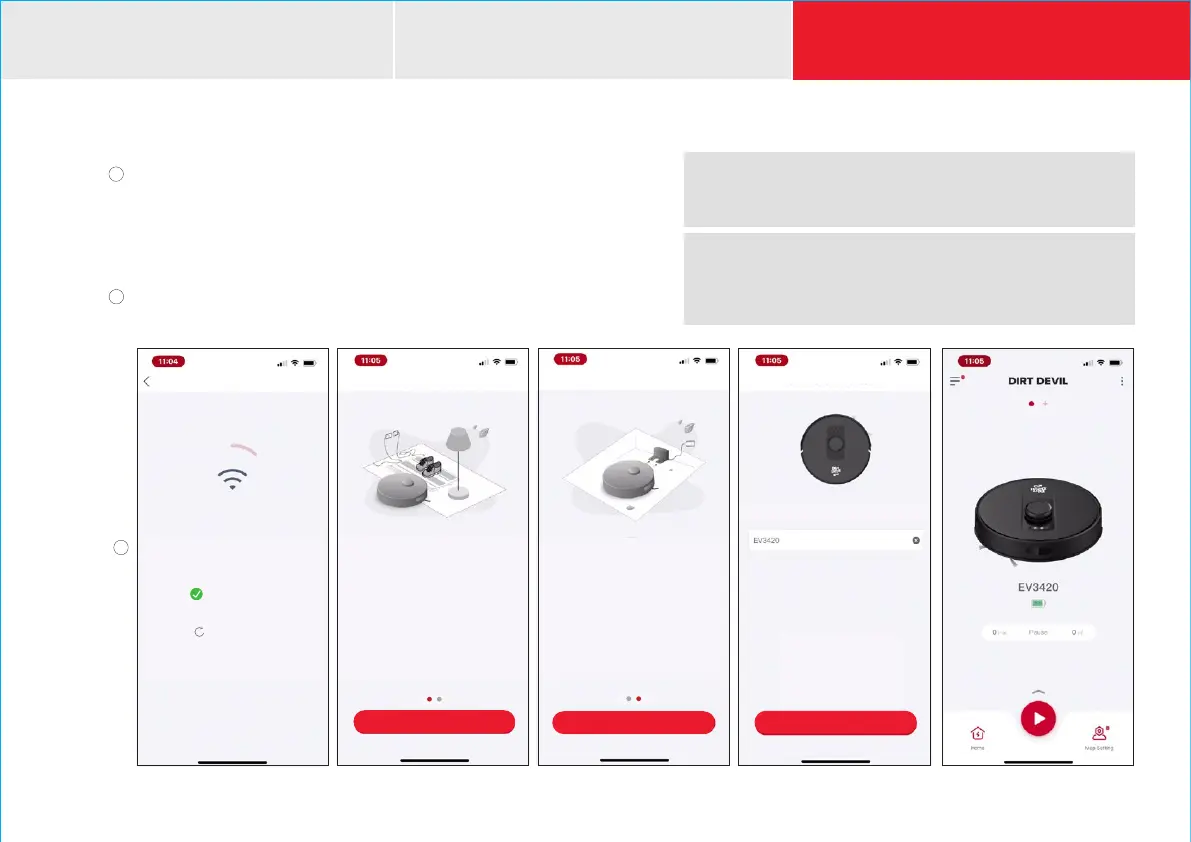
Switch the interface back to the Dirt Devil Clean App for the device to
start receiving Wi-Fi passwords and connect to the network. An audio
voice prompt will state, “Network Conguration, Please Wait ”
If the device is successfully connected to the network the audio voice
conrm, “Connected to Network Successfully.”
Click “NEXT” to begin control of the robot vacuum with the app
on your mobile device.
H
y
Dirt Devil Clean APP
UNIT SET-UP
ADDING DEVICE
NETWORK CONNECTION
G
Connection may take 2-3 minutes
Keep robot within 5 feet of router
Mobile Device
Connected to Robot
Robot Connected
to Network
Wi-Fi Connection
NEXT
Initial Run
Connection Successful!
• START from the Charging Base
(charge for 4-5 hours)
• ROBOT VACUUM will create a home
map from rst use and learn to avoid
obstacles and boundaries over time
Connection Successful!
Name your Robot Vacuum
Robot Naming
NEXT
Press NEXT to start cleaning
Press PLAY to Auto Clean
Swipe up to view more options
Press PLAY to Auto Clean
Swipe up to view more options
G
BEFORE USE
Before Cleaning
Connection Successful!
• TIDY UP: Before cleaning, please
pick up wires, rags, slipper sand
fringe on carpet to avoid being
caught by robot vacuum.
NOTE: Firmware updates are essential to ensure optimal performance.
You may be notied on the app to upgrade to the latest version.
Select "AGREE" when prompted to update.
NOTE: At the end of the robot's cleaning cycle it will automatically
return to the charging dock. Please note that the brush will continue
to spin without suction in return mode and you may hear it making
contact on some oor surfaces.















 To Next Page