29
Naming Favorites Lists
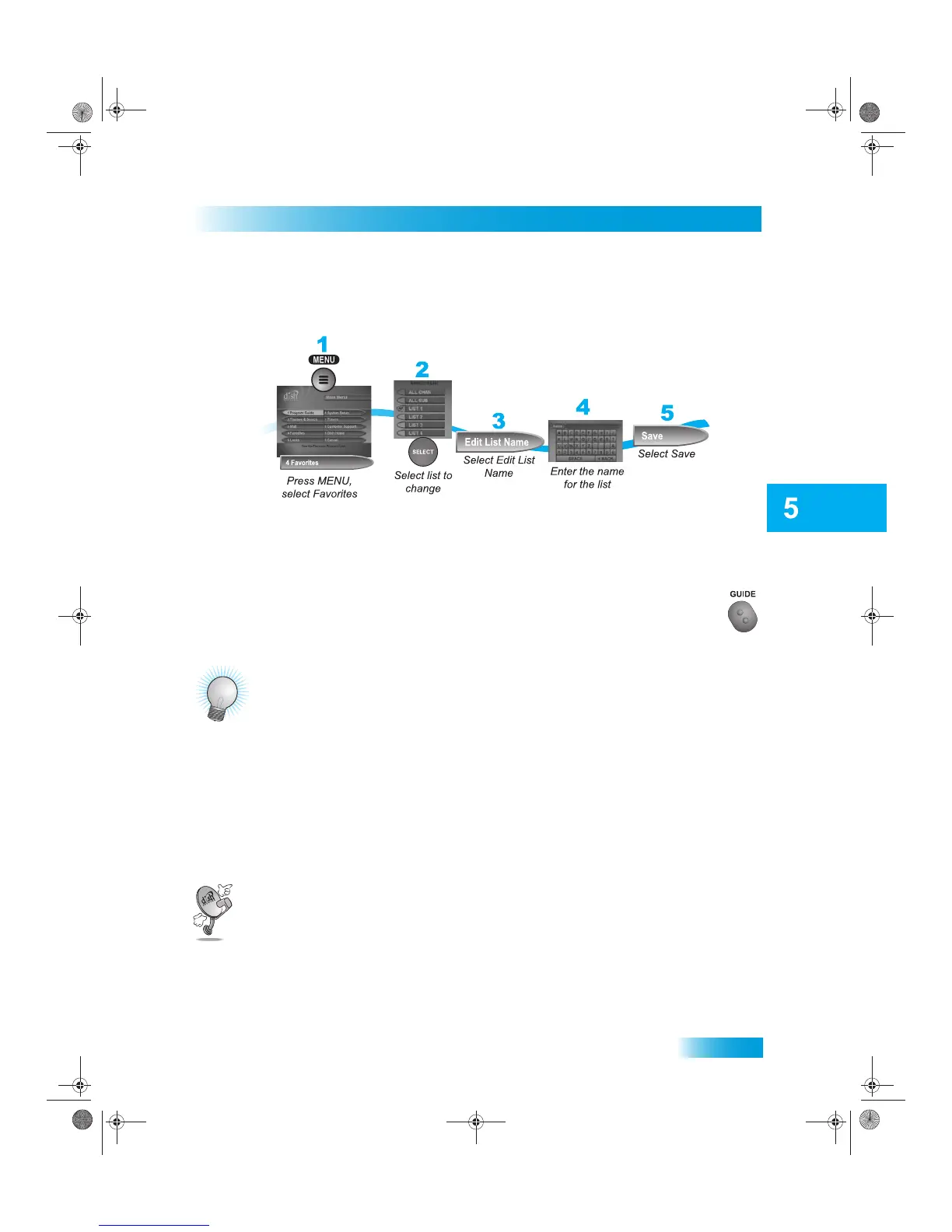
NAMING FAVORITES LISTS
You can name your Favorites Lists whatever you want, up to eight characters long.
USING FAVORITES LISTS
Press GUIDE to open the Program Guide. Press GUIDE again to select the next
Favorites List. Press GUIDE repeatedly to scan through all the available lists.
TIPS
• Two lists cannot have the same name.
• Pressing GUIDE to switch Favorites Lists works only if you have added channels to the Favor-
ites List. If you have not created a Favorites List, pressing GUIDE switches the receiver
between the All Chan and All Sub Lists.
• Hidden channels do not display in Favorites Lists.
QUESTIONS
• Why are channels missing from the Program Guide?
– You might have a Favorites List that does not contain those channels. Press GUIDE until
the All Chan or All Sub list displays.
– You might have channels hidden.
Chapter 5 381.fm Page 29 Thursday, May 21, 2009 6:04 PM











 To Next Page