Home
Dish Network
Receiver
Wally
Setup
Page 6
Dish Network Wally - Page 6
20 pages
Manual
Save Page as PDF
To Next Page
To Next Page
To Previous Page
To Previous Page
Loading...
A
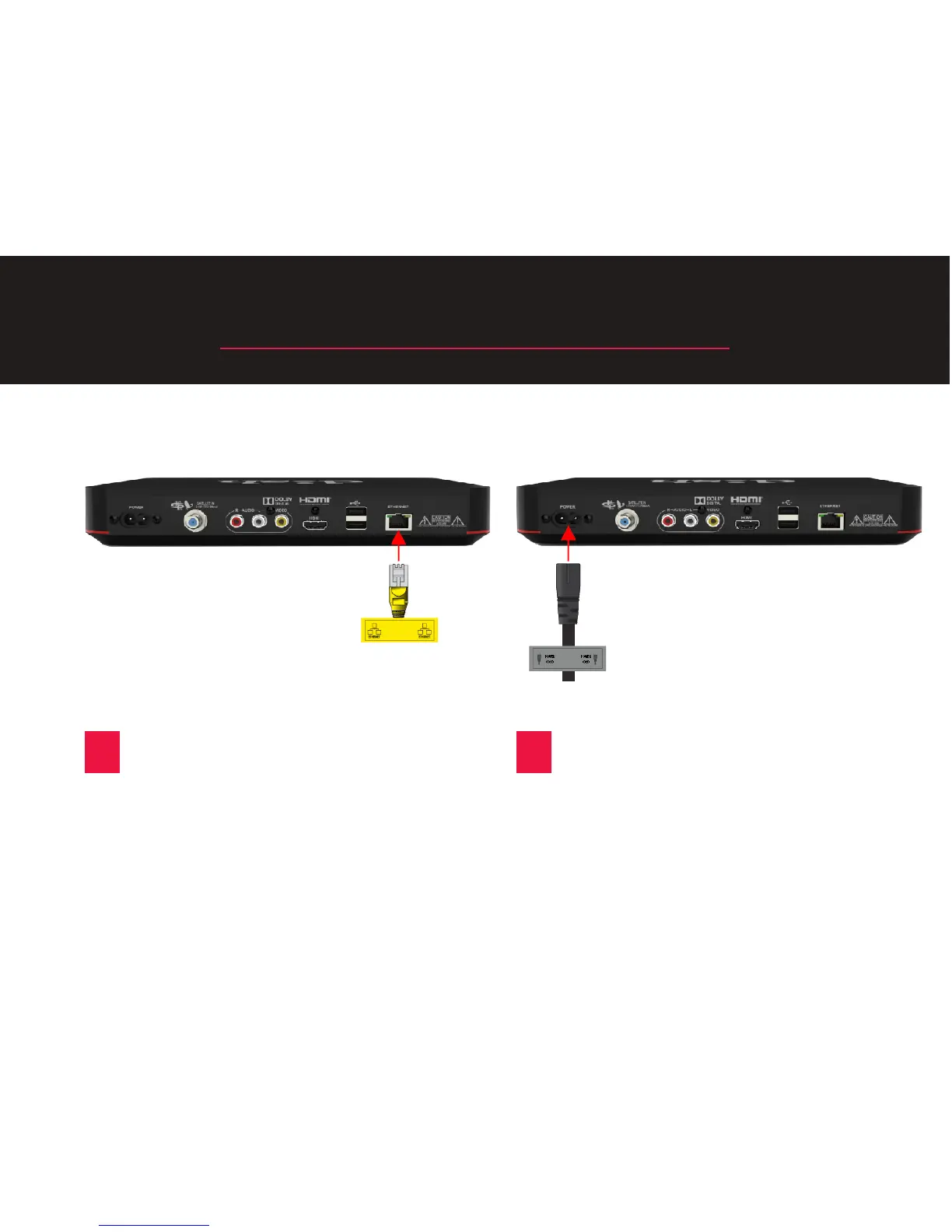
STEP 3: Connect the Cables (Cont.)
C
Connect the Ethernet cable
to the “Ethernet” port on your
replacement Wally.
(You may not
have this cable.)
D
Connect the power cord that
came with your replacement Wally
to the “Power” port on the new
Wally.
6
5
7
Other manuals for Dish Network Wally
User Guide
69 pages
Setup Guide
16 pages
Manual
36 pages
Related product manuals
Dish Network 311
99 pages
Dish Network 322
137 pages
Dish Network 500
144 pages
Dish Network VIP222
143 pages
Dish Network 123698
98 pages
Dish Network DISH322
6 pages
Dish Network Receiver
160 pages
Dish Network ViP 222k
2 pages
Dish Network Solo 311
106 pages
Dish Network ViP 211 Series
2 pages
Dish Network SoloDVR ViP 612
135 pages
HDTV DVR Satellite Receiver
147 pages










 To Next Page