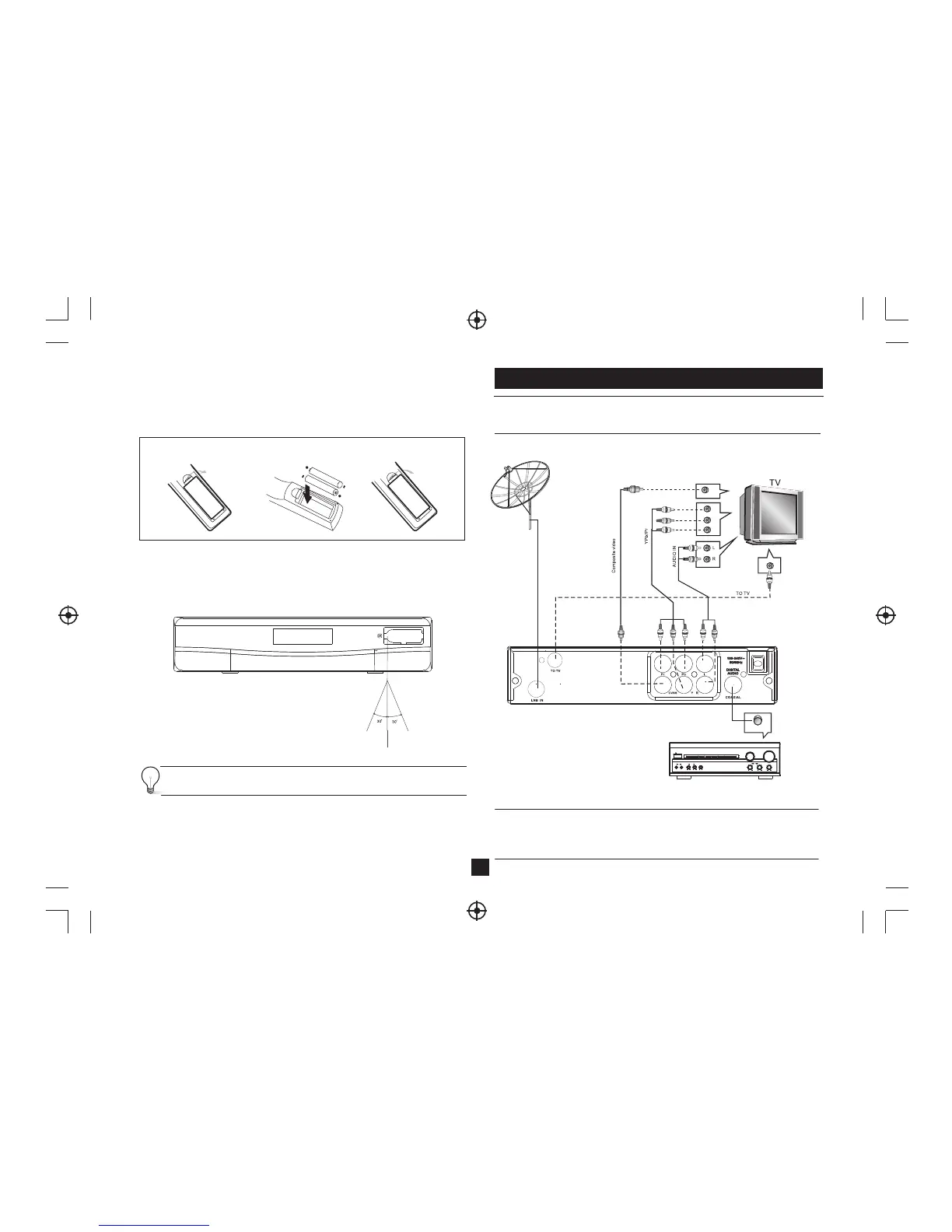
Installing the Batteries
Remove the battery cover from the remote control and put 2xAAA size batteries inside
the compartment.
The diagram inside the battery compartment shows the correct way to install the
batteries.
OPEN
OPE
N
1.Open the cover
2.Install batteries
3.Close the cover
Using the Remote Control
To use the remote control, point it towards the front of the digital set top box The remote
control has a range of up to 7 metres from the set top box at an angle of up to 60 degrees.
The remote control will not operate if its path is blocked.
Sunlight or very bright light will decrease the sensitivity of the remote
control.
Connections
Caution: Make sure to check the voltage specification of the wall outlet is the same
rating with the receiver. To prevent the risk of electric shock, do not open the cover or
the back of the receiver.
2
Note: When connecting the receiver to other equipment, e.g., TV, VCR and amplifier,
make sure to refer to relevant user manual for instruction.
Also, make sure you disconnect all the equipments from the mains supply before the
connection.
BASS
TREBLE
ECHO
DOWN UP
VOLUME
INPUT SELECTOR
MUTE
KARAOKE
CHANNEL
TEST
MODE
3 STEREO
PRO LOGIC
BYPASS
EXCITE
POWER
MIC
2
1
1
MIC VOL
2
MIC
Amplificador Digital
VIDEO IN
Y
Pb
Pr
Coaxial


 To Next Page