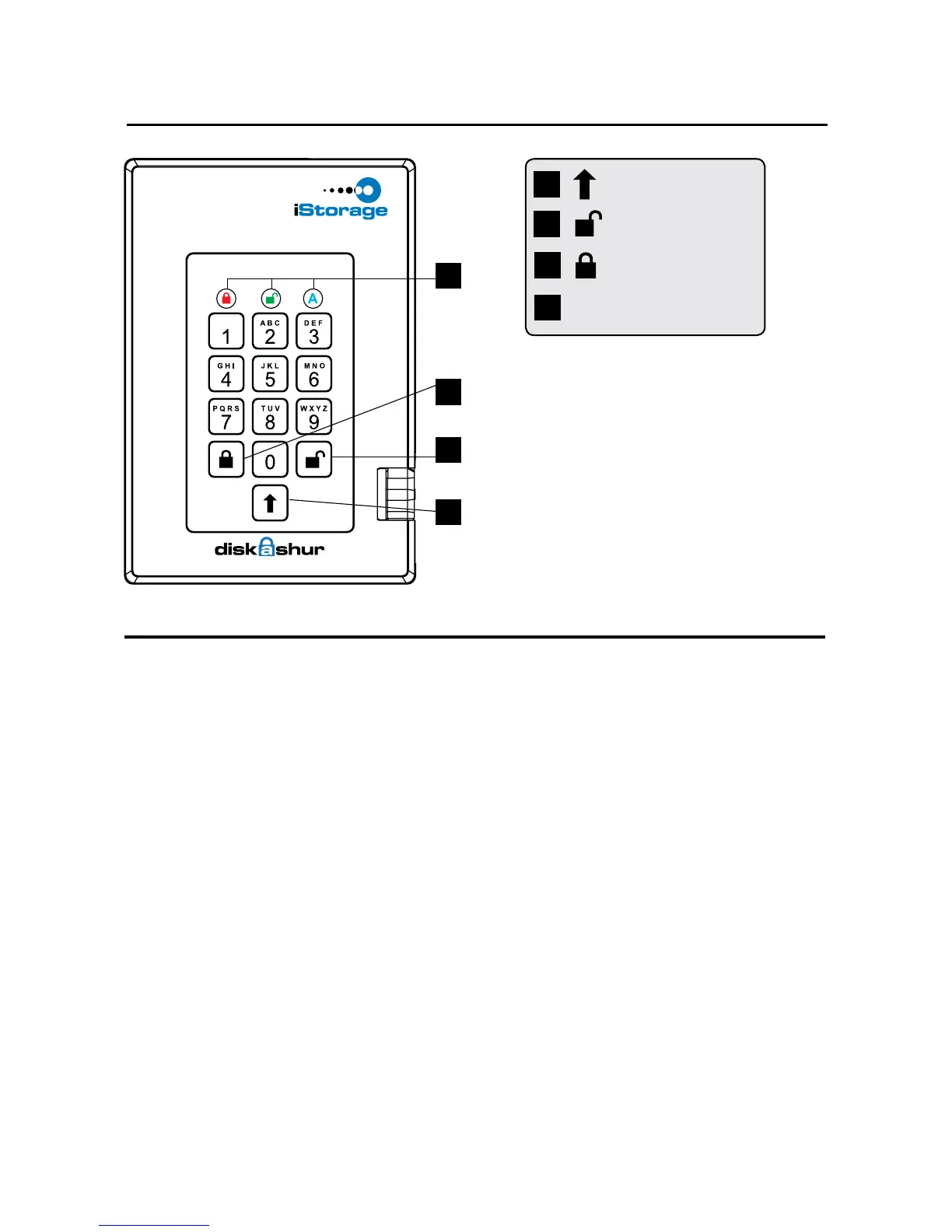
7
1
2
3
4
3
1
2
SHIFT button
UNLOCK button
LED Indicator lights
4
LOCK button
When you rst plug in the FIPS
diskAshur PRO drive, the unit will
do a self-test to verify all security
components are working properly.
The LEDs will go through 3 test
stages RED, GREEN, and BLUE.
This will be followed by three
GREEN ashes on a successful
test. Any test failure will leave the
unit in an interoperable state with
the RED LED ashing.
First Time Use
Before diskAshur PRO can be used, the Admin PIN MUST be set. The LED will display
Solid BLUE and Solid GREEN to indicate diskAshur PRO is waiting for a PIN to be set.
To Set-up the Admin PIN:
1. Press UNLOCK + 9. The LED will change to Solid BLUE and Blinking GREEN.
2. Enter the new Admin PIN and press UNLOCK key. If accepted the GREEN LED
will ash for 3 short blinks, then return to Solid BLUE and Blinking GREEN.
3. Re-enter the Admin PIN and press the UNLOCK key. If accepted the GREEN
LED will be Solid for 3 seconds.
4. LED will then turn BLUE and remain in Admin mode for 30 seconds or if the
LOCK key is pressed, will return the drive to a standby state.
5. The Admin PIN is now set and will allow access to the drive or the Admin features.
6. To UNLOCK the drive, exit Admin by pressing the LOCK button. Then enter the
new PIN and press UNLOCK.
Requirements for Admin, User and Self-Destruct PIN:
PINs must be a minimum length of 7 maximum 16 digits.
Cannot contain all consecutive numbers (2345678 or 9876543)
Cannot contain all same number (1111111)
The SHIFT key can be used for additional combinations.
SHIFT + 1 are a separate value than just 1.
diskAshur PRO Keypad Panel


 To Next Page