EasyManua.ls Logo

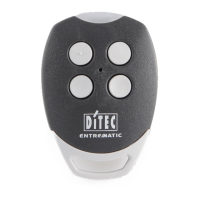
DITEC GOL4-C - User Manual

DITEC GOL4-C
2 pages
Print Icon
To Next Page IconTo Next Page
Loading...
!!!"#$$%&'(%)'*%+),%$"-%(.
.
!
!
!
Manual
How to Programme your
NEW REMOTE CONTROL
DITEC GOL4-C
How to program your new remote control
There are 2 methods for programming your new remote control.
From the receiver:
1. Open the casing of your receiver. It is located next to your motor.
2. On the receiver circuit board, press the programming button (PRG). The LED light on the receiver illuminates. Let the button go.
3. Press a button on your new remote control. Keep it pressed down. The LED light of the receiver blinks and then remains lit fixedly. Let the
button go.
4. Your new remote control is programmed.
From a remote control that has already been programmed:
1. Press the top two buttons on your new remote control simultaneously for 5 seconds. The LED light on the remote control illuminates.
2. In the next ten seconds, take a DITEC GOL4C or BIXLS2 (older version) that has already been programmed (and that is already in use)
and place the head of the remote control exactly in the middle of the four buttons on the new remote control (as shown in the figure). Press
a button on the already-programmed remote control and keep it pressed down.
3. The LED light on the new remote control flashes three times.
4. Your new remote control is programmed.
Question and Answer IconNeed help?

Do you have a question about the DITEC GOL4-C and is the answer not in the manual?

DITEC GOL4-C Specifications

General IconGeneral
TypeRemote Control
Frequency433.92 MHz
Number of Buttons4
Type of encodingFixed code
Operating Temperature-20°C to +55°C
Weight16 grams

Summary

How to Program Your New Remote Control

Programming from the Receiver

Program the new remote by pressing the PRG button on the receiver and then a button on the new remote.

Programming from an Existing Remote

Program the new remote by pressing two buttons on it, then holding a button on an existing remote near it.

How to Erase Remote Controls

Erasing All Remote Controls

Press the receiver's PRG button, then press it again for 3 seconds to erase all remotes.

Erasing a Single Remote Control

Press the receiver's PRG button, then press the specific remote buttons to erase it.

Related product manuals