DiversiTech International Ltd.
Glaisdale Drive East, NG8 4LY
Nottingham United Kingdom
Email sales@pumph.co.uk
Phone +44(0)115 900 5858
20
FOR FURTHER INSTALLATION ADVICE PLEASE CALL THE TECHNICAL SUPPORT HELPLINE ON 0115 900 5858.
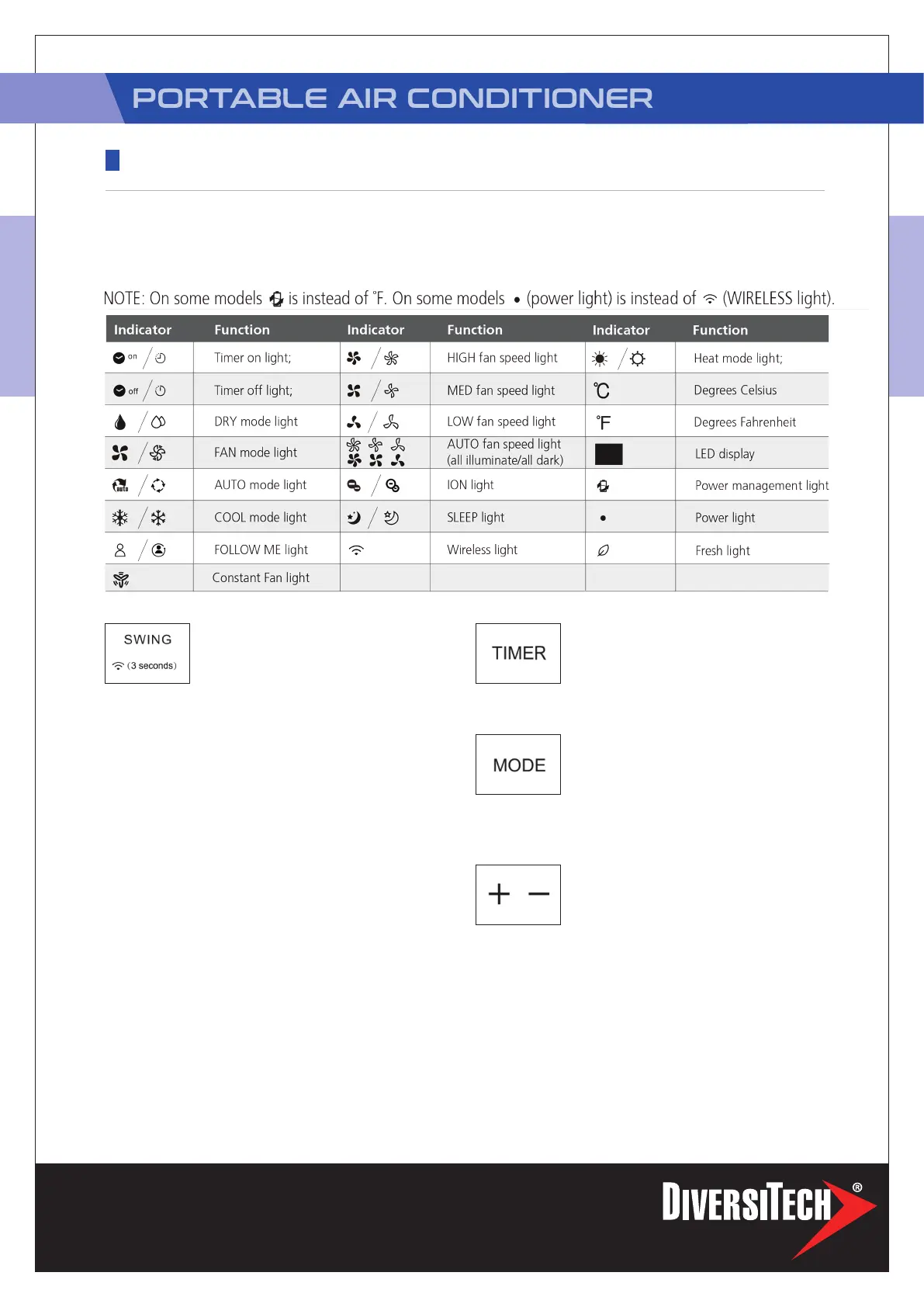
Swing/Wireless(On some models)
button
Used to initiate the Auto swing feature.
When the operation is ON, press the
SWING button can stop the louver at the desired angle.
Used to initiate the Wireless function. For the rst time
to use Wireless function, press and hold the swing button
for 3 seconds to initiate the Wireless connection mode.
The LED DISPLAY shows ‘AP’ to indicate you can set
Wireless connection. If connection(router) is successful
within 8 minutes, the unit will exit Wireless connection
mode automatically and the Wireless indicator illuminates.
If connection is failure within 8 minutes, the unit exits
Wireless connection mode automatically. After Wireless
connection is successful, you can press and hold SWING
and DOWN (-) buttons at the same time for 3 seconds
to turn off Wireless function and the LED DISPLAY shows
‘OF’ for 3 seconds, press SWING and UP(+) buttons at
the same time to turn on Wireless function and the LED
DISPLAY shows ‘On’ for 3 seconds.
NOTE: When you restart the Wireless function, it
may take a period of time to connect to the network
automatically.
Timer button
Used to initiate the AUTO ON start time
and AUTO OFF stop time program, in
conjuction with the + & - buttons. The
timer on/off indicator light illuminates under the timer on/
off settings.
Mode button
Selects the appropriate operating mode.
Each time you press the button, a mode
is selected in a sequence that goes from
AUTO), COOL, DRY, FAN and HEAT (cooling only models
without). The mode indicator light illuminates under the
different mode settings.
Up (+) and Down (-) buttons
Used to adjust (increasing/decreasing)
temperature settings in 1°C/1°F (or 2 °F)
increments in a range of 17°C/62°F to
30°C/86°F (or 88°F) or the TIMER setting in a range of
0~24hrs.
NOTE: The control is capable of displaying temperature
in degrees Fahrenheit or degrees Celsius. To convert from
one to the other, press and hold the Up and Down buttons
at the same time for 3 seconds.
NOTE: The following control panels are for explanation purpose only. The control
panel of the unit you purchased may be slightly different according to the models. Your
machine may not contain some indicators or buttons. The actual shape shall prevail.
OPERATING INSTRUCTIONS
CONTROL PANEL FEATURES
PAC-H-12


 To Next Page
 Loading...