7
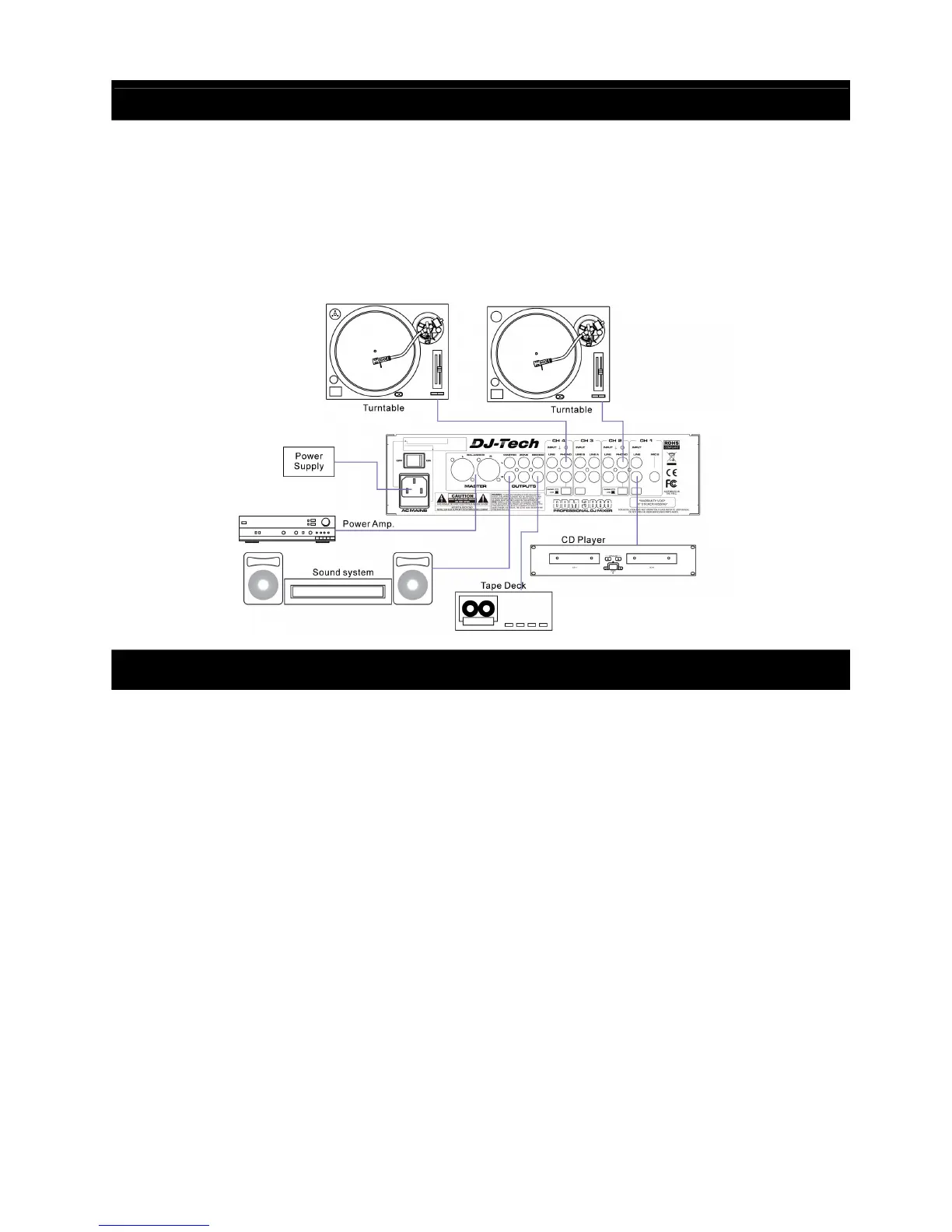
QUICK SETUP DIAGRAM
Study this setup diagram. Make sure all faders are at "zero" and all devices are off. First, connect all input
sources and processors. Next, connect your microphone and monitor headphones. Finally, connect the
stereo outputs to the power amplifier(s) and/or audio receivers such as tape decks. Plug your mixer into AC
power. Now you are ready to switch everything on.
IMPORTANT: Always switch on your audio input sources such as turntables or CD players first, then your
mixer, and finally any amplifiers. When turning off, always reverse this operation by turning off amplifiers,
then your mixer, and then input devices.
SPECIFICATIONS
Power source AC 230V~50Hz / AC 120V~ 60Hz
Fuse T1AL/250V / T1AL/125V (5x20mm)
Power consumption 0W/ 28 W (off/ max)
Input sensitivity 1,58V LINE
14,5mV DJ MIC
15,9mV MIC CH1
16,7mV PHONO
Input impedance 5kohms LINE
52.4kohms DJ MIC
10.4kohms MIC CH1
45.6kohms PHONO
Output voltage 6,6V RMS @ 10kohms
Output impedance 550 ohms
Frequency response 20Hz – 20kHz (-1.5dB)
THD <0.07%
S/N ratio >77dB
Channel separation >65dB
Talkover -15dB
Dimensions 320 (H) x 355 (W) x 110 (D) mm (Rack mount depth 85mm)
Weight 4.4kg


 To Next Page