6
©
2016 DJI All Rights Reserved.
OSMO+ User Manual
Inserting the Battery
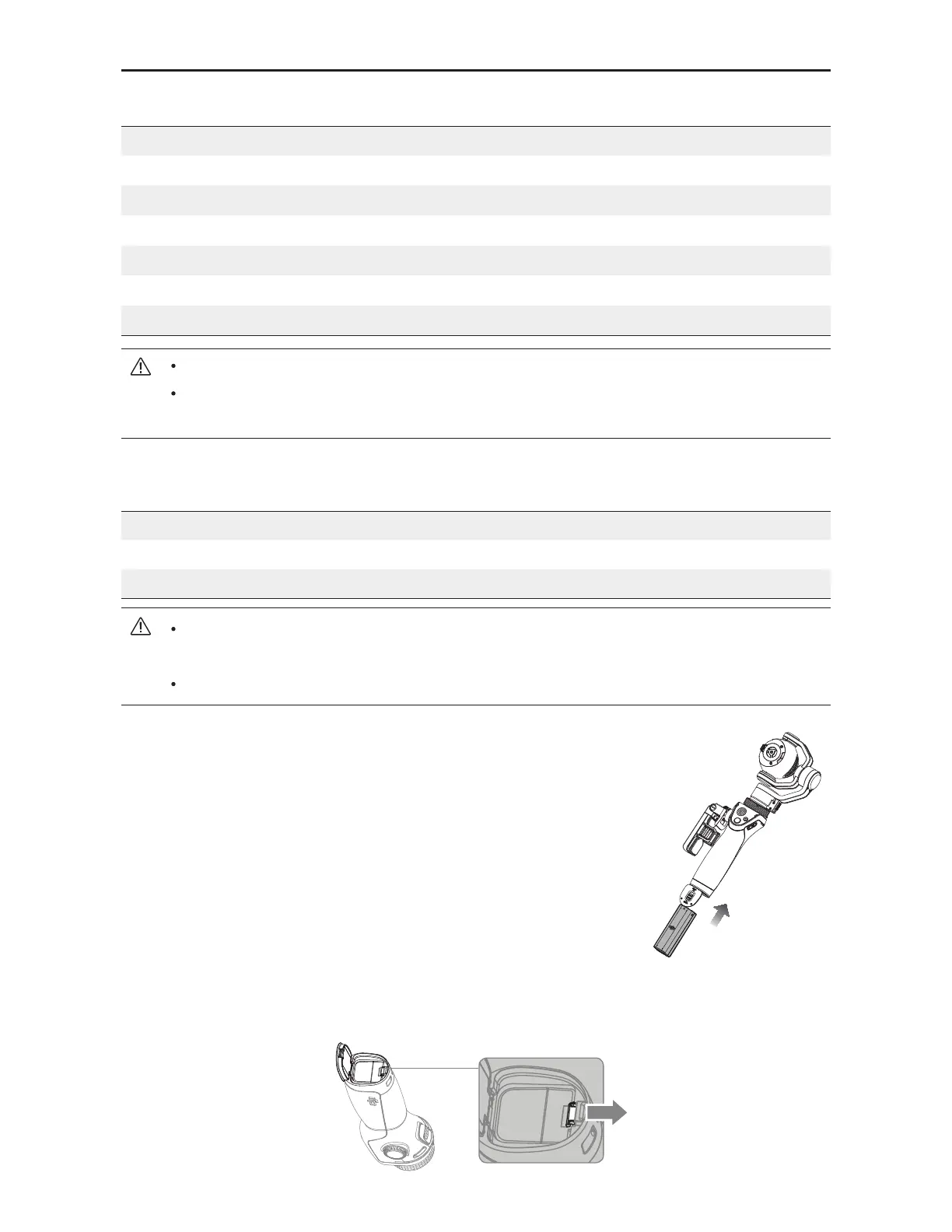
Slide the locking switch at the base of the Osmo+ to open the
battery cover. Insert the battery and lock the battery cover.
%DWWHU\&KDUJHU6SHFLÀFDWLRQV
Model OS1C11
Input 100-240 V
,
50/60 Hz
Output 12.6 V
/13.2 V; 0.8 A
Only charge the battery with the provided battery charger. DJI takes no responsibility
for accidents caused by the use of non-DJI battery chargers.
Remove the battery from the charger unless it is charging to prevent battery discharging.
Removing the Battery
Slide the locking switch at the base of the Osmo+ to open the battery cover. Push the red
safety hook away from the battery to let it pop up, and then remove the battery.
#FTVSFUPGVMMZDIBSHFUIF*OUFMMJHFOU#BUUFSZGPSUIFmSTUUJNFUPBDUJWBUFJU
Read the user manual, Intelligent Battery Safety Guidelines before use. The user
takes full responsibility for all operations and usage.
%DWWHU\6SHFLÀFDWLRQV
Model HB02-542465
Type LiPo
Capacity 1225 mAh
Energy 14.1 Wh
Voltage 11.1 V
Charging Temperature 41° to 104° F (5° to 40° C)
Operating Temperature 32° to 104° F (0° to 40° C)



 To Next Page