DK-1100A Ink Roll Coder Operation Manual
3. INSTALLATION AND RELOCATION
3.1 Installation
3.1.1 Installation Requirements
3.1.2 Checking Home Position of the Type Holder
Packaging machine runs well
Stable power supply AC220V 10V, max. 2A fuse
Reliable printing signal can be from relay, proximity sensor or PLC
Enough space for installing printer
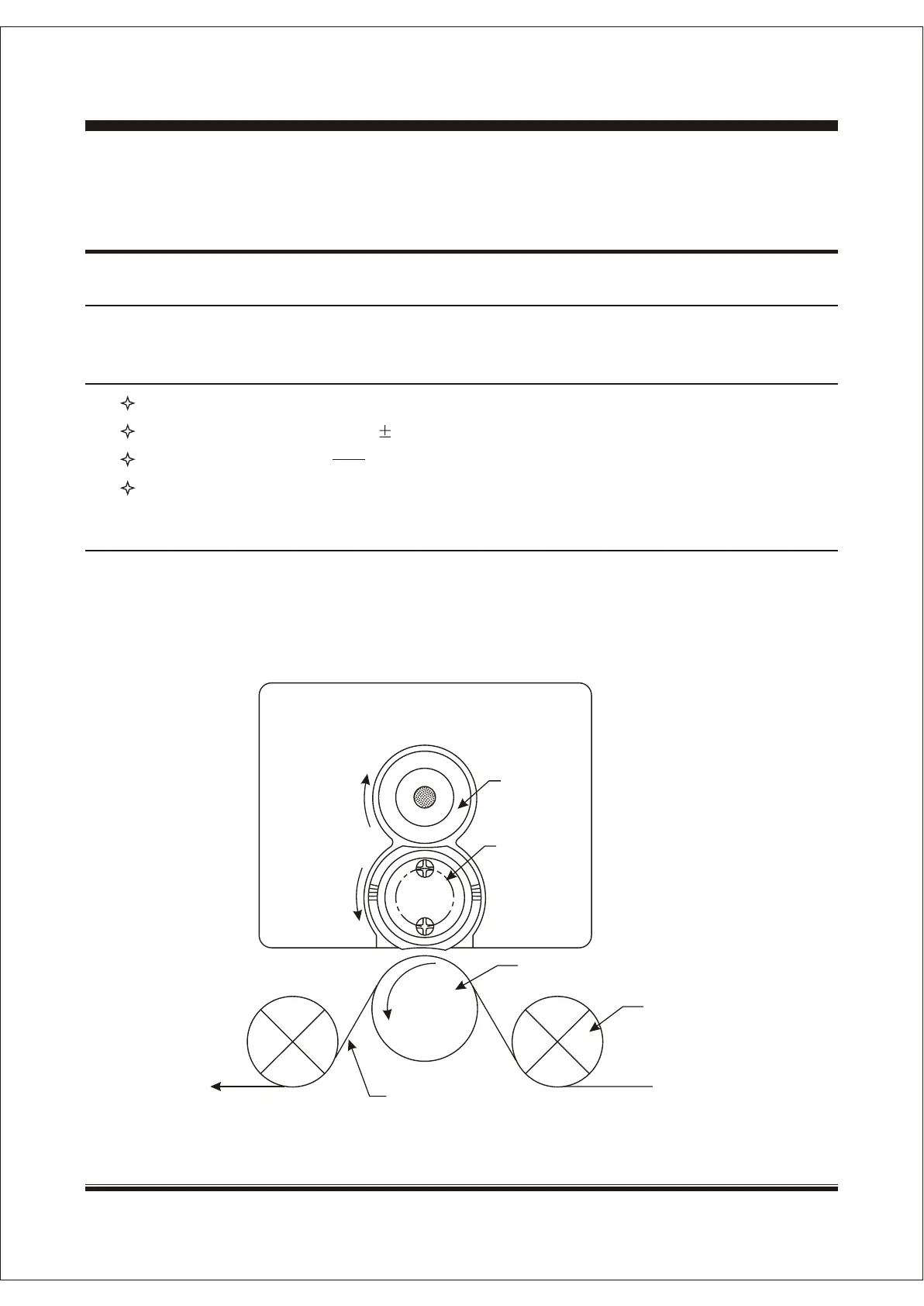
At the very beginning of the installation, manually check the home position, that is the Hot Ink Roll,
Rubber Roller and Pressure Roller should be in position as diagram 4. The rubber wheel can not
touch pressure roller or packing film. Otherwise, it will cause failed or missed printing.
Diagram 4
Hot Ink Roll
Rubber Wheel
Hot Ink Roll
Rubber Wheel
Pressure RollerPressure Roller
RollerRoller
Packaging FilmPackaging Film
SHANGHAI DIKAI SEPARATE MACHINERY CO., LTD.SHANGHAI DIKAI SEPARATE MACHINERY CO., LTD. 3-123-12


 To Next Page