Operating Instructions
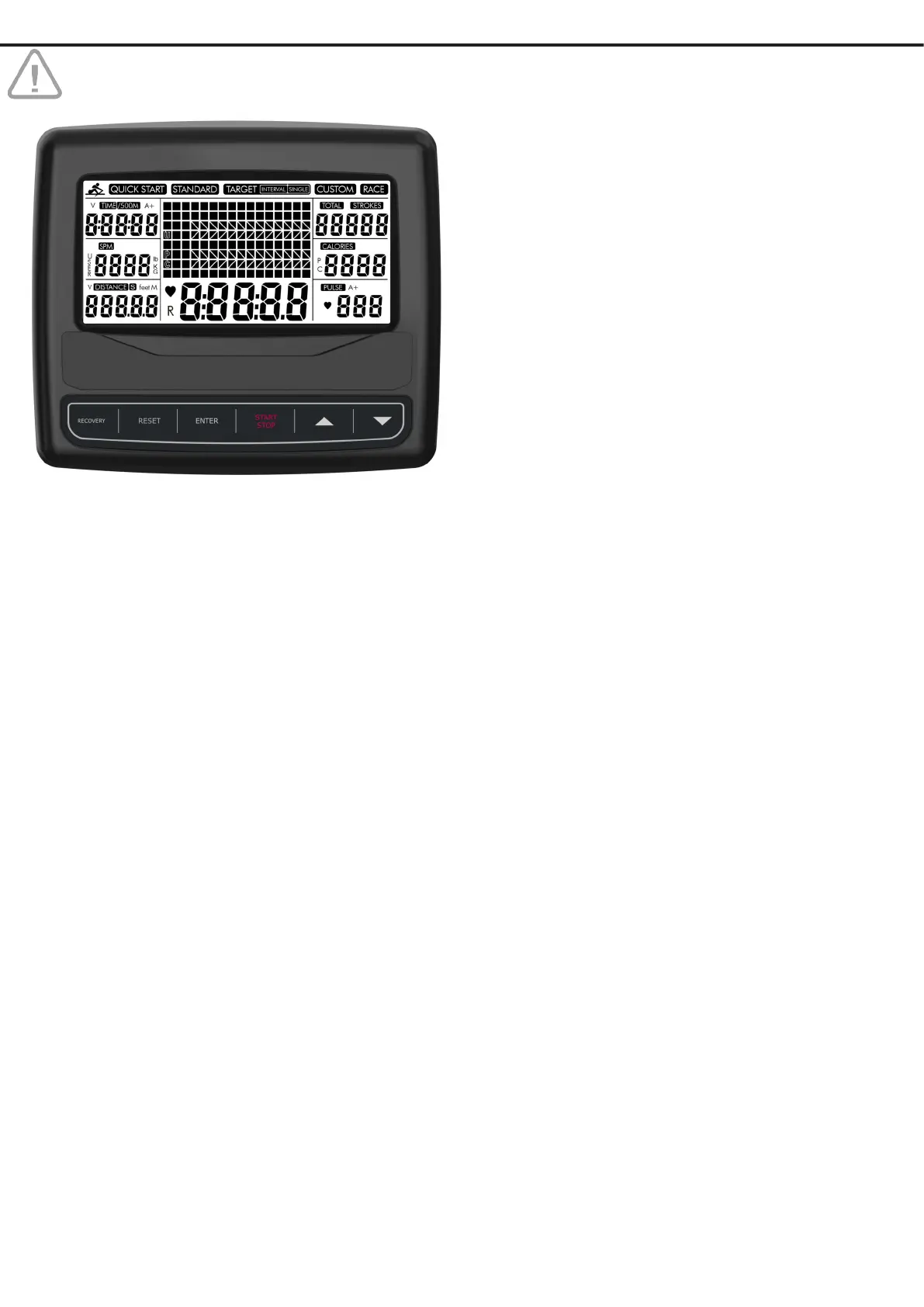
TOTAL Total strokes accumulated.
CALORIES Calorie consumption.
PULSE Current heart rate.
WATT Current energy generated.
A+ Average value for time, calories, watt
and pulse.
Let’s get started
The Matrix shows 16 columns of 100 m each.
QUICK START Select QUICK START using ▲▼ and
press START.
Press ENTER to toggle between values
shown in the central display.
STANDARD Select STANDARD using ▲▼ and press
ENTER to select one of the 5 STANDARD
proles: 2K, 5K, 10K, 30:00 or 500m/1:00.
Press START to begin exercising.
Press RESET to clear the console once the
exercise is nished.
SINGLE Select TARGET SINGLE using ▲▼and press
ENTER to select one of the 4 TARGET
proles: TIME, DISTANCE, CALORIES or
THR (Target Heart Rate).
Program TARGET value using ▲▼.
Press START to begin exercising.
Press RESET to clear the console once the
exercise is nished.
INTERVAL Select TARGET INTERVAL pressing ▲▼and
press ENTER to select one of the 3 TARGET
proles: TIME, DISTANCE or VARIABLE.
TIME and DISTANCE mode:
Program TARGET value using ▲▼, press
ENTER.
Program REST value using ▲▼.
Press START to begin exercising.
VARIABLE mode:
Program TARGET TIME using ▲▼, press
ENTER.
Program TARGET DISTANCE using ▲▼,
press ENTER.
Program REST TIME using ▲▼.
Press START to begin exercising.
Press RESET to clear the console once the
exercise is nished.
READ CAREFULLY BEFORE USING.
Switch on
Insert 2 batteries AAA 1.5 V (Batteries not included).
Set the Water Level L1-6 using ▲▼.
The display will switch to Standby Mode if no movement is
registered for 4 minutes. All settings and exercise data are
saved until you start rowing again.
Function buttons
RECOVERY Press to run 60 seconds Pulse Recovery
Test (chestbelt compulsary).
RESET Press to clear last data entry.
Hold for 3 seconds to reset the display.
ENTER Press to conrm Program Selection or Para
meter Settings.
START/STOP Press to start, pause or stop training session.
▲▼ To set values for time, calories, count and
distance.
Press for program selection: Quick Start,
Standard, Target Single, Target Interval,
Custom or Race.
Display Functions
TIME Training time.
TIME/500M Average 500 meter time.
SPM Strokes per minute.
DISTANCE Distance.
STROKES Current strokes.


 To Next Page