Operating Instructions
Let’s get started
Training in MANUAL MODE
Select Manual via ▲▼ and conrm with enter.
• Use ▲▼ to load level ‘L’, conrm selection by pressing
enter.
• Time ashes: use ▲▼ to set exercise time, conrm selec-
tion by pressing enter. If you donot intend setting exercise
time, simply press enter.
• Distance ashes: use ▲▼ to set distance, conrm selec-
tion by pressing enter. If you donot intend setting exercise
distance, simply press enter.
• Calories ashes: use ▲▼ to set calorie consumption,
conrm selection by pressing ‘enter’. If you donot intend
setting calorie consumption, simply press enter.
• Pulse ashes: use ▲▼ to set maximum heart rate,
conrm selection by pressing enter. If you donot intend
setting a heart rate level, simply press enter, the monitor
will display current heart rate value.
• Start exercising by pressing st/stop.
Training in PROGRAM MODE
Select P1-12 (program) via ▲▼ and conrm with enter.
• Set target value for level, time, distance, calories and
pulse.
• If you donot intend setting any target value, start exer-
cising by pressing st/stop.
Training in USER MODE
Select User to set up your own prole.
• Set loadsettings for each segment via ▲▼ and conrm
with enter.
• Press enter again for 2 seconds and set target value for
level, time, distance, calories and pulse.
• If you donot intend setting any target value, start exer-
cising by pressing st/stop.
• Start exercising by pressing st/stop.
Training in HRC. MODE
Select HRC and use ▲▼ to set your age, conrm with enter.
• Select 55%, 75%, 90% or TAG.
• In TAG you may preset your target heart rate value via
▲▼. Conrm with enter.
• Set target value for level, time, distance, calories and
pulse.
• If you donot intend setting any target value, start exer-
cising by pressing st/stop.
• Upon entering rate in Bpm (Beats per minute) the load
tension will be controlled by current heart rate.
• The resistance will be auto-adjusted according to current
heart rate gure. If your heart rate gure is under the tar-
get pulse, the tension will be up-adjusted one level every
30 seconds, up to the maximum level 16.
• As soon as your heart rate gure has achieved the target
pulse, tension will be down adjusted one level imme-
diately.
READ CAREFULLY BEFORE USING.
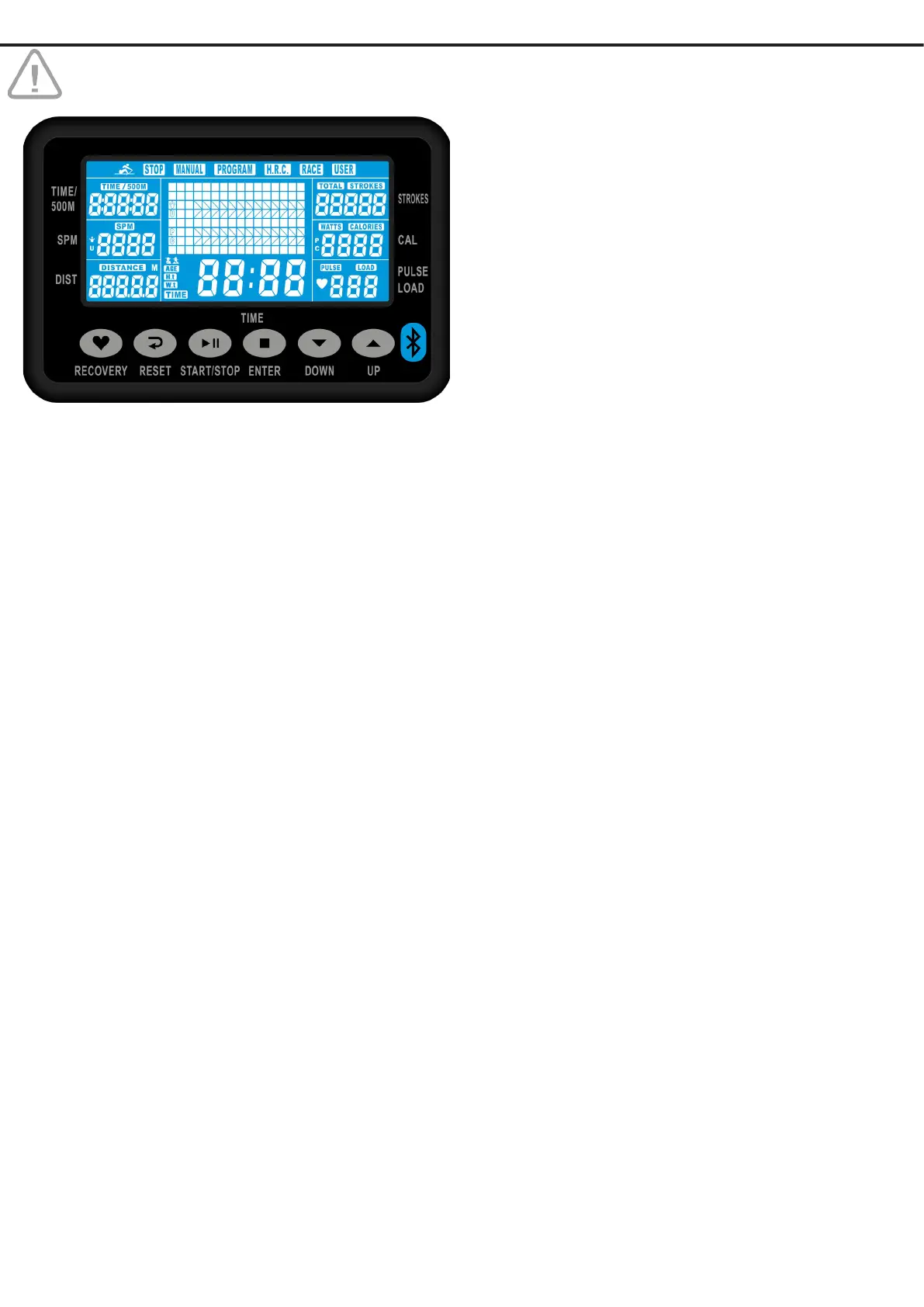
Switch on
Plug in the adapter, the home page will be activated and show
Stop, Manual, Program, H.R.C. and Race.
Function buttons
RECOVERY Press this button for recovery function after
exercising, while the LCD is still active.The
computer will run a time down for 60 se
conds, after which your recovery rate will be
displayed,grades 1 up to 6. Level 1 featuring
fast recovery, level 6 slow recovery.
Chestbelt compulsary !
RESET Press to clear last data entry.
Hold for 3 seconds to reset the display.
START/STOP Press to start, pause or stop training session
ENTER Press to conrm Program Selection or Para
meter Settings.
▲▼ To set values for time, calories, count and
distance.
Press for program selection.
Display Functions
TIME Training time.
TIME/500M Average 500 meter time.
DISTANCE Distance.
CALORIES Calorieburn.
STROKES Current strokes.
SPM Strokes per minute.
PULSE Current heart rate.


 To Next Page
 Loading...