12
To remove stations that are listed but unavailable
1. Press Menu button and then press DOWN or UP to show the
submenu: Prune, press the ENTER button to enter the Prune
option.
2. Press UP to select Yes and then press ENTER button to confirm to
prune.
Note: This removes all invalid stations indicated in the station list with a
‘?’ in front of the station name.
Station Presets
The unit allows you to store up to 20 DAB stations for easy recall at any
time.
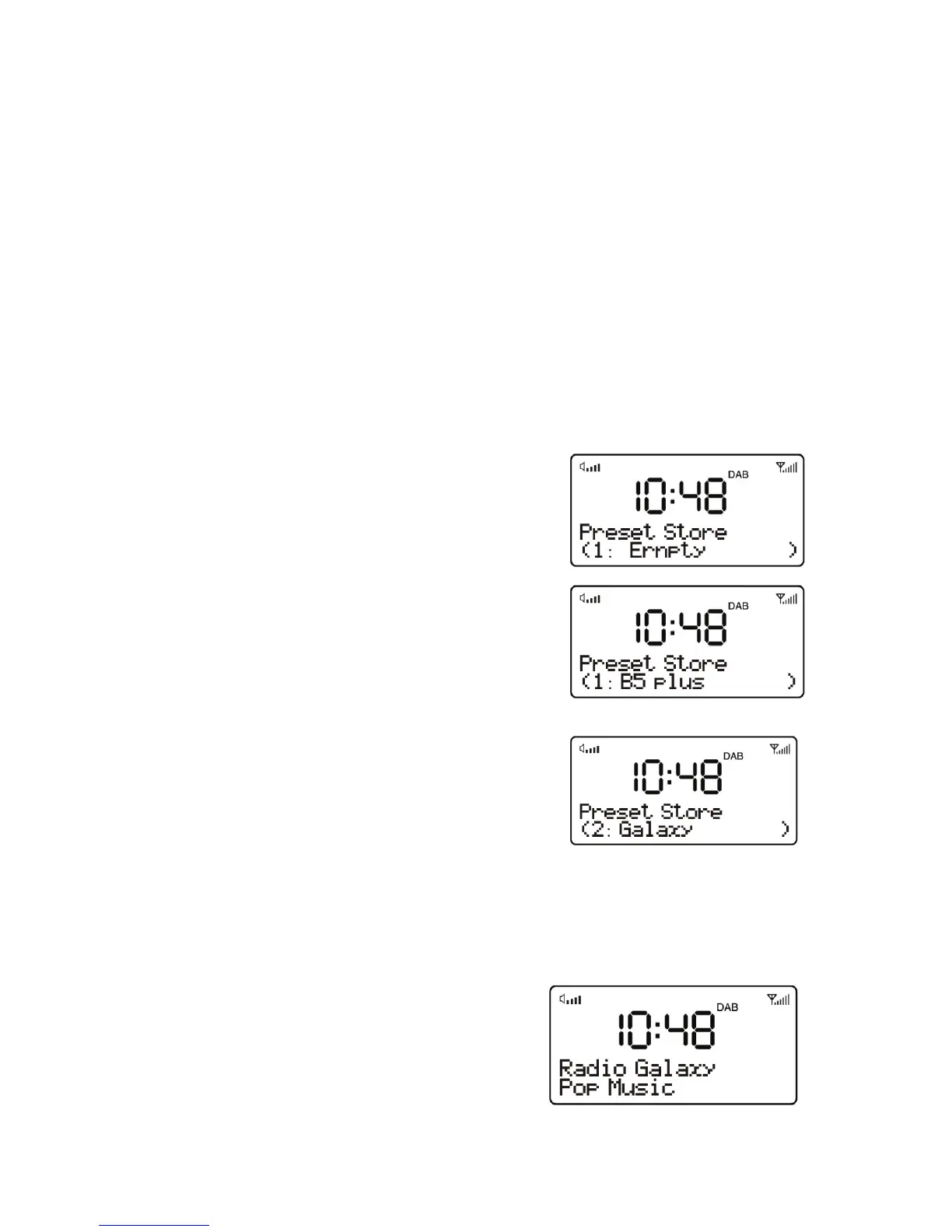
To save a station
1. If you have found the desired station,
press and hold the PRESET button until
the display shows Preset Store.
2. Press DOWN or UP button to choose
the preset memory position, press
ENTER button to confirm the settings.
To recall a station
1. Short press the PRESET button
during DAB mode to enter the preset
memory selecting mode.
2. Press DOWN or UP button to select
the preset station.
3. Press ENTER button to choose and play the displayed station
Now playing information
While a station is playing, the screen
shows its name and DLS (Dynamic
Label Segment) information broadcast
by the station such as programme name,
track title and contact details. Long DLS
info, over 16 characters scrolls across the display.


 To Next Page