User Manual
2/7
IV. Contents in the package
*
* AC Adaptor 1PC
* User Manual 1PC
512S Recorder 1PC
V. Control Panel Instruction
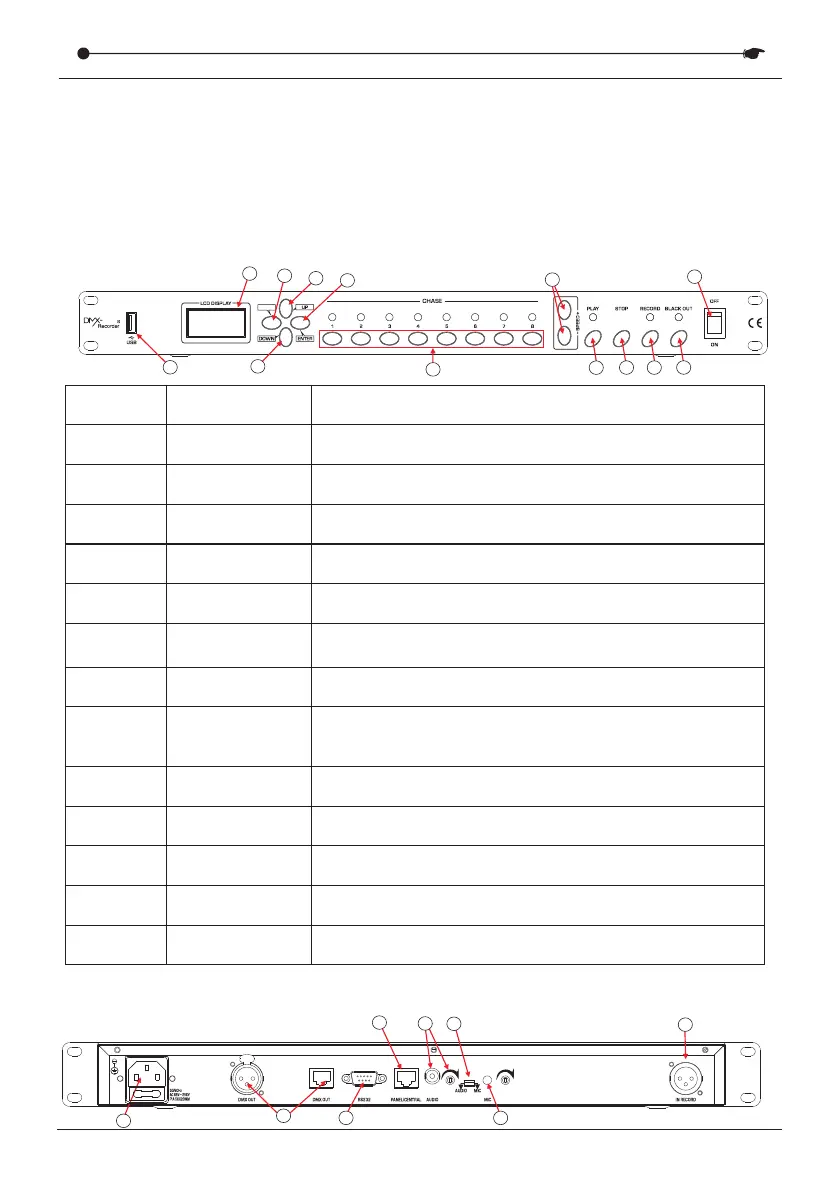
Front panel
Number
1
2
3
4
5
6
7
8
9
10
11
Description
USB port
LCD display
MENU
UP
DOWN
ENTER
CHASE 1-8
+ SPEED-
PLAY
STOP
RECORD
Function
USB disk backup and download
Display current function or menu data
MENU button is used to select menu interface
This button is used to select item of submenu
This button is used to select item of submenu
Confirm the selection and return to the previous menu
Serial number of CHASE1-8
This button is used to adjust the running speed
when playback the chase
Stop recording and playback
Playback the chase
Record the chase
12
13
BLACK OUT
Power switch
Active/stop the blackout status
Turn on/off the recorder
1
2
3
4
5
6
7
8
9
10
11
12
13
MENU
51 2
Back panel
1
2
3
4
5
6
8
7
DMX RECORDER SERIES


 To Next Page