2
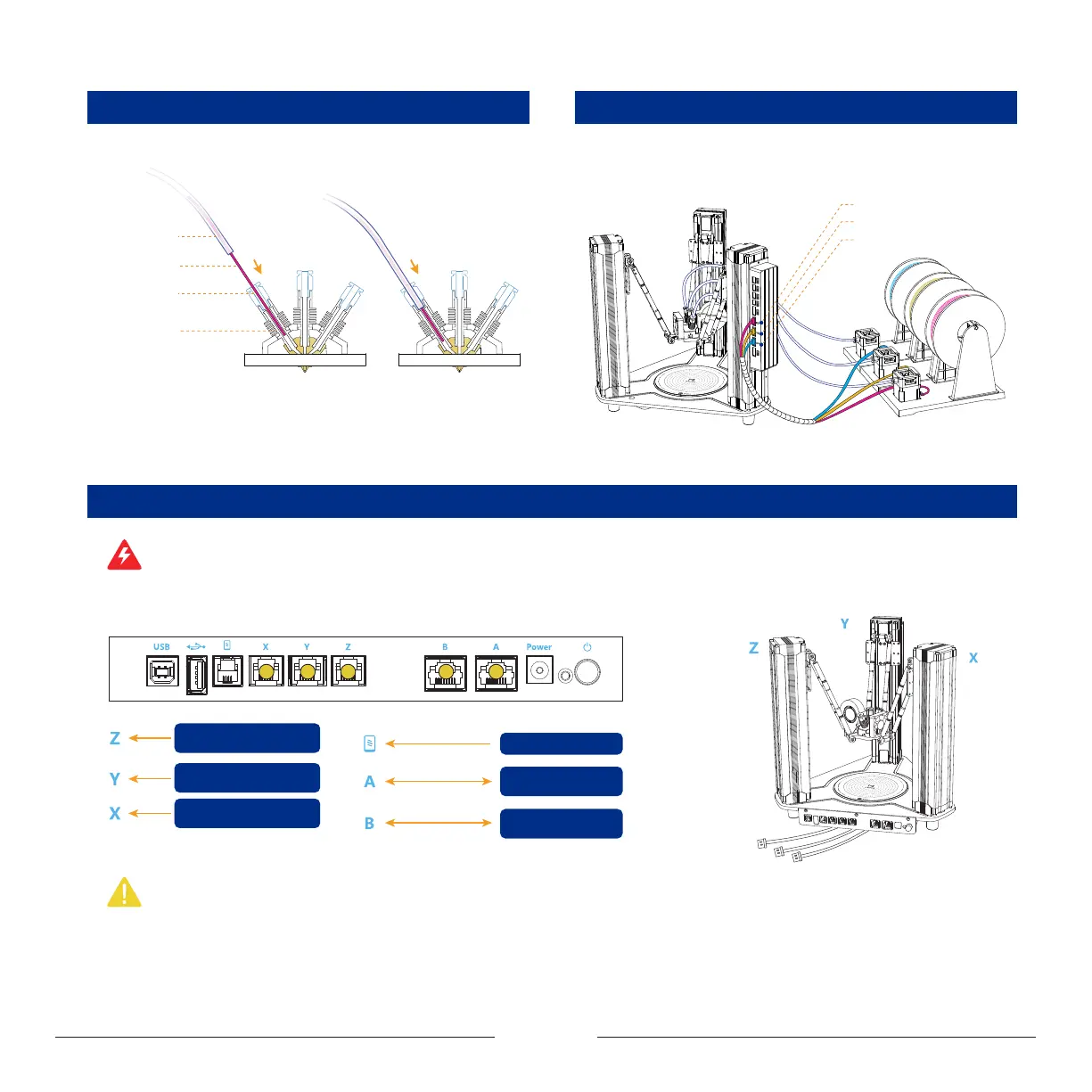
Extruder port (For RED filament)
Extruder port (For YELLOW filament)
Extruder port (For BLUE filament)
1.1.5 Connect Cables to Main Control Board
Before power on the machine, please follow the chart below and connect all cables to the main control board correctly.
Warning: Wrong connection of cables may cause burnout of control board! Hot-plug is strictly prohibited! Always make sure that all cables are plugged in place before power-on!
Plugging of cables during power-on status will cause malfunction!
Note: The linear actuators are labeled with X, Y, Z based on mounting positions in the above drawing, which should be connected to the corresponding port on main control
board correctly!
8-core cable
8-core cable
Port B on printer
head control board
Port A on printer
head control board
LCD touch pad
Linear actuator on right side
of main control board
Linear actuator on left side
of main control board
Linear actuator on oppsite
side of main control board
Filament
Bourdon pipe
Quick pipe
connector
PTFE pipe
1.1.3 Connect the Bourdon Pipe to the Print Head
Straighten out the filament, insert it into the print head. In the meanwhile,
feed the bourdon pipe into the pipe connector to clamp it.
Connect the extruders to the corresponding ports of the printer head control
board with cables. As shown below:
1.1.4 Install Extruder Motor Power Cables


 To Next Page