44 5
1
2
3
4
5
6
7
8
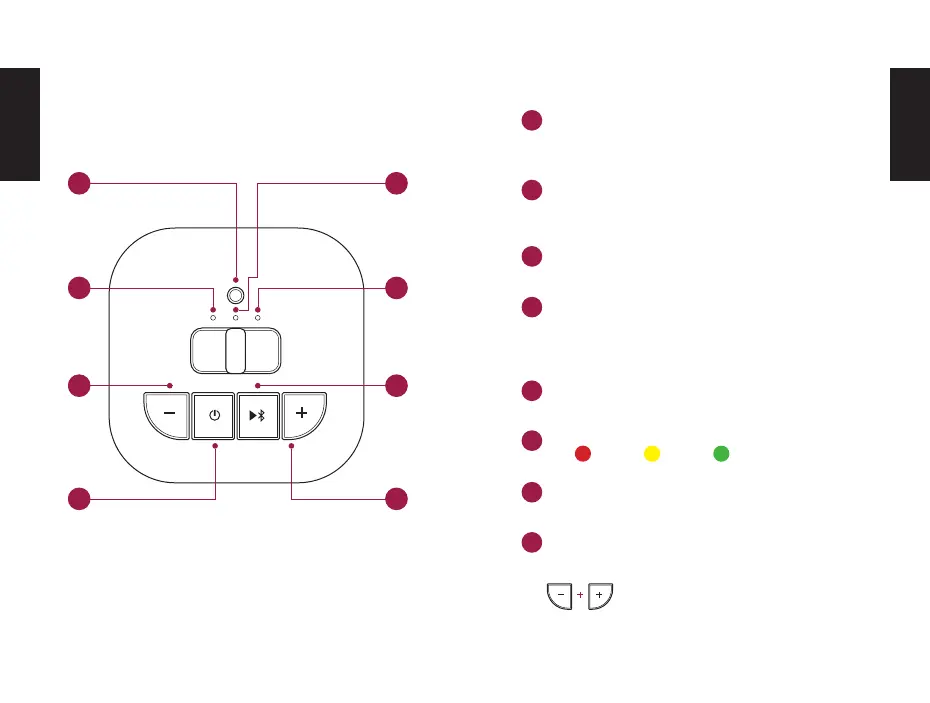
CONTROLS
Pairing Button
Connecting two DOCKIN D MATE DIRECT
speakers (see section: „Stereo Link Function“)
Bluetooth Status LED
Flashing: Bluetooth pairing mode
Solid: Bluetooth connected
Press: Reduce volume
Press and hold: Previous title
Press: Displays the current battery level on the
battery LED
Press and hold: Turns on the speaker (hold for 3
seconds until the Bluetooth Status LED lights up).
Bass Boost LED
Red: Bass boost activated
Battery LED
Press: Play / Pause
Press and hold: Disconnect Bluetooth
Press: Increase volume
Press and hold: Next title
Press and hold:
Activate bass boost mode
10% 30% >30%
EN
EN
1
2
3
4
5
6
7
8


 To Next Page