66 7
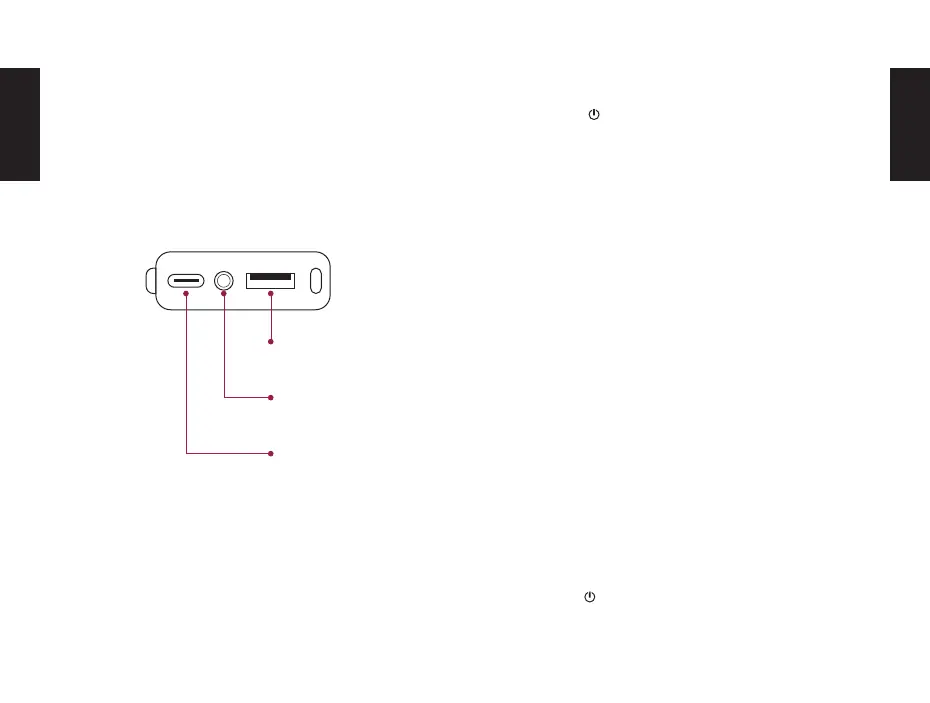
CONNECTIONS ON THE BACK TURNING ON
BLUETOOTH CONNECTION
TURN OFF
USB-C
Charge connection
Press the button on the top of the unit for 3 seconds
until the left Bluetooth Status LED lights up. The DOCKIN
D MATE DIRECT automatically connects to the last Blue-
tooth source (Bluetooth Status LED is solid blue) or en-
ters pairing mode if the last source is not available (Blue-
tooth Status LED ashes blue).
1. Activate Bluetooth on the source device
2. Search for ready-to-connect devices in the Blue-
tooth settings
3. Select „DOCKIN D MATE DIRECT“ from the list of
Bluetooth devices. After successful pairing the Blue-
tooth Status LED will light up permanently blue.
To disconnect the current Bluetooth connection, press
and hold the Play/Bluetooth buttons for three seconds.
Press the button for 3 seconds to turn o the device.
AUX input
(3.5mm minijack)
Powerbank
USB output
EN
EN


 To Next Page