Icon Description
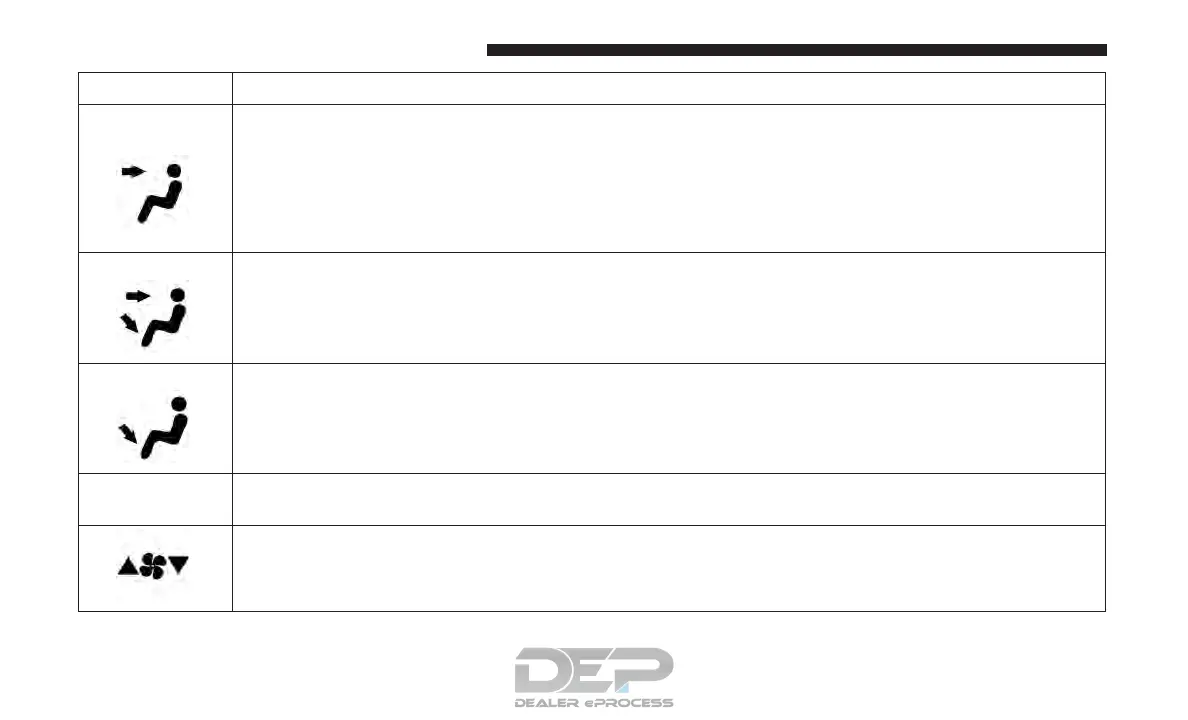
Headliner
Mode
Rear Mode Controls
Select the desired air distribution mode from the selectable modes on the touchscreen. The rear air-
flow distribution mode can be adjusted so air comes from the headliner outlets, and floor outlets.
Headliner Mode
Air comes from the outlets in the headliner. Each of these outlets can be individually adjusted to
direct the flow of air. Moving the air vanes of the outlets to one side will shut off the airflow.
Bi-Level Mode
Bi-Level Mode
Air comes from both the headliner outlets and the floor outlets.
NOTE: In many temperature positions, the Bi-Level mode is designed to provide cooler air out of
the headliner outlets and warmer air from the floor outlets.
Floor Mode
Floor Mode
Air comes from the floor outlets.
78º Rear Temperature Display
This display shows the temperature setting for the rear seat occupants.
Blower Control Display
This display shows the current Blower speed selection.
348 UNDERSTANDING YOUR INSTRUMENT PANEL















 To Next Page