Need help?
Do you have a question about the Doheny's 90500 and is the answer not in the manual?
Provides an overview of the variable speed pump and its capabilities.
Instructions on how to start the pump and its initial operation.
Procedure to stop the running pump.
How to adjust the pump's running speed and RPM settings.
Describes how the pump operates under pre-programmed conditions like ECO, CLEAN, BOOST.
Explains the adjustable running hours and RPMs for Mode 1 and Mode 2.
Step-by-step guide to setting and changing parameters for Mode 1 and Mode 2.
Details the three pre-programmed schedules: Regular Mode, Mode 1, and Mode 2.
This document is a user manual for Doheny's Inground VS Pumps, specifically item numbers 90500 and 90550. It covers installation, operation, parts, performance, alerts, and warranty information.
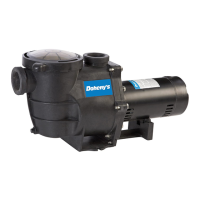
The Doheny's Inground VS Pump is a variable speed pump designed for use with swimming pool filtration systems, as well as spas, waterfalls, cleaners, heaters, and salt chlorine systems. It offers flexible operation through a control panel, allowing users to run the pump on three scheduled programs: Regular mode (using quick start buttons), Mode 1 (16-hour clean cycle), and Mode 2 (24-hour clean cycle). The pump is designed for energy efficiency and extended motor life through step-by-step acceleration and deceleration.
The pump's control panel features a four-digit LED screen that displays current time, running speed (RPM), and alarm conditions. It supports a 12-hour AM/PM system. The pump offers three quick start buttons with default speeds:
MODE 1 - 16 Hour Running Cycle (Default Settings):
MODE 2 - 24 Hour Running Cycle (Default Settings):
The pump includes LED indicators for speed, alarm conditions, and error messages related to under/over voltage, high temperature, over current, and freeze protection. It also features a memory function to keep records of scheduled programs for up to 15 days after a power off.
Alert Codes and Descriptions:
The pump is available with 1.5 HP and 3 HP variable speed motors.
Starting the Pump: Upon power-on, the display shows the current time. Pressing any of the ECO, CLEAN, or BOOST buttons will start the pump. Initially, the pump runs at 2850 RPM for 5 minutes to eliminate air and prevent dry grinding of the impeller, then switches to the selected program's default speed.
Stopping the Pump: Pressing the STOP button will halt the pump, and the lights on the screen will twinkle.
Changing Running Speed:
Setting and Changing Mode 1/Mode 2 Specifications:
Alerts and Warnings: The control panel displays alerts. When an alarm exists, the corresponding LED lights up, and all control panel buttons are disabled until the alarm is acknowledged by holding the ENTER button until the display turns off.
General Maintenance:
Storage/Winterization:
Doheny Enterprises, Inc. offers a 1-year limited warranty from the date of purchase for original purchasers. This warranty covers defects in materials and workmanship for the pump and its housing/strainer. Defective parts will be replaced without charge within 90 days of receipt of the defective product, barring unforeseen delays. After 90 days, defective components must be returned (transportation paid) to the place of purchase for warranty replacements. The warranty does not cover failures due to freezing, negligence, improper installation, use, or care, or use in association with an automatic valving system. Doheny is not responsible for cartage, removal, reinstallation labor, or other associated costs. The warranty does not apply to components manufactured by other companies.
 General
| Brand | Doheny's |
|---|---|
| Model | 90500 |
| Category | Water Pump |
| Language | English |

 To Next Page