- 10 -
Setup
(continued to next page)(continued to next page)
(continued to next page)(continued to next page)
(continued to next page)
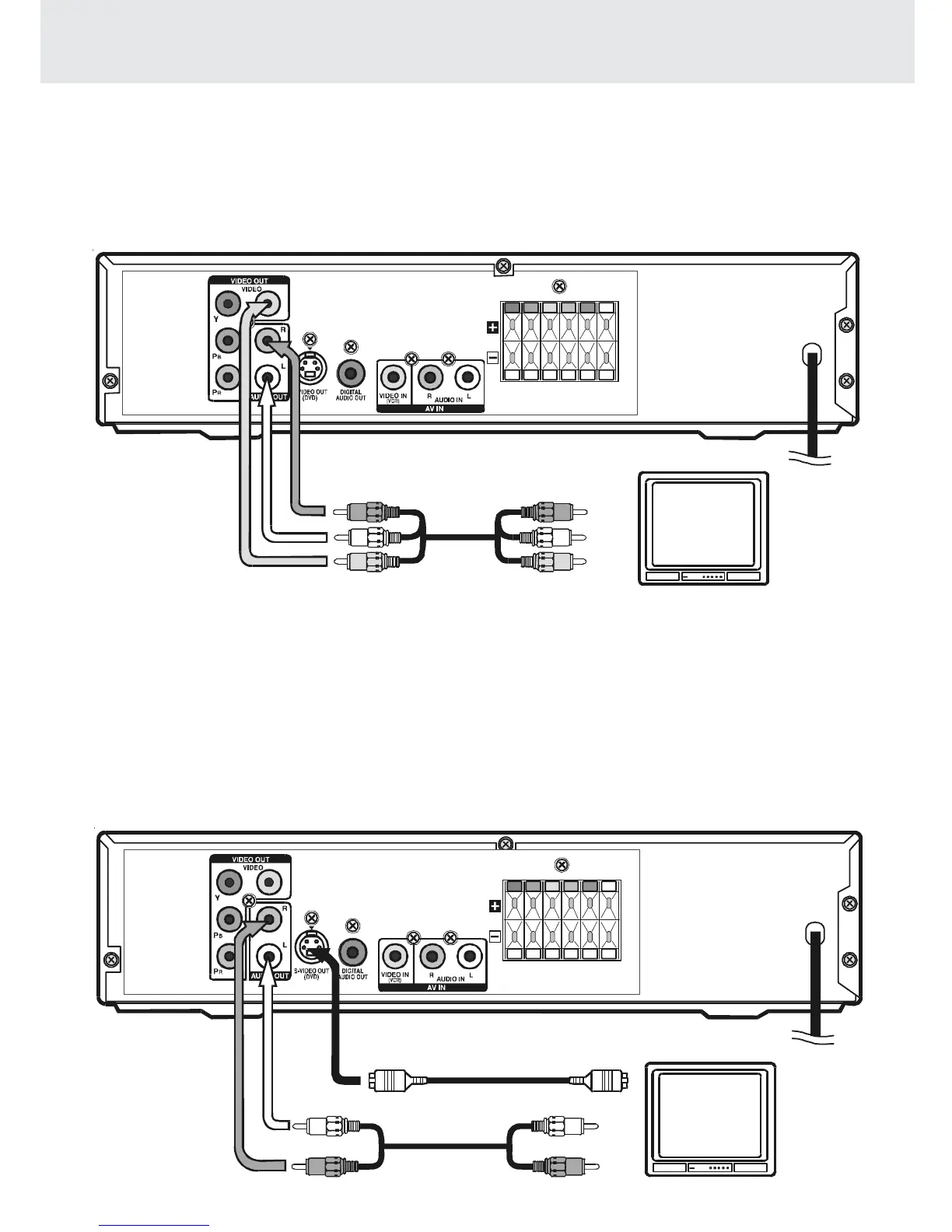
A. Connecting a TV
The Unit can be connected to your TV in several different ways, depending on the design of your TV.
RCA Audio/Video cable
Use the supplied Audio/Video cable.
1. Connect the VIDEO OUT and left/right AUDIO OUT jacks on the unit to the VIDEO IN and left/right AUDIO IN jacks
on your TV.
or
S-Video cable
Use an S-Video cable (not supplied) and the Audio cable (not supplied).
1. Use an S-Video cable to connect the S-VIDEO (DVD) jack on your Unit to the S-VIDEO IN jack on your TV.
2. Use the Audio cable to connect the left/right AUDIO OUT jacks on the unit to the left/right AUDIO IN jacks on your TV.
To wall
outlet
S-Video cable (not supplied)
Audio cable
(not supplied)
(red)
(white)
To wall
outlet
Audio/Video cable (supplied)
(red)
(yellow)
(white)
Note:
• If you want the sound come from the speakers of the Main Unit, you need not to connect the left/right AUDIO OUT
jacks from the Main Unit to your TV.



 To Next Page