- 8 -
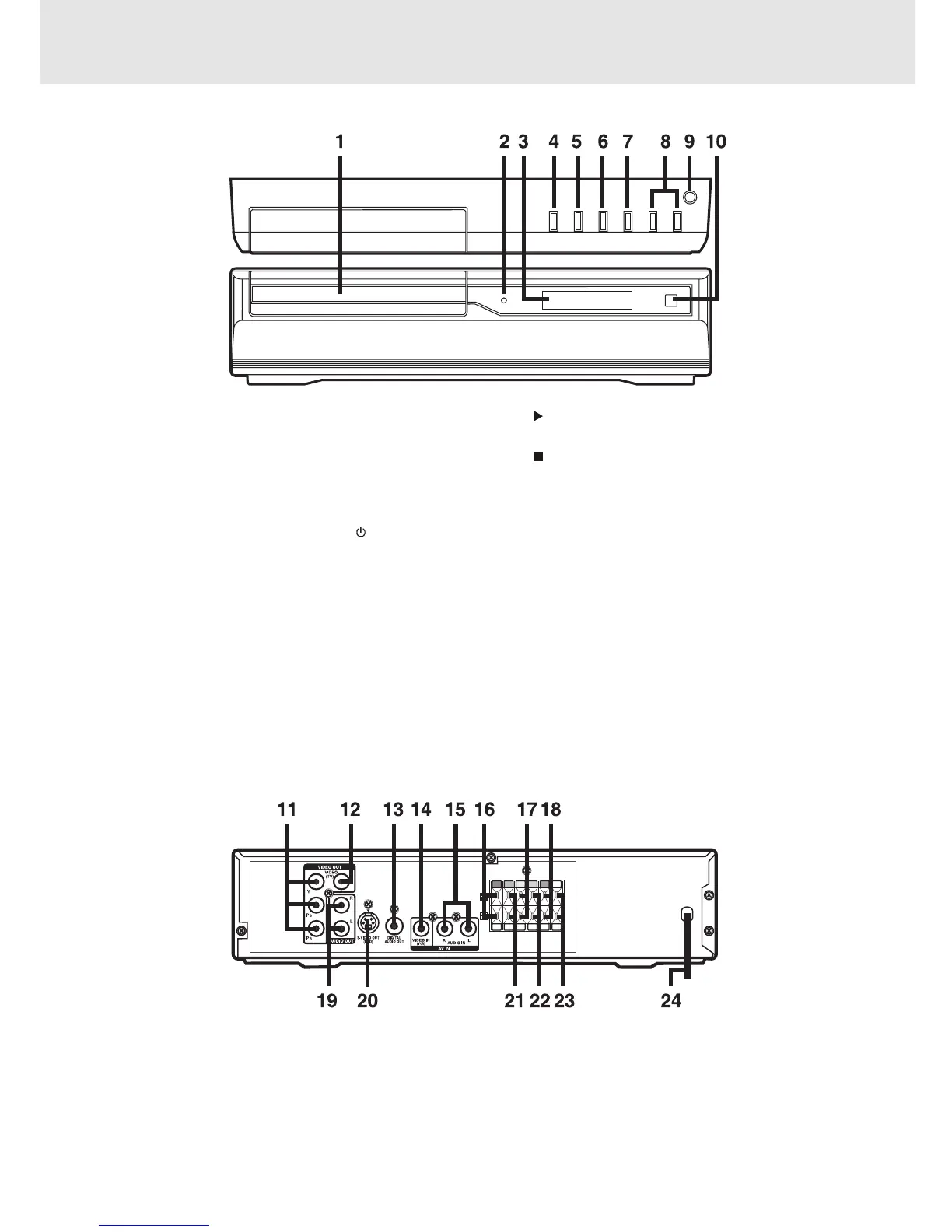
Rear Panel
1) Disc tray
Open or close tray by pushing OPEN/CLOSE button.
Place a disc on the disc tray, label side up.
2) STANDBY indicator
When the Unit is turned on by pressing the
STANDBY/ON button, the light will illuminate a few
seconds. If you press the STANDBY
/ON button on
the remote control, the Unit will turn off and go into
standby mode. The light will continue to illuminate.
3) Display window
Display system information.
4) OPEN/CLOSE button
Use to open and close the disc tray.
11) COMPONENT VIDEO jacks (Y, PB/CB, PR/CR)
12) VIDEO OUT (TV) jack
13) DIGITAL AUDIO OUT jack
14) VIDEO IN (VCR) jack
15) AUDIO IN (L/R) jacks
16) Right FRONT speaker terminals
17) SUBWOOFER terminals
18) Left REAR speaker terminals
19) AUDIO OUT (L/R) jacks
20) S-VIDEO (DVD) output jack
21) Right REAR speaker terminals
22) CENTER speaker terminals
23) Left FRONT speaker terminals
24) Power cord
Front and Top Panel
5) PLAY button
Press to start or resume playback
6)
STOP button
Stop playing a disc.
7) FUNCTION button
Select the source.
8) VOLUME controls
Change the loudness of the sound from the speakers
connected to the Unit.
9) STANDBY/ON button
Turn the power on or off.
10) Remote sensor
Receive the remote control unit signals.
Parts and Functions
Note:
Screen saver - If no button is pressed within 2 minutes, the screen save function will activate, If you want to return
to the normal screen, press any button.



 To Next Page