Page 6
Operating instructions
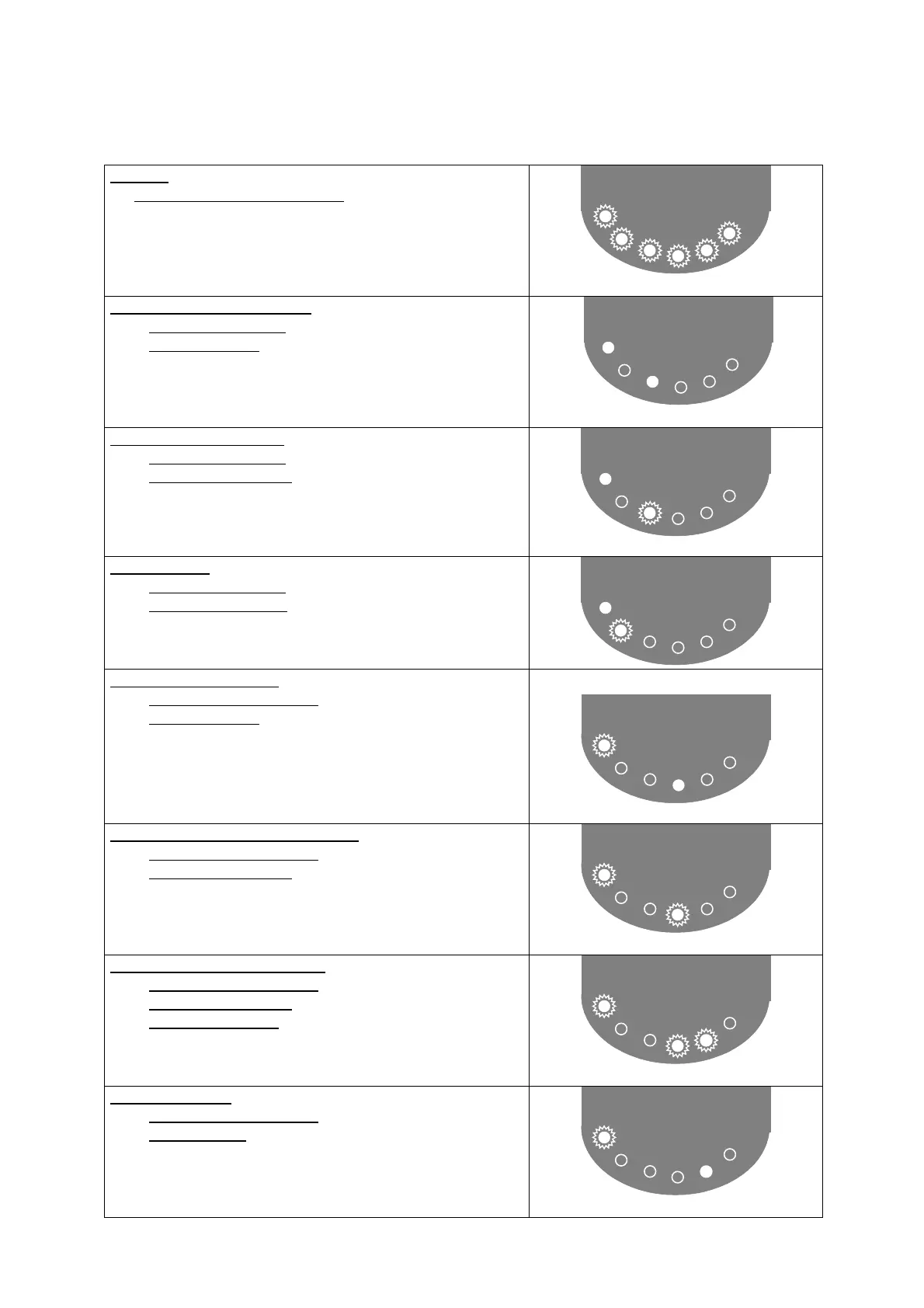
To begin
• All 6 LEDs will flash for 5 seconds
• Initialization of the CPU
• Charge position is changing
Absorption phase (6 hrs max.)
• LED "Power On" is on
• LED "Boost" is on
• Batteries are in Absorption phase
POWER.ON
BOOST
Equalization Phase (4 hrs)
• LED "Power On" is on
• LED "Boost" is flashing
• Batteries are in equalization phase
POWER.ON
BOOST
Floating Phase
• LED "Power On" is on
• LED "Float" is flashing
• Batteries charged and in floating phase
POWER.ON
FLOAT
Internal temperature fault
• LED "Power On" is flashing
• LED "Temp" is on
• Internal temperature fault
• The charger is on stand-by for 30 seconds
• Check the installation and climatic conditions
• Check the internal fan is operational
• Check charger's confinement
POWER.ON
Temp
Faulty Battery Temperature - optional
• LED "Power On" is flashing
• LED "Temp" is flashing
• External temperature fault
• The charger is on stand-by for 30 seconds
• Check the installation and climatic conditions
• Check the external sensors
POWER.ON
Temp
Faulty external sensor - optional
• LED "Power On" is flashing
• LED "Temp" is flashing
• LED 'BAT' is flashing
• Faulty external sensor temperature
• The charger is on stand-by for 30 seconds
• Check the external sensor connections
POWER.ON
Temp
Batt
Faulty output load
• LED "Power On" is flashing
• LED 'BAT' is on
• Faulty output load
• The charger is on stand-by for 30 seconds
• Check external sensor
• Check state of electronic card
POWER.ON
Batt



 To Next Page