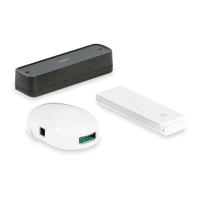
The Dometic Power Awning Pro system is a sophisticated solution designed to enhance the convenience and functionality of compatible RV power awnings. This system primarily consists of a wireless remote control, a receiver, and an optional wind sensor, all working in concert to provide seamless remote operation and protection for your awning.
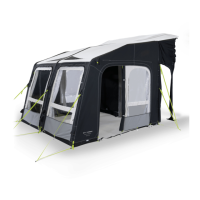
At its core, the Power Awning Pro allows users to remotely control the opening and closing of their RV awning. This eliminates the need to manually operate the awning, offering a significant convenience, especially in varying weather conditions or when setting up camp. The system is designed to be compatible with Dometic 9100, 9200, and 9500 series power awnings, ensuring a broad range of applicability for RV owners.
Function Description
The system's primary function is to provide wireless control over your RV's power awning. The wireless remote control serves as the central interface for the user, allowing for the extension and retraction of the awning with simple button presses. The receiver acts as the intermediary, receiving signals from the remote and translating them into actions for the awning motor and any integrated LED lighting.
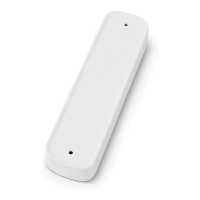
A key feature of the Power Awning Pro is its optional wind sensor. This sensor is a critical safety component designed to protect the awning from potential damage due to high winds. When the wind sensor detects strong wind conditions, it automatically sends a signal to the receiver, which then initiates the retraction of the awning. This proactive measure helps prevent the awning from becoming unstable, bending, or collapsing in adverse weather, thereby extending its lifespan and ensuring safety. The wind sensor also incorporates a functionality check, sending a signal to the receiver every 60 minutes to confirm its operational status. If this signal is not received (e.g., due to removal or low battery), the awning will automatically retract as a precautionary measure.
The system also includes an ignition lock-out feature, specifically for motorized RVs. When the RV's ignition is in the ACC, ON, or START position, the receiver automatically retracts and locks the awning, cutting power to prevent accidental deployment or damage while the vehicle is in motion. This safety mechanism ensures that the awning is always secured when the RV is being driven. When the ignition is in the OFF position, the awning is unlocked and can be operated normally.
Usage Features
Operating the Power Awning Pro is designed to be intuitive and user-friendly. The remote control features dedicated buttons for extending and retracting the awning, as well as controls for any integrated LED lighting. Users can press and hold the "Down" button to extend the awning to its fully deployed position or release it to stop deployment at any desired point. Similarly, the "Up" button retracts the awning. For fine adjustments, the "Up" or "Down" buttons can be "jogged" to achieve the preferred deployed position.
The remote control also offers control over the awning's LED lights. Dedicated "LED" buttons allow users to turn the lights on or off, and "LED +" and "LED -" buttons enable dimming and brightening of the lights, providing ambient lighting control for various outdoor settings.
Pairing the remote control and the wind sensor with the receiver is a straightforward process, though it requires attention to timing. The pairing steps must be completed within a four-second window to maintain the receiver in pairing mode. Different pairing procedures are outlined for 9200/9500 series awnings and 9100 series awnings, accommodating the specific functionalities of each model, including "One Touch" programming for the 9100 series. Verification steps are provided to ensure that the remote control functions as expected after pairing, confirming that the awning extends and retracts correctly.
The wind sensor's sensitivity can be adjusted to suit different preferences and environmental conditions. Once programmed, the sensitivity can be set from 1 (most sensitive) to 9 (least sensitive) using a sensor dial, allowing users to fine-tune how readily the awning retracts in response to wind. This adjustment can be made at any time without the need for reprogramming.
Maintenance Features
While the manual primarily focuses on installation and operation, it implicitly highlights several maintenance-related aspects through its warnings and troubleshooting sections. The importance of using NEC-approved connectors and terminals of appropriate size for all wire connections is stressed, which is crucial for long-term electrical reliability and safety, preventing fire or electric shock hazards.
The troubleshooting guide provides solutions for common issues, such as the remote control failing to pair, the wind sensor beeping or causing automatic retraction every 30 minutes, or the awning automatically retracting every 60 minutes. These issues often point to simple fixes like restarting the pairing process, replacing the wind sensor battery, or reattaching the wind sensor to its base. The system's design to retract the awning every 30 minutes if the wind sensor battery is low serves as a built-in maintenance alert, prompting the user to address the battery issue before it leads to a complete loss of wind protection.
For LED lighting issues, such as lights not illuminating, the troubleshooting section guides users to check if the existing LED switch was properly disconnected during installation or to investigate a blown 3A auto-reset fuse, which protects the LED strip from over-current conditions. These instructions empower users or qualified service personnel to diagnose and resolve common problems, ensuring the continued functionality of the system.
The manual also emphasizes the importance of professional service for any adjustments, alterations, or maintenance, stating that such tasks must be done by a qualified service person. This ensures that complex repairs or modifications are handled correctly, preserving the integrity and safety of the awning system. Furthermore, the use of only Dometic replacement parts and components is recommended to maintain the product's performance and warranty.
Overall, the Dometic Power Awning Pro system is designed for ease of use, robust protection, and reliable performance, making RV awning operation more convenient and secure.



 To Next Page
 General