CFF20, CFF35, CFF45, CFF70DZ Operation
17
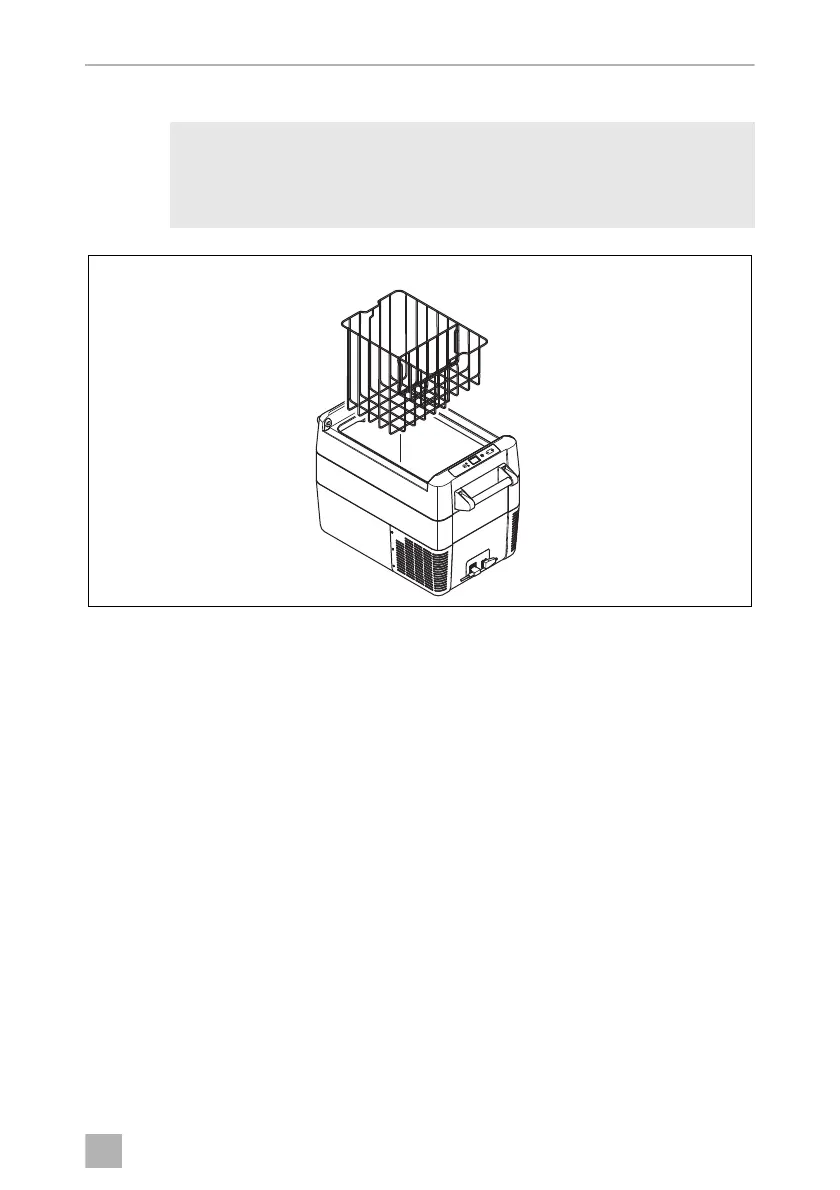
Removing the basket
A
Selecting the temperature units
Temperature display units can be switched between Celsius and Fahrenheit as
follows:
➤ Switch on the cooler.
➤ CFF20, CFF35, CFF45: Press the “SET” button (fig. 3 5, page 11) twice.
CFF70DZ: Press the “SET” button (fig. 3 5, page 11) three times.
➤ Use the “UP +” (fig. 3 7, page 11) or “DOWN –” (fig. 3 6, page 11) buttons to
select Celsius or Fahrenheit.
✓ The selected temperature unit then appears in the display for a few seconds. The
display flashes several times before it returns to the current temperature.
NOTICE! DAMAGE HAZARD!
CFF35, CFF45: Removing the basket with the lid open may scratch the
lid and deform the basket. We recommend to remove the lid (fig. 8)
before removing the basket (fig. 0).
DometicCFF20-35-45-75DZ_OPM_4445103133_APAC(en)_202x-xx-xx.book Seite 17 Dienstag, 20. Oktober 2020 4:16 16


 To Next Page