47
EN
Americana and New Generation Refrigerators Service Procedures
8.38 Replacing the Thermo Fuse
(Americana Models Only)
37 Removing the Thermo Fuse
q
Thermo Fuse
w
Flue Stack
1. Disconnect the unit from all power sources (120VAC
and 12VDC).
2. Disconnect the wires to the thermo fuse.
3. Remove the screws/rivets securing the thermo fuse
to the flue stack.
4. Remove the defective thermo fuse.
5. Perform these steps in reverse to complete the
replacement.
8.39 Testing the Thermofuse for
Continuity (New Generation Models
Only)
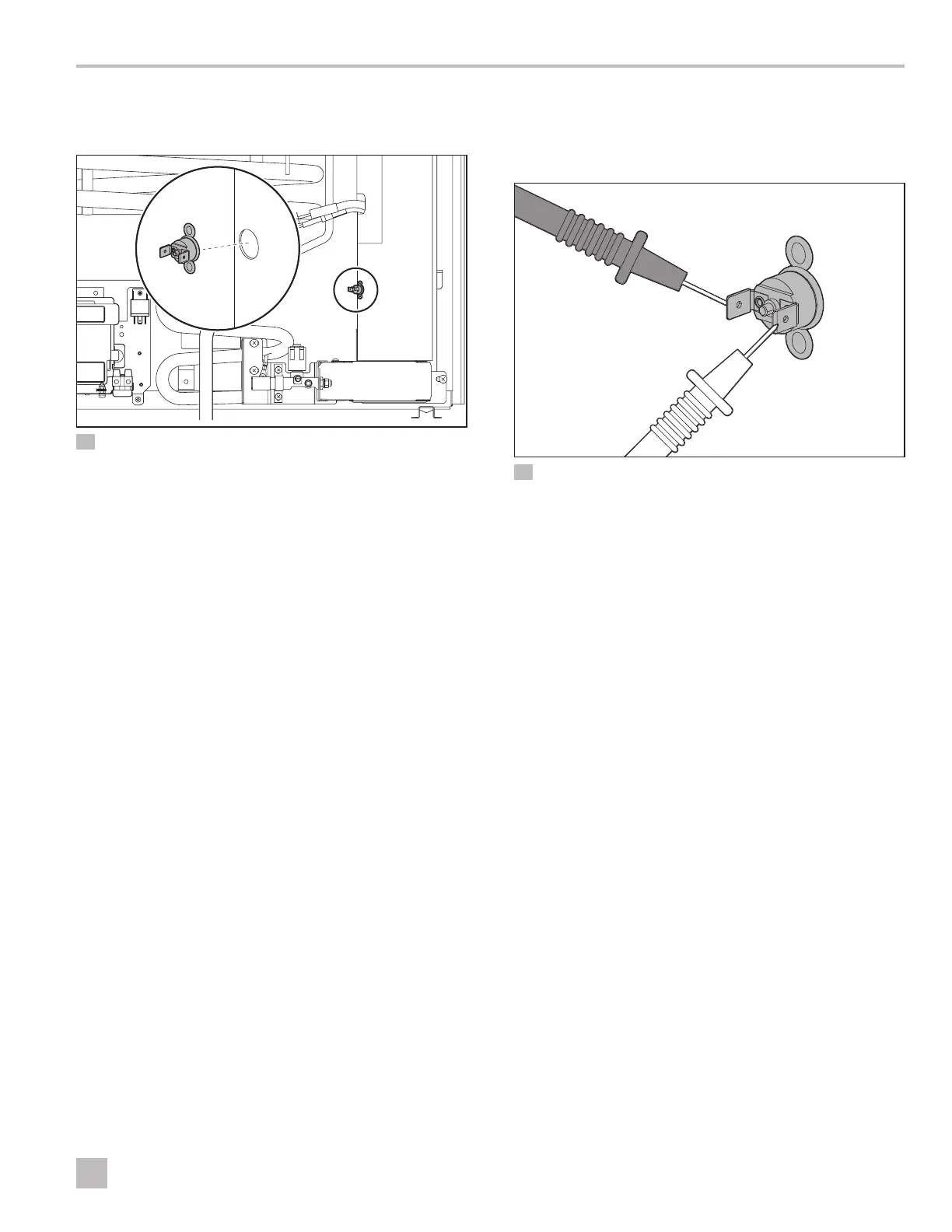
38 Testing the Thermofuse Blades
q
Thermofuse
w
Blades
1. Perform the steps in “Replacing the Thermofuse
(New Generation Models Only)” on page 48 to
disconnect the wiring from the thermofuse.
2. Attach the one lead of the multi-meter to each blade
of the thermofuse.
The reading should show continuity.
3. If the reading shows no continuity, reset the
thermofuse by pressing the center button.
4. Retest for continuity.
If the reading shows no continuity aer the reset, it
indicates a blown fuse.
I
Consult the operating manual for the multi-meter
for specific device function.
q
w
q
w


 To Next Page
 Loading...