FUNCTION INTRODUCTION
1
1
2
2
3
3
4
4
5
5
6
6
7
①
②
③
④
⑤
⑥
⑦
⑧
⑨
① ② ③ ④ ⑤
⑥ ⑦
⑧ ⑨ ⑩ ⑪ ⑫
⑬
⑭
⑮
⑯ ⑰ ⑱/⑲ ⑳
㉑ ㉒
㉓
㉔ ㉕
㉖
㉗
㉘ ㉙
㉚
㉛ ㉜
㉝ ㉞
㉟ ㊱ ㊲ ㊳
㊴
㊵ ㊶
㊷
㊸ ㊹
㊺
Number -
Sync Switch
Intro/Ending
Speed +
Speed -
On
Off
Chord
Accompaniment Volume
⑩
⑪
⑫
⑬
⑭
⑮
⑯
⑰
⑱
Octave
Transposition
Memory Setting
Settings 1
Settings 2
Settings 3
Settings 4
Memory
Recording Track
⑲
⑳
㉑
㉒
㉓
㉔
㉕
㉖
㉗
Number" Key"
Brightness
On
Off
Dual Tones
On
On
Off
Dual Keyboard/Dual Piano
㉘
㉙
㉚
㉛
㉜
㉝
㉞
㉟
㊱
On
Off
Reverb
On
Off
Chorus
Metronome
Off
Soft
㊲
㊳
㊴
㊵
㊶
㊷
㊸
㊹
㊺
Standard
Hard
Strength
On
Off
Percussion
Demo/Music
Rhythm
Tone
Tone Selection
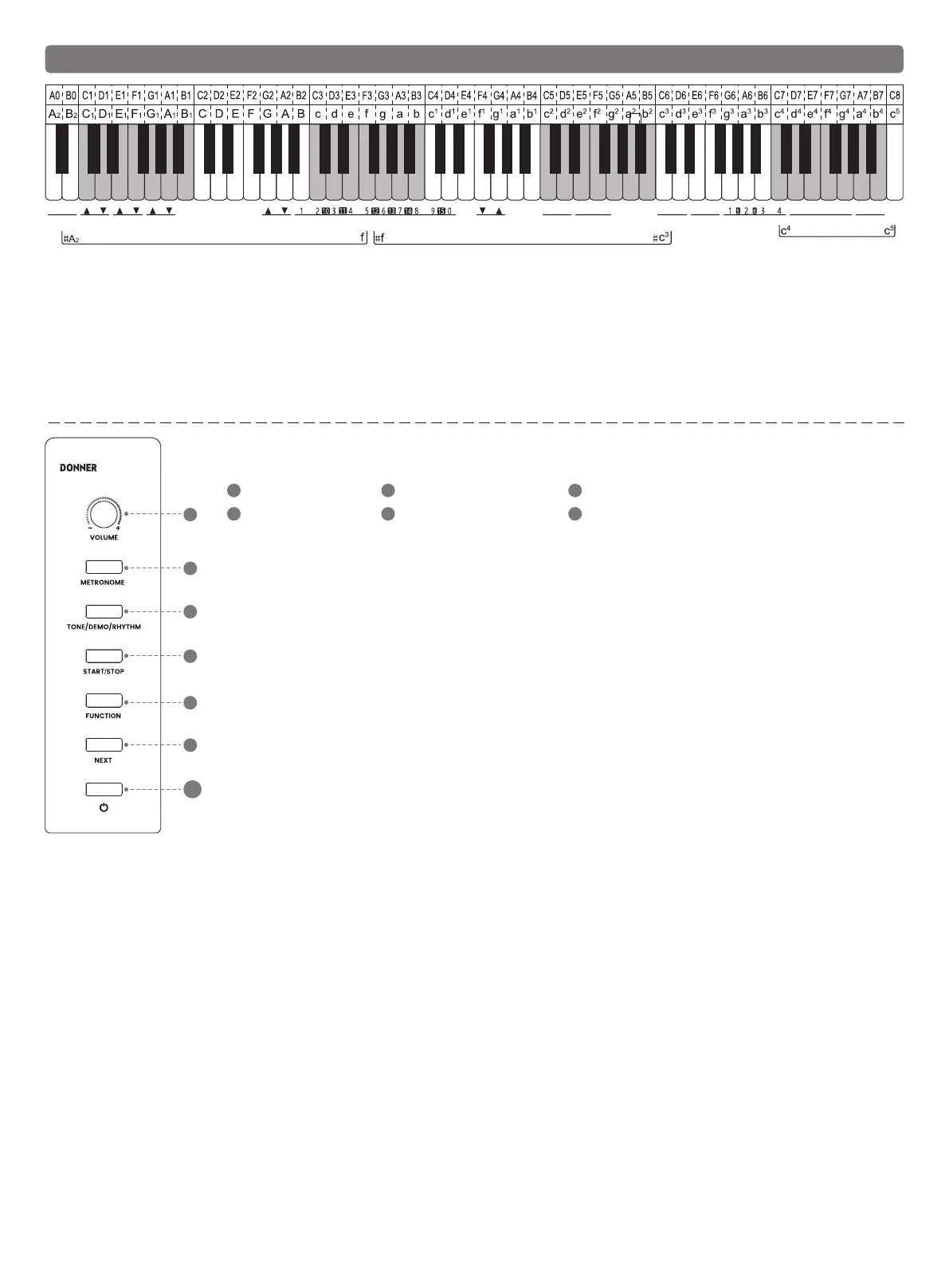
1. No. 0 Acoustic Grand Piano is the default tone after power on.
2. Long press the "TONE/DEMO/RHYTHM" button and simultaneously press a corresponding key in the
tone area "white key c4-c5” to enter the tone mode.
3. Press the "NEXT" button or long press the "FUNCTION" button and simultaneously press the "#A2 number-" key to
switch the tone. Or long press the "FUNCTION" button and simultaneously press the corresponding "B-d1 number"
Key" to select the tone (please refer to the Table of Tones).
Rhythm Selection
1. Long press the "TONE/DEMO/RHYTHM" button and simultaneously press any black and white key in rhythm area
(#f-c3) to enter the Rhythm Mode.
2. In the mode of Rhythm Selection, press the "NEXT" button or long press the "FUNCTION" button and simultaneously
press the "#A2 number-" key to switch the rhythm.
3. Or long press the "FUNCTION" button and simultaneously press the corresponding "B-d1 number key" to select the
rhythm (please refer to the Table of Rhythms)
4. After the selection, press the "START/STOP" button to start rhythm playback, press the "START/STOP" button again to
stop playing.
VOLUME METRONOME TONE/ DEMO/ RHYTHM
START/STOP FUNCTION NEXT
DDP-60
Selection of Demo Music
1. Long press the "TONE/DEMO/RHYTHM" button and simultaneously press any black and white key in the demo area (#A2-f) to enter the Music Mode.
2. In the mode of Music Mode, press the "NEXT" button or long press "FUNCTION" button and simultaneously press the "#A2 number-" key to switch
the rhythm.
3. Or long press the "FUNCTION" button and simultaneously press the corresponding "B-d1 number key" to select music (Please refer to the Table of
Music)
4. After the selection, press the "START/STOP" button to start music playback, press the "START/STOP" button again to stop playing.
Demo Teaching Function
1. In the demo music mode (please refer to the Demo Selection to enter the demo mode), long press any black and white key (demo area #A2-f) first
and then press “START/STOP”.
2. Then enter the mode of demo teaching. Press any key on the keyboard to start playing the main melody. The melody will stop if no keys are pressed.
3. Press the "START/STOP" button again to exit the mode.
Auto Chord
1. Long press the "FUNCTION" button and simultaneously press the "A2 Chord On" button on the keyboard to activate the auto chord.
2. Long press the "FUNCTION" button and simultaneously press the "B2 Chord Off" button on the keyboard to inactive the auto chord.
Sync ON and Sync OFF
1. Long press the "FUNCTION" button and simultaneously press the "#C1Sync" button on the keyboard to turn on the sync function.
2. Press the "#C1Sync" button again to turn off the sync function.
Intro/Ending
1. Long press the "FUNCTION" button and simultaneously press the "#D1Intro/Ending" button on the keyboard, and then press the "START/STOP"
button to start the intro playing,
2. During the rhythm playing, long press the "FUNCTION" button and simultaneously press the "#D1Intro/Ending" button on the keyboard to start the
ending playing.
Accompaniment Volume
Long press the "FUNCTION" button and simultaneously press the "C1 Accompaniment Volume Up" button or "D1 Accompaniment Volume Down" on the
keyboard adjust the accompaniment volume.
Octave
Long press the "FUNCTION" button and press "E1 Octave Up" or "F1 Octave Down" on the keyboard to adjust the octave.
Transposition
Long press the "FUNCTION" button and press "G1 Transposition Up" or "A1 Transposition Down" on the keyboard to adjust ±12 semitones.
Brightness
Long press the "FUNCTION" button and press "f1 Brightness Up" or "g1 Brightness Down" on the keyboard to adjust the sound brightness.
Recall/Save
1. Long press the "FUNCTION" button and press any one of "C-F Settings 1-4” keys on the keyboard, and then long press the "Memory Setting" to save
your selected parameters such as tone, rhythm, speed and volume.
2. Long press the "FUNCTION" button and press the "C-F Settings 1-4" key in the settings you just saved, and then short press the "Memory Setting" to
recall the saved parameters.
3. This piano is capable of four save settings, 4 memories and 16 memory settings in total. Long press the "FUNCTION" button first and then press the
"G Memory Up" key or “A Memory Down” key to select the memory.
Recording/Playback
1. Long press the "METRONOME" button and press "B-d1 Recording Track" on the keyboard after the beep to select the track to be recorded. There
are "0-15" tracks in total, of which 1-15 is the melody track and 0 is the accompaniment track.
2. After selecting the recording track, it will enter the recording mode. Play the piano and start recording, the metronome indicator flashes to start
recording.
3. Long press the "START/STOP" button to stop recording, and the metronome stops flashing to exit the recording mode.
4. Long press the "START/STOP" button again to play the recorded sound.
5. Recording Deletion: Long press the "metronome" button to enter the recording mode after the beep, and then long press the "PLAY/STOP" button to
delete all track recordings.
Dual Tones:
1. Choose one tone as the first of dual tones.
2. Long press the "FUNCTION" button and press the "C2 Dual Tone" key on the keyboard.
3. The dual tone is activate now and the second tone is the No. 49 tone by default.
4. In this mode, enter the Tone Mode to change the second tone (please refer to the Tone Selection.)
5. Press and hold the "FUNCTION" button again, and press the "d 2 Dual Tone Off" key on the keyboard to exit the dual tone mode.
Dual Keyboard/Dual Piano:
1. Choose a tone as the left area.
2. Long press the "FUNCTION" button and press the "e2 Dual Keyboard" key on the keyboard to activate the Dual Keyboard mode.
3. In the activated state, the keyboard is divided into two identical areas on the left and right. The split point is located at the Middle C. In the Dual
Keyboard mode, the pitch of Middle C is always the same as the pitch of the rightmost C.
4. In this mode, enter the Tone Mode to change the tone of right area (please refer to the Tone Selection.)
5. Long press the "FUNCTION" button and press the "f2 Dual Piano" key on the keyboard. Then, both the left and right keyboards will play the tone of
piano.
6. Long press the "FUNCTION" button and press the "g2 Dual Keyboard/Dual Piano Off" key on the keyboard to exit Dual Keyboard/Dual Piano mode.
Reverberation
1. Long press the "FUNCTION" button and press the "c3 Reverb On" key on the keyboard to activate the reverb mode. Then, the digital piano will play
with the reverb effect.
2. Press the "C3 Reverb" button to switch the type of reverberation. All together 8 reverberation effects are preset.
3. Long press the "FUNCTION" button and press the "d3 Reverb Off" button to turn off the reverb effect.
Chorus
1. Long press the "FUNCTION" button and press the "e3 Chorus" key on the keyboard to activate the chorus mode, then the digital piano will play with
the chorus effect.
2. Press the "e3 Chorus" button to switch the type of chorus. All together 8 chorus effects are preset.
3. Long press the "FUNCTION" button and press the "f3 Chorus Off" button to turn off the chorus effect.
Metronome
1. Long press the metronome button in the function box and the indicator will light up to play the metronome.
2. Long press the "FUNCTION" button and press the "g3-b3 Beat 1-6" key on the keyboard to select the number of beats.
Speed
1. Long press the "FUNCTION" button and press “#d4 Speed Up" on the keyboard to increase the BPM value.
2. Long press the "FUNCTION" button and press “#f4 Speed Down" on the keyboard to reduce the BPM value.
3. BPM Range: 30-280
Strength
1. Long press the "FUNCTION" button and press the "d4-g4 Strength" button on the keyboard to select the strength curve of the keyboard.
2. All together 5 strength curves: "OFF, SOFT, STANDARD, HARD" and default strength after power on.
Keyboard Percussion
1. Long press the "FUNCTION" button and press the "a4 Percussion On" button on the keyboard to enter the Keyboard Percussion mode, and the
keyboard will play the percussion effect.
2. Long press the "FUNCTION" button and press the "b4 Percussion Off" button on the keyboard to exit the Keyboard Percussion mode.



 To Next Page
 Loading...










