1
Welcome to Donner
Thank you for choosing Donner DEP-1 digital piano!
Please read this instruction manual carefully before using this product.
Be sure to save these instructions for future reference.
IMPORTANT SAFETY INFORMATION
Please charge before use! With a high-capacity lithium battery, the charging time is about 5h, and please charge for more than 6h for the first
use (5V/2ACharging adapter)
1. There are no user-serviceable components inside this product, please do not disassemble or modify this product to avoid the danger of fire and
electric shock.
2. To avoid deformation, discoloration, or more serious damage, do not store it in the following environments (Direct sunlight, high temperature,
excessive humidity, excessive dust, strong vibration)
3. Never leave the instrument in an unstable place to avoid falling and causing damage.
4. To avoid interference with other products such as televisions and radios, do not place the piano near the electrical devices.
5. Never place any container with liquid on the instrument to prevent the liquid flow into the instrument.
6. To avoid discoloration of the panel and keyboard, do not clean the instrument with thinners, alcohol, or similar chemicals. Spots or dirt which is difficult
to remove can be wiped off with a slightly water-dampened cloth.
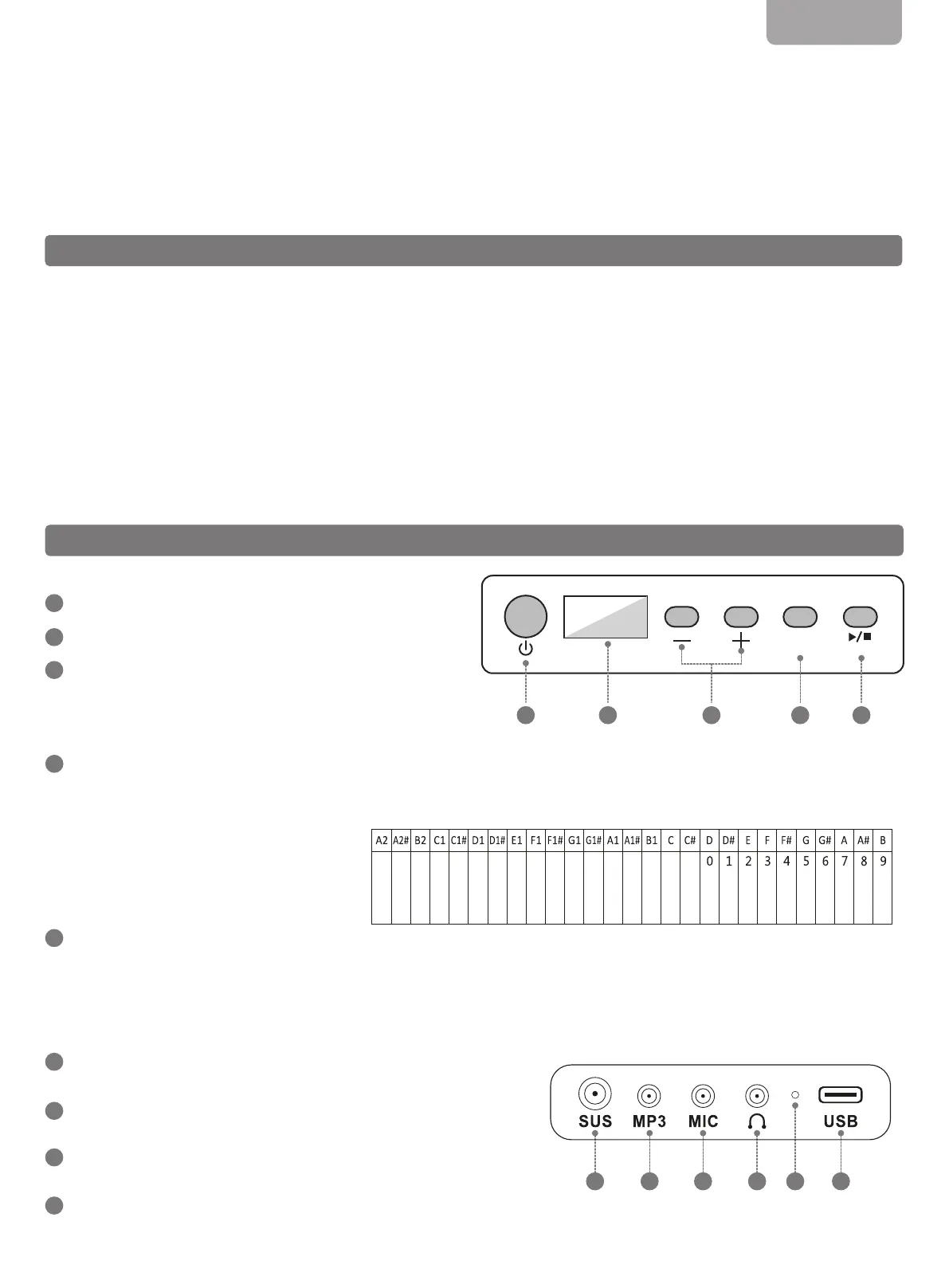
Power Button
Digital Tube Display
+/- Button
- Press the + button and the - button to adjust the volume (from 00-15),
and the default volume is 12.
- Long press the + button to increase quickly, and long press
the - button to decrease quickly.
Setting Button
-
Long press the setting button, and you will hear two beeps. The left part of the keyboard keys become function keys, as shown in the following table.
Hold down the setting button while pressing the compound key to enter function mode.
- Press the setting button to enter the start/stop playing mode. The digital tube displays the rhythm serial number, and pressing the + button and –
button to switch the rhythm.
Record Button
- Record/Play (long press is for recording, and the short press is for playing).
a) Long press the record button, hear a beep and then press the key on the keyboard to record MIDI signal.
b) Short press the record button to play the last recorded signal.
SUS Jack
- Sustain pedal delay function.
MP3 Jack
- Audio input function.
MIC Jack
- Microphone function.
Headphone Jack
- Audio input function.
PRODUCT OVERVIEW
ENGLISH
● Front Panel
● Interface
1
2
3
4
5
1
2
3
4
1 2
3
4 65
Vibrate
Sustain
Drum Kit
Split
LED switch
Velocity switch
Tempo -
Tempo +
Transpose -
Transpose +
Volume -
Volume +
Metronome
Chord
Rhythm
Demo
Tone
Charging Indicator
- The charging indicator is red when the piano is plugged into USB for charging, and the charging indicator is green the battery is full.
USB Port
- MIDI Type-C charging/transferring MIDI.
- Note that not applicable to PD-type quick charging cable.
Setting Record
1
2
3 4 5


 To Next Page
 Loading...











