2
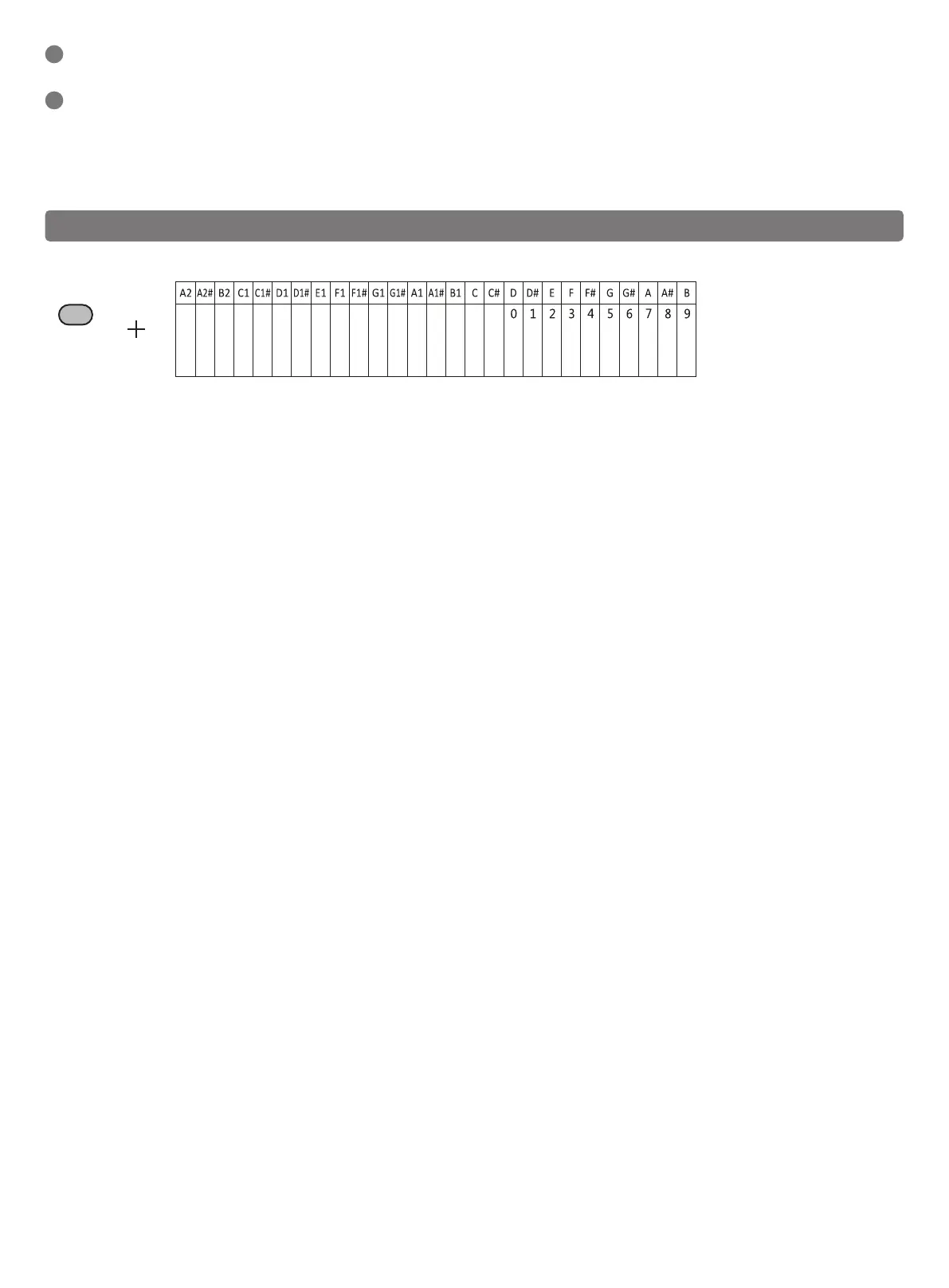
Operation guide: Hold down the setting button while pressing the corresponding key to set the function of this piano.
● Tone
1. Press the Tone key (A2) and press the + button and the – button to switch the tone. The digital tube shows the serial number of tone.
2. Press the number key 0-9 (D-B) can directly input the tone number (000-127), the number beyond the range is invalid.
3. Press the + button and the - button at the same time can return the default status [000] (grand piano).
● Demo
1. Press the Demo key (A2#) to play the demo song, select the demo song from 000- 020, and the digital tube displays the serial number of the demo
song.
2. Press the + button and the - button to switch the demo song.
3. Press the number key 0-9 (D-B) to directly enter the demo song number (000- 020), and the number beyond the range is invalid.
4. Press the + button and the - button at the same time can return the default status [000].
● Rhythm
1. Press the Rhythm key (B2) to play the rhythm and select the rhythm from 000 to 127. The digital tube displays the serial number of the rhythm.
2. Press the + button and the - button to switch the rhythm.
3. Press the number key 0-9 (D-B) to directly enter the rhythm number (000- 127), and the number beyond the range is invalid.
4. Press the + button and the - button at the same time can return the default status [000].
● Chord
1. Press the Chord key (C1) and cycle switch: single-finger chord → multi-finger chord → chord closure → single-finger chord → …
2. The system enters chord opening mode during the rhythm playing. Chord function: press the key in A2~f# to play the chord matching the rhythm, and
the tone of the chord changes with the pitch of the key.
● Metronome
Press the Metronome key (C1#) and cycle to switch: 1/4, 2/4, 3/4, 4/4
● Volume
1. Press the Volume - key (D1) and Volume+ key (D1#) to adjust the volume (from 00-15). The default volume is 12.
2. Press the + button and the - button at the same time to return to the default level 12 volume.
● Transpose
1. Press the Transpose - key (E1) and the Transpose+ key (F1) to adjust the transpose from -6 to 6. The default boot level is 0.
2. Hold down the Transpose - key (E1) and Transpose+ key (F1) at the same time to move back to level 0.
● Tempo
1. Press Tempo - key (F1#) and Tempo+ key (G1) to adjust the tempo from level 0 to level 16. The default boot level is 8.
2. Hold down the Tempo - key (F1#) and Tempo+ key (G1) at the same time to move back to level 8.
● Velocity Switch
1. Press the Velocity switch key (G1#) to turn off and then press it again to turn on
2. Turn on by default.
● LED Switch (Need to buy products with LED)
1. Press the LED switch (A1) to turn off, and then press it again to turn on.
2. The default LED is on (if the piano has LED)
● Split
Press the Split key (A1#) to turn on the split function, and then press it again to turn off it.
● Drum Kit
1. Press the pan Drum Kit key (B1) to turn on this function, and then press it again to turn it off.
2. When the Drum Kit is turned on, all the keys turn into percussion tone, and when turning off the Drum Kit, the percussion tone is off.
SUS Jack
- Sustain pedal delay function.
MP3 Jack
- Audio input function.
MIC Jack
- Microphone function.
Headphone Jack
- Audio input function.
COMPOUND FUNCTION KEY
5
Vibrate
Sustain
Drum Kit
Split
LED switch
Velocity switch
Tempo -
Tempo +
Transpose -
Transpose +
Volume -
Volume +
Metronome
Chord
Rhythm
Demo
Tone
Charging Indicator
- The charging indicator is red when the piano is plugged into USB for charging, and the charging indicator is green the battery is full.
USB Port
- MIDI Type-C charging/transferring MIDI.
- Note that not applicable to PD-type quick charging cable.
6
Setting
● Sustain
1. Press the Sustain key (C) to enable the sustain effect, and then press it again to close.
2. Turn on the sustain function to produce sound delay effect during the performance.
● Vibrate
1. Press the Vibrate key (C#) to enable the vibrate function, and then press it again to disable it.
2. Turn on the vibrate function to produce the effect of sound vibration during the performance.


 To Next Page
 Loading...











