Function Introduction
Selecting & Playing Timbre
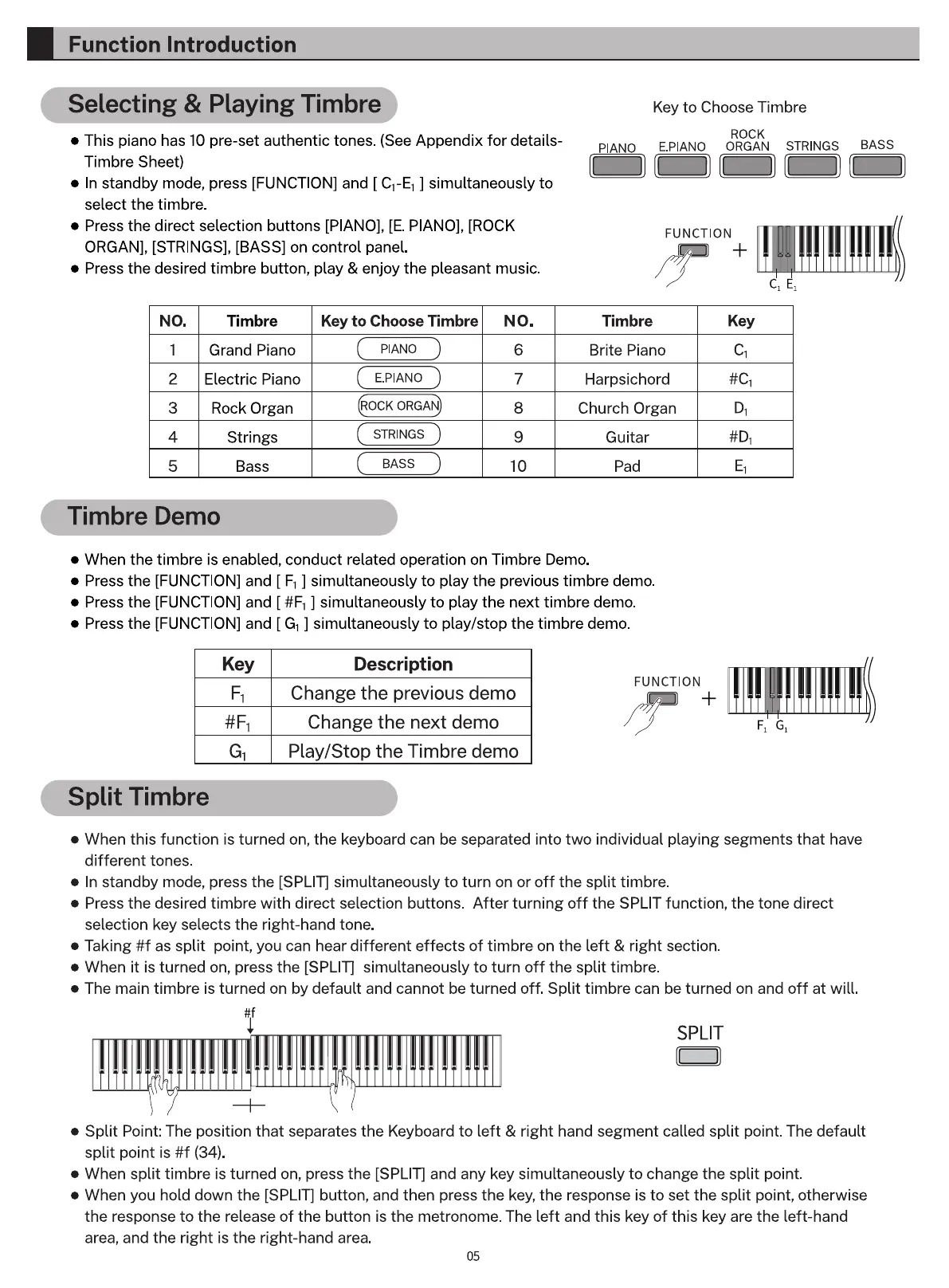
This piano has 10 pre-set authentic tones. (See Appendix for details-
Timbre Sheet)
e In standby mode, press [FUNCTION] and [ CI-EI ] simultaneously to
select the timbre.
Press the direct selection buttons [PIANO], [E. PIANO], [ROCK
ORGAN], [STRINGS], [BASS] on control panel.
• Press the desired timbre button, play & enjoy the pleasant music.
Key to Choose Timbre
ROCK
PIANO E.PIANO ORGAN STRINGS BASS
FUNCTION
I I IIII Ili
Key
NO.
2
3
4
5
Timbre
Grand Piano
Electric Piano
Rock Organ
Strings
Bass
Key to Choose Timbre NO.
E PIANO
6
7
8
9
10
Timbre
Brite Piano
Harpsichord
Church Organ
Guitar
Pad
Timbre Demo
• When the timbre is enabled, conduct related operation on Timbre Demo.
e Press the [FUNCTION] and [ Fl ] simultaneously to play the previous timbre demo.
e Press the [FUNCTION] and [ ] simultaneously to play the next timbre demo.
• Press the [FUNCTION] and [ GI ] simultaneously to play/stop the timbre demo.
Key
Fl
Split Timbre
Description
Change the previous demo
Change the next demo
Play/Stop the Timbre demo
FUNCTION
• When this function is turned on, the keyboard can be separated into two individual playing segments that have
different tones.
In standby mode, press the [SPLIT] simultaneously to turn on or off the split timbre.
• Press the desired timbre with direct selection buttons. After turning off the SPLIT function, the tone direct
selection key selects the right-hand tone.
Taking #f as split point, you can hear different effects of timbre on the left & right section.
When it is turned on, press the [SPLIT] simultaneously to turn off the split timbre.
The main timbre is turned on by default and cannot be turned off. Split timbre can be turned on and off at will.
SPLIT
Split Point: The position that separates the Keyboard to left & right hand segment called split point. The default
split point is #f (34).
e When split timbre is turned on, press the [SPLIT] and any key simultaneously to change the split point.
When you hold down the [SPLIT] button, and then press the key, the response is to set the split point, otherwise
the response to the release of the button is the metronome. The left and this key of this key are the left-hand
area, and the right is the right-hand area.
05



 To Next Page