Function Introduction
Transposition Setting
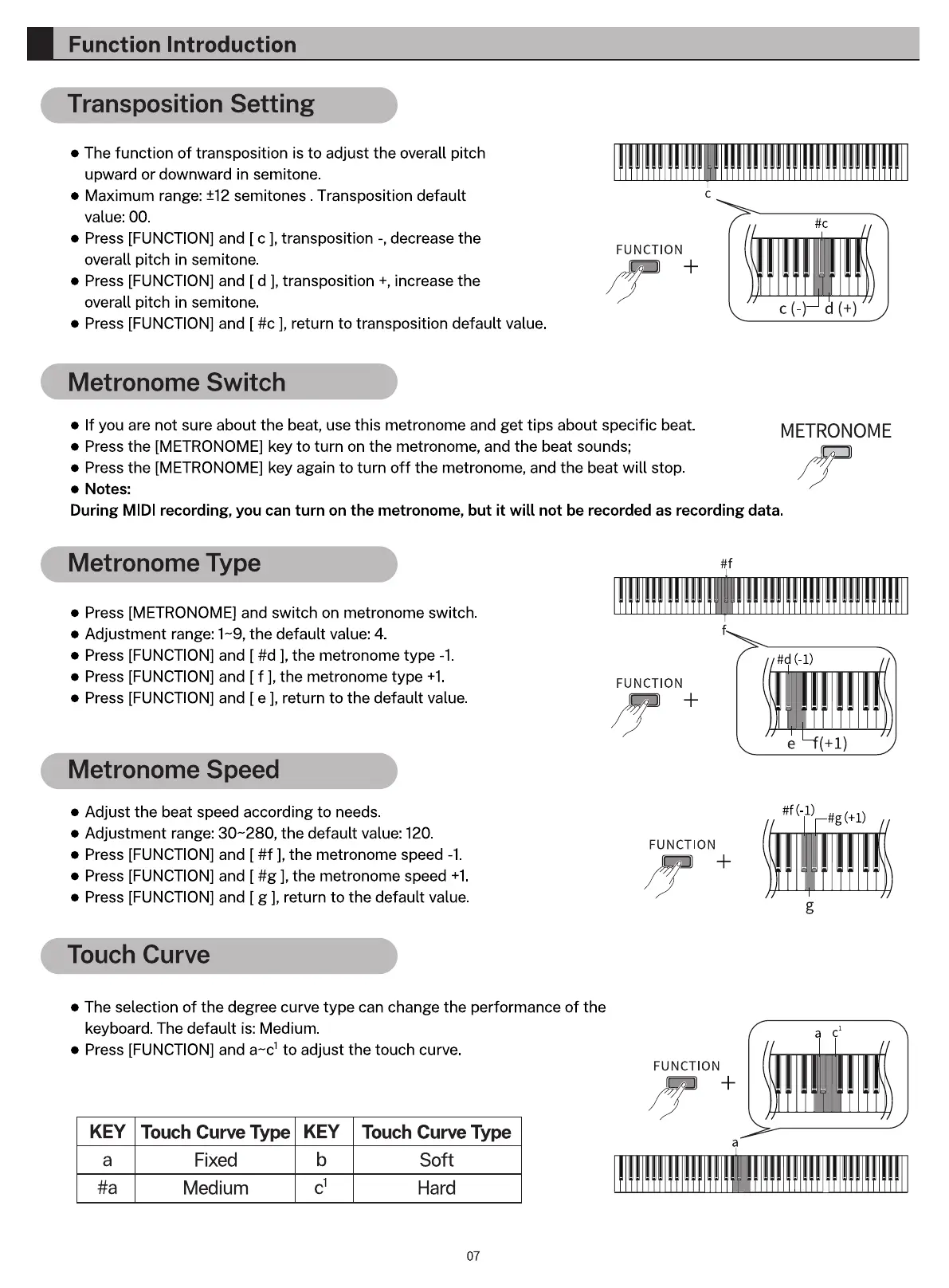
• The function of transposition is to adjust the overall pitch
upward or downward in semitone.
e Maximum range: ±12 semitones . Transposition default
value: 00.
Press [FUNCTION] and [c ], transposition -, decrease the
overall pitch in semitone.
Press [FUNCTION] and [d ], transposition +, increase the
overall pitch in semitone.
Press [FUNCTION] and [ #c ], return to transposition default value.
Metronome Switch
IIllIII II II IIIII II I IllI III
c
FUNCTION
If you are not sure about the beat, use this metronome and get tips about specific beat.
Press the [METRONOME] key to turn on the metronome, and the beat sounds;
e Press the [METRONOME] key again to turn off the metronome, and the beat will stop.
• Notes:
METRONOME
During MIDl recording, you can turn on the metronome, but it will not be recorded as recording data.
Metronome Type
• Press [METRONOME] and switch on metronome switch.
e Adjustment range: 1-9, the default value: 4.
Press [FUNCTION] and [ #d ], the metronome type -1
Press [FUNCTION] and [ f ], the metronome type +1
Press [FUNCTION] and [ e ], return to the default value.
Metronome Speed
Adjust the beat speed according to needs.
• Adjustment range: 30-280, the default value: 120.
e Press [FUNCTION] and [ #f ], the metronome speed -1.
e Press [FUNCTION] and [ #g ], the metronome speed +1.
Press [FUNCTION] and [ g ], return to the default value.
Touch Curve
The selection of the degree curve type can change the performance of the
keyboard. The default is: Medium.
• Press [FUNCTION] and a-cl to adjust the touch curve.
KEY Touch Curve Type KEY Touch Curve Type
IIllI I IIII I III II IllI
FUNCTION
FUNCTION
FUNCTION
a
a
Fixed
Medium
b
cl
Soft
Hard
07



 To Next Page