5
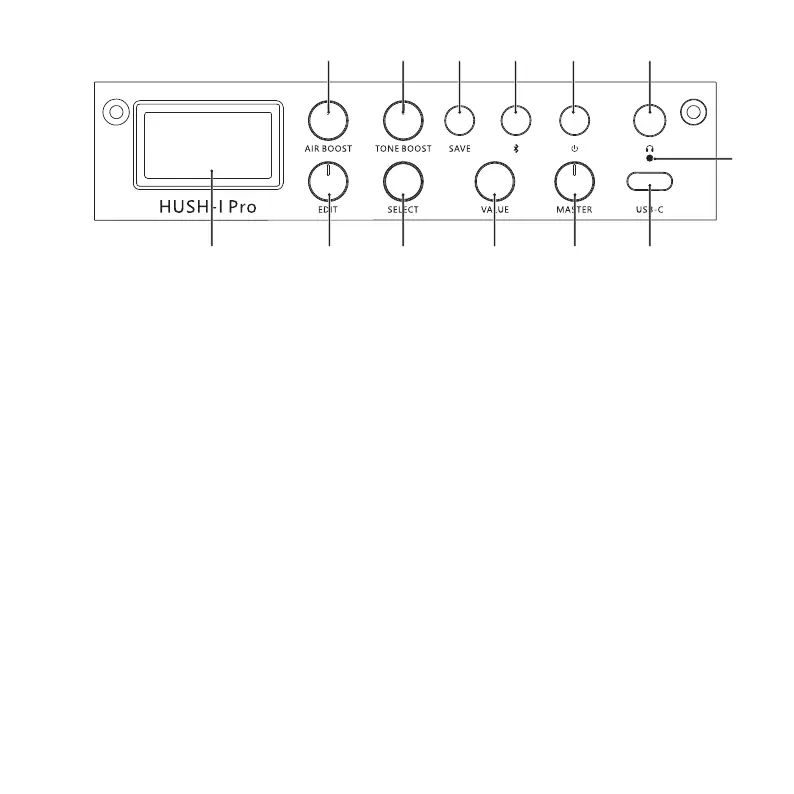
Panel Function Illustration
①
②
③
④
⑤
⑥
⑦
⑧
⑨
⑩
⑪
⑫
⑬
① ② ③ ④ ⑤
⑥ ⑦ ⑧ ⑨ ⑩ ⑪
⑫
⑬
Display screen: It displays current status.
EDIT: The rotary knob is used to select mode or choosing the effect type of the current preset tone.
SELECT: The rotary knob is used to select current function mode on the display screen or regulate function parameters. (The
knob is invalid in the BYPASS mode)
VALUE: The rotary knob is used to regulate the function parameters or volume . (The knob is invalid in some situations)
MASTER: The master volume knob is used to control the ultimate output volume in all cases.
AIR BOOST: It is used to regulate the master air value (low frequency compensation) of all preset outputs; it is invalid in the
BYPASS mode.
TONE BOOST: It is used to regulate the master brightness value (high frequency compensation) of all preset outputs; it is
invalid in the BYPASS mode.
SAVE: Press the button once to select the preset location and volume of preset, and press it again to confirm the storage.
Bluetooth button (Bluetooth indicator):
Long press the button to turn on/off Bluetooth;
shortly press it to reset the parameters or volume of current function. (The button is invalid in some situations);
Bluetooth indicator:
The off status indicates that it is turned off;
the flickering status indicates that it is not connected;
the solid status shows that it is connected.
Power switch
Phone output
Charge indicator
USB port: It is used for power supply/charging/host connection.


 To Next Page