6
MODULE DETAILS
OPERATION
The following operation guide allows you to enjoy the powerful sound and flexible control of the Built-in effect of HUSH-I PRO
quickly and safely!
Connection
Cautions: There are several different connections options available with the HUSH-I PRO.
1. Before connecting the HUSH-I PRO, make sure that the volume knobs of MASTER are turned to the minimum.
2. Follow the principle that after connecting all the devices, turn on the MASTER first, then turn on the playback devices (such as
amplifiers). When turning off, turn off playback device first, and then the HUSH-I PRO.
3. Recommend using the power supply that is equipped with the HUSH-I PRO, because mismatches and noise may occur when
using other power supplies.
4. The output must use 1/4"mono shielded audio cables. High-quality audio cables ensure clean and stable signal transmission.
1. BYPASS Mode
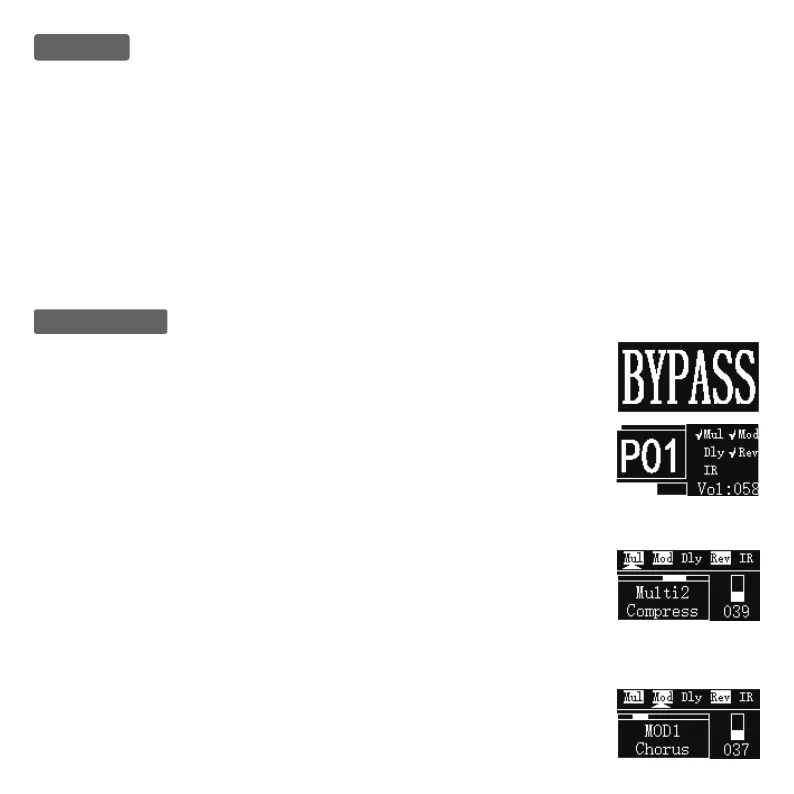
The Bypass mode can be activated by rotating the “EDIT” button to Level 1.
2. Select Presettings
The preset selection can be activated by rotating the “EDIT” button to Level 2; in this mode, you may
select presettings by rotating the “SELECT” button, and the presettings selected will be displayed on
the screen P#. The preset volume output may be changed by regulating the “Value” button.
Reset: Shortly press the Bluetooth button to restore the preset volume value to 80%.
3. Effect Chain Module
● MUL Module
The MUL (Multi) module may be activated by rotating the “EDIT” button to Level 3. You may switch to
diverse effects by rotating the “SELECT” button. The factory settings include three mixed effects:
Overdrive, Compressor, and Booster. The effect output values may be changed by regulating the
“Value” button.
Reset: Shortly Press the Bluetooth button to restore the effect value to 30%.
● MODULATION Module
The Modulation module may be activated by rotating the “EDIT” button to Level 4. You may switch to
diverse effects by rotating the “SELECT” module. The factory settings include five modulation
effects: Chorus, Phaser, Tremolo, Flanger, and AutoWah. The effect output values may be changed
by regulating the “Value” button.
Reset: Shortly Press the Bluetooth button to restore the effect value to 20%.


 To Next Page