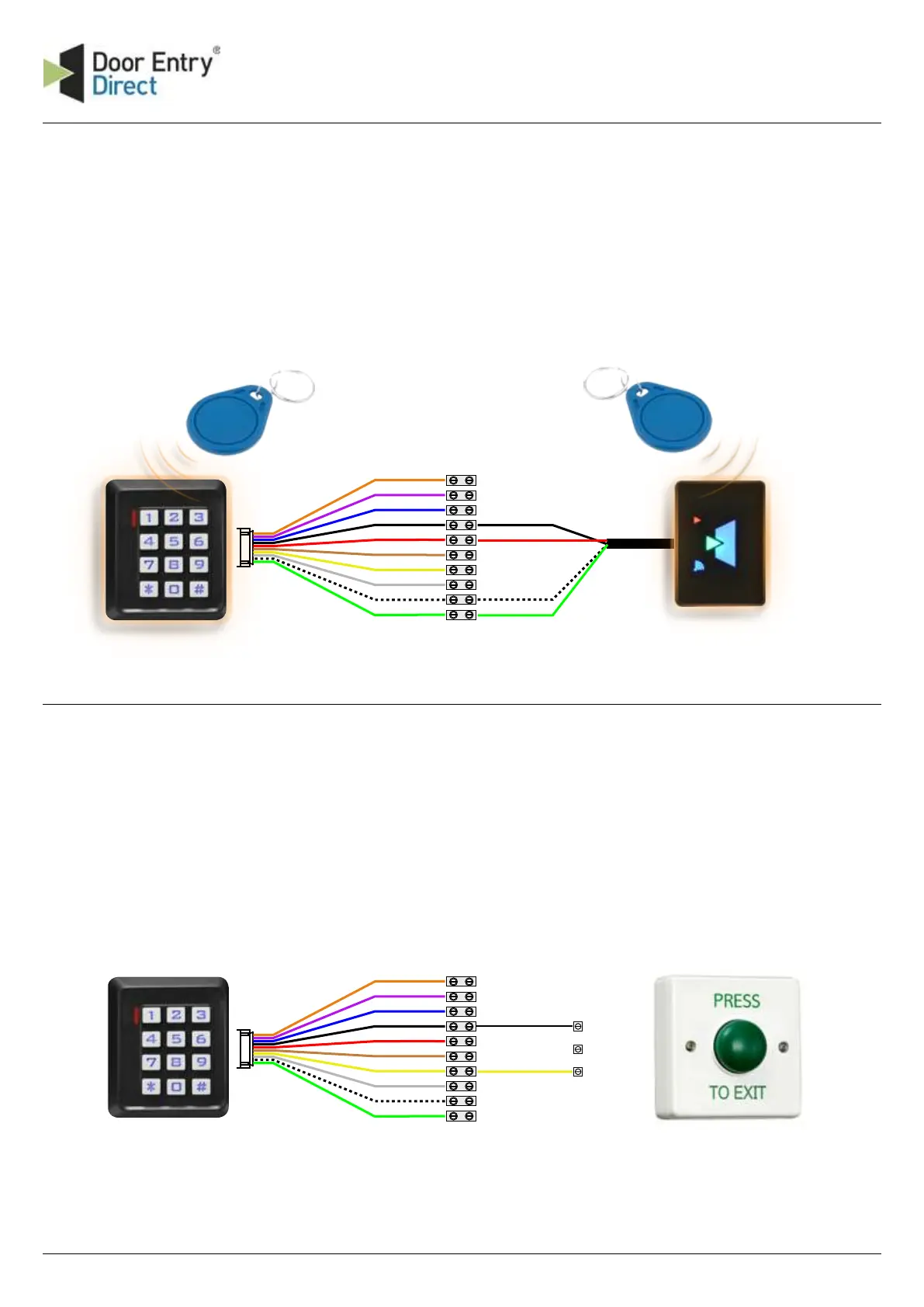
N/C Orange
COM Purple
N/O Blue
Black GND
Red +12V DC
Brown D_IN
Yellow OPEN
Grey ALARM
White D1
Green D0
1 Locating the control unit
The DC260 control unit should be fitted close to the door
through which you wish to control access. It should be
on the secure side. When programming the unit, you will
need access to both the reader and controller,
therefore you should arrange them reasonably close
together.
Black
Red
White
Green
2 Connecting the reader
The DC260 can control access both in and out of the
controlled door when using the built-in "EXIT" reader with
the external UPR reader.
The distance between the UPR reader and the controller
can be extended up to 25 meters using BEL9536 cable or
equivalent.
3 Egress button
Pressing the egress button (push to make switch) will
operate the door opening timer. The timer starts when
the button is pressed and released, a time clock may be
used for real time door unlocking.
N/C Orange
COM Purple
N/O Blue
Black GND
Red +12V DC
Brown D_IN
Yellow OPEN
Grey ALARM
White D1
Green D0
Push to brake
OUT - built-in "EXIT" reader
IN - external UPR reader


 To Next Page