Operation & Maintenance M anual OPERATING INSTRUCTIONS
Display Setup
The Display Me
nu functions give users the ability to configure the LCD. Options for
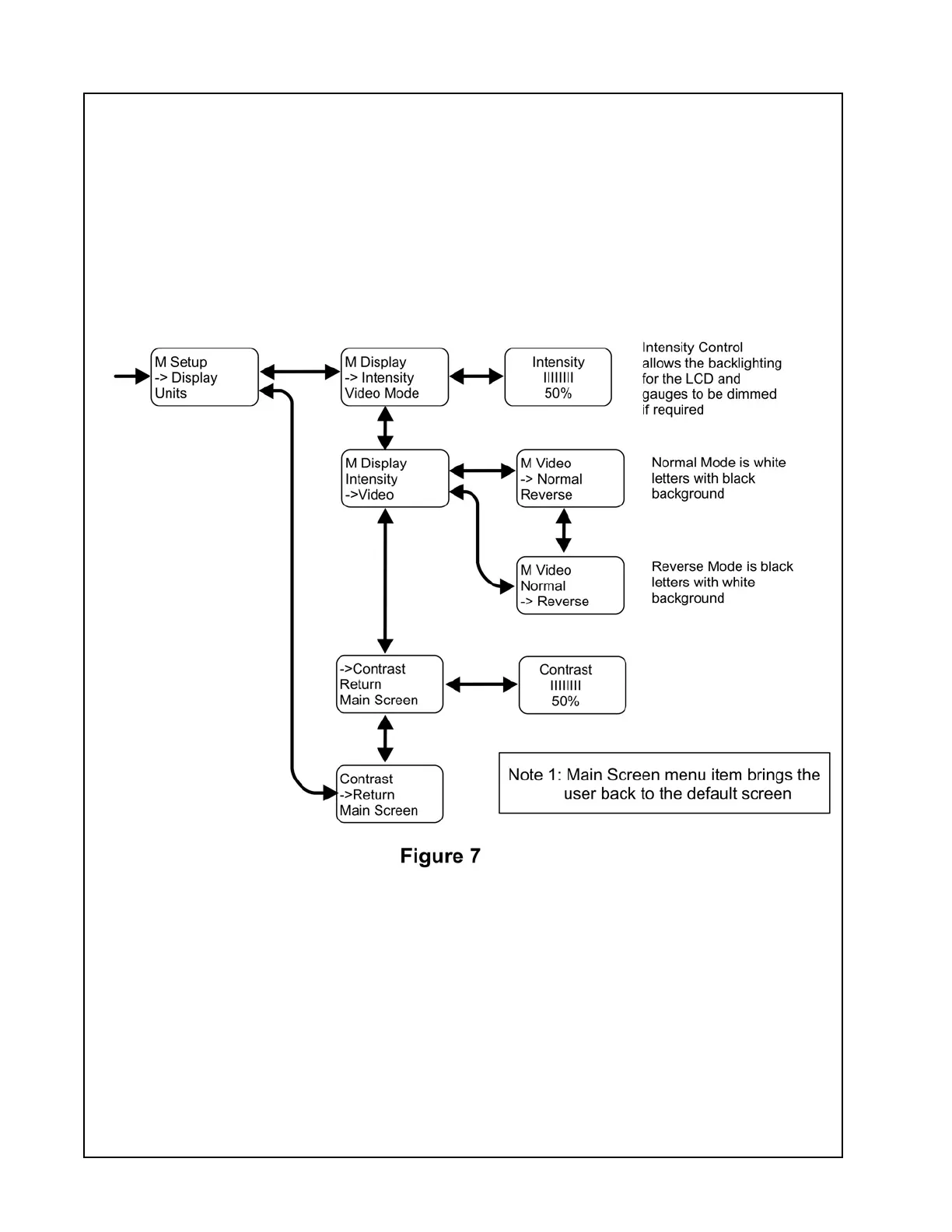
configuring the display include intensity, contrast, and viewing m ode. To access the Display
Menu, press and hold the ENTER button while the Default Screen is displayed until the Main
Menu appear
s. Scroll to the S etup option using the DOWN button then press the ENTER
button. Scroll to the Display option using the DOWN button then press the ENTER button.
Use the DOWN or UP buttons to highlight and the ENTER button to select the desired display
setting. S
ee Figure 7. To return to the default screen, use the DOWN button to highlight the
Main Screen menu item and press the ENTER button.
In the event of a compressor Fault this feature is not active and the power will remain on until
the Fault has been acknowledged or the control system is manually powered off.
Po
wer remains on as long as Key Switch is in ON position.
32






 To Next Page