10
ADDING ADDITIONAL DOOR STATIONS
Keypad Doors (DORVT13,14)
1234 # 12 # Door Number # * Door 1 = 0 Door 2 = 1 Door 3 = 2 Door 4 = 3
Non - Keypad Doors (DOVT010,11)
Remove front fascia cover
The next steps need to be done QUICKLY
Power up Door station – The 2 buttons will flash twice. Instantly press TOP button for 3 seconds -
The system should beep and flash, press and hold BOTH buttons for 3 seconds - the system should
beep, and the light should go out. Press TOP button ONCE - it should beep 1 time = Door 1
Press TOP button TWICE - it should beep 2 times = Door 2
Press TOP button THREE TIMES - it should beep 3 times = Door 3
Press TOP button FOUR TIMES - it should beep 4 times = Door 4
Power off once completed OR wait 10 seconds without pressing any buttons
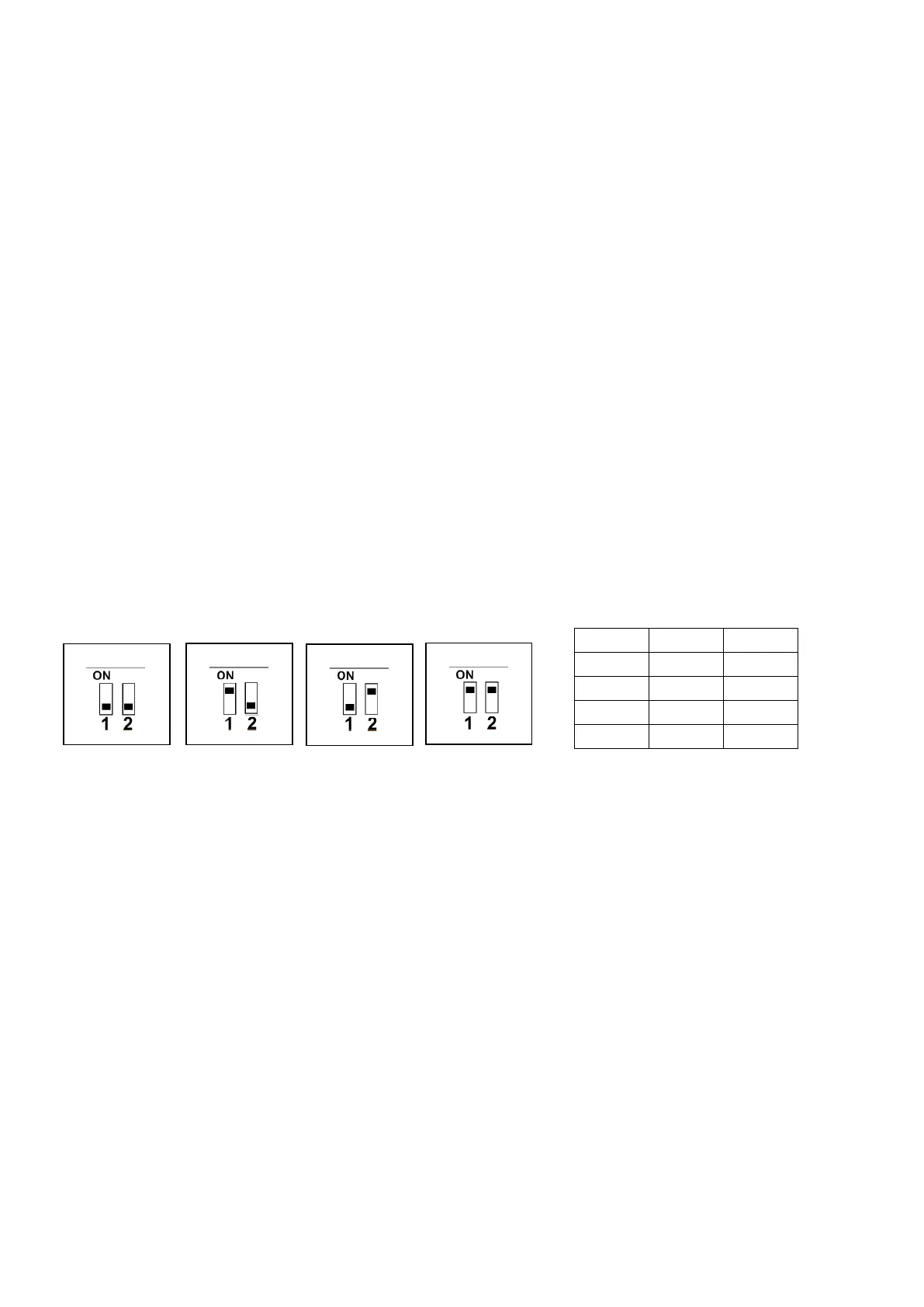
Slimline Door Stations (DORVT25)
THIS DIP SETTING IS UNDER THE LABEL – REINSTALL STICKER AFTER CHANGING
Use Dip Switches to Address station


 To Next Page
 Loading...