4. Steps for usage
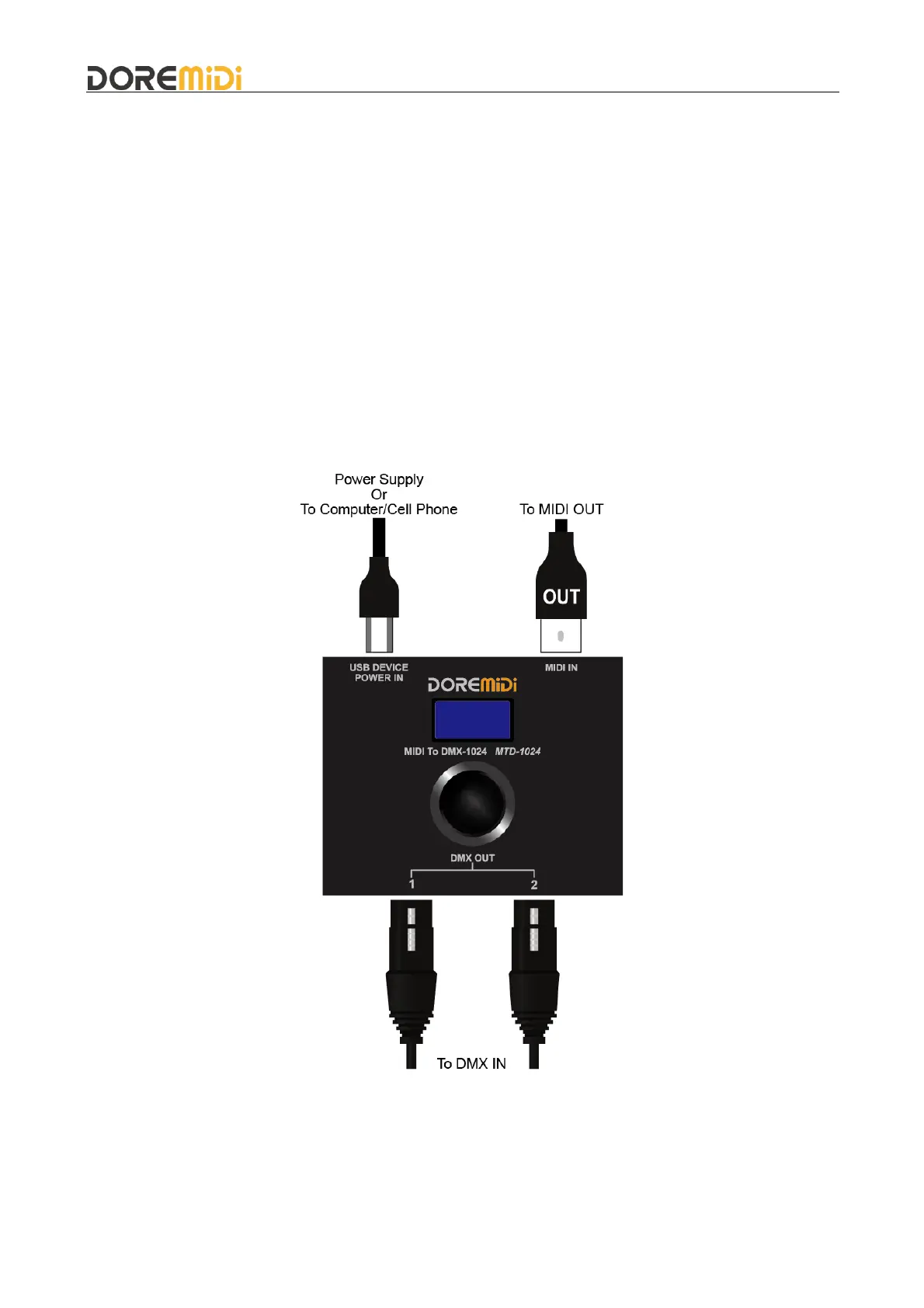
4.1. Power supply
Supply power to the product through the USB port, support 5VDC/1A power supply input.
4.2. Connect
Connect MIDI five-pin instrument: Connect the MIDI IN of the product to the MIDI OUT of the
instrument through a MIDI five-pin cable.
Connect to computer/mobile phone: If playing MIDI messages via software, it can be connected to a
computer/mobile phone via USB.
(Note: The mobile phone needs to have OTG function, and different mobile phone interfaces need
to be connected through an OTG converter.)
Connect DMX device: Connect DMX OUT1 and DMX OUT2 to the input port of DMX devices
through 3Pin XLR cable.
4.3. Configure MIDI to DMX
Click the knob to select SN / DMX / Sta / Ctl / CH / En, and rotate the knob to set the parameters.
After setting, the value 0~127 of the received MIDI message will output the value 0~255
corresponding to the DMX channel, that is, DMX value = MIDI value x 2. As shown in the table:


 To Next Page