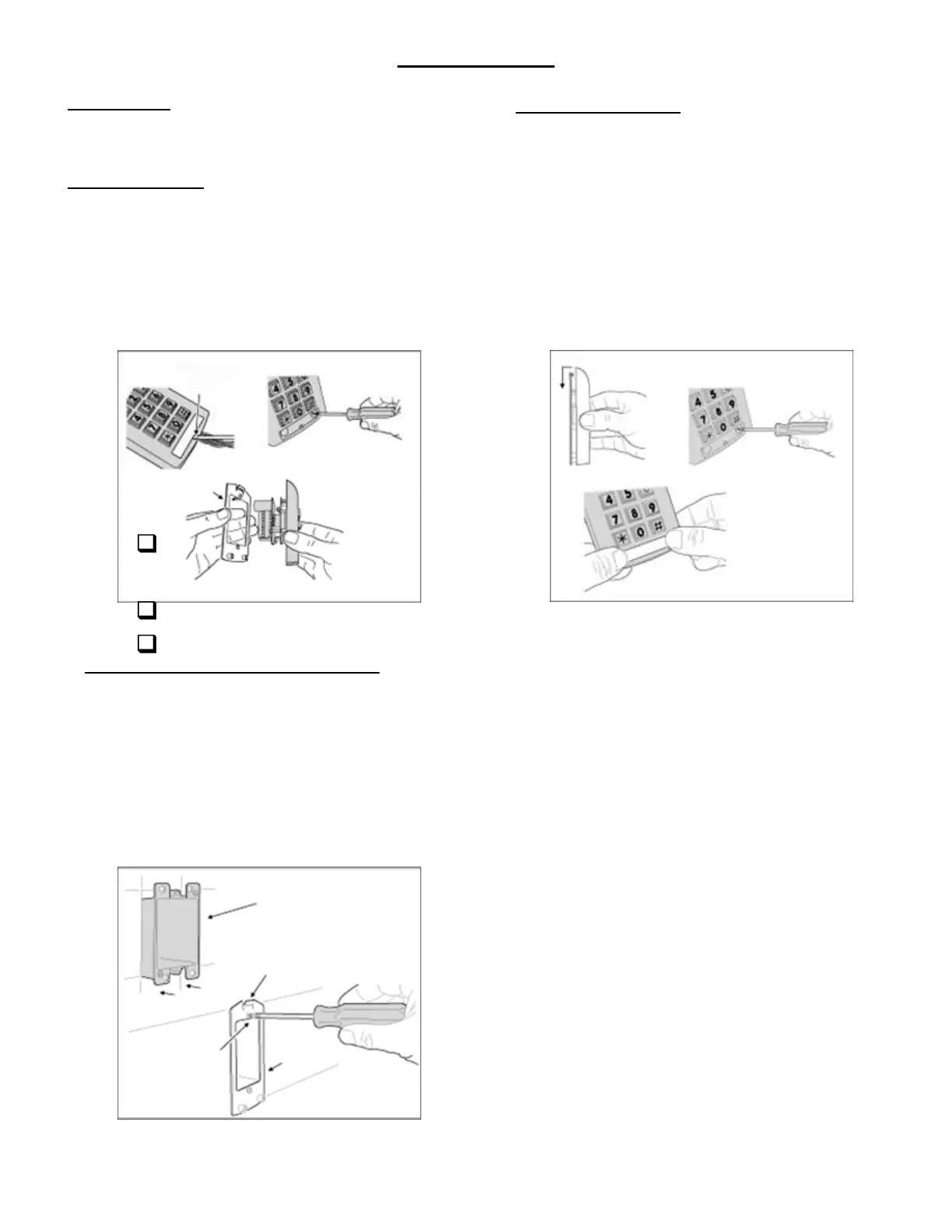
Fig. 3 Opening the Keypad
INSTALLATION
Before installing the keypad, the unit must be partially disassembled
to access the mounting plate.
Opening the Keypad
The keypad assembly is secured with two screws that are hidden
behind the keypad’s nameplate. Refer to Fig. 3 for disassembly
details.
Use a small flat blade screwdriver to pry off the keypad’s
nameplate
Use a philips head screwdriver to remove the two screws.
Separate the mounting plate from the keypad assembly
Install the Electrical Box and Mounting Plate
The keypad is designed to fit into a standard single-gang
electrical box. Select a location near the controlled door and
choose a convenient height for the keypad. Be sure there is
good wiring accessibility for the unit’s power and the output to
the door strike or access device.
Install the electrical box in the wall.
Screw the mounting plate onto the electrical box.
(see Fig. 4)
Final Keypad Installation
After wiring the keypad (see next page), complete the
installation by securing the keypad to the mounting plate.
If a lower beeper sound level is required, before installing
the keypad, remove Jumper at P4 (place the jumper block
on one pin to save the jumper).
Hook the keypad assembly onto the mounting plate tab
(see fig. 5).
Secure with two philips screws.
Sanp nameplate into position over screws.
1. PRY UP ON
THE NAMEPLATE
HERE
2. REMOVE THE
TWO SCREWS
3. SEPARATE THE
MOUNTING PLATE
FROM THE KEYPAD
MOUNTING
PLATE
Fig. 4 Installing the Mounting Plate
INSTALL A SINGLE-GANG
ELECTRICAL BOX AT THE
PROPER LOCATION FOR
THE KEYPAD
ATTACH THE MOUNTING
PLATE TO THE
ELECTRICAL BOX
MOUNTING
PLATE
MAKE SURE THE TAB
IS UP
1. HOOK THE KEYPAD ASSEMBLY
ONTO THE MOUNTING PLATE
2. INSTALL THE
TWO SCREWS
3. SNAP THE
NAMEPLATE
INTO PLACE
Fig. 5 Connecting the Keypad to the Mounting Plate
Getting Started
Page 3
08279830 Rev.01/07 Page 3 of 8



 To Next Page