Select Door Sense or Inhibit Input Default: Door Sense
The input (gray wire) can be programmed for DOOR SENSE or
INHIBIT.
Press: 1 0 # Input #
Input=0 for Door Sense; =1 for Inhibit
When programmed for DOOR SENSE, if an open condition on
the input occurs before access is granted (with an entry code or
with the request-to-enter input) a FORCED ENTRY output will
occur. If an open condition remains 60 seconds after a relay
activation for access, a DOOR AJAR output will occur.
When programmed for INHIBIT, a closed condition on the input
will prevent Relay #1 from activating when access is requested
with an entry code. This mode is typically used with an external
timer to disable the access device at certain times.
Select Forced Entry Output Default: Output #3
Sets which output activates if the DOOR SENSE input opens
before access is granted. This output is not timed.
Press: 1 1 # Output #
Output=Output to Activate(0-4)
1=Main Relay; 2=Auxiliary Relay; 3=Output #3; 4=Output #4;
0=No Output
Select Door Ajar Output Default: Output #4
Sets which output activates if the DOOR SENSE input stays
open 60 seconds after access is granted. This output is not
timed.
Press: 1 2 # Output #
Output=Output to Activate (0-4)
1=Main Relay; 2=Auxiliary Relay; 3=Output #3; 4=Output #4;
0=No Output
Setting Entry Code Length Default: 4 digits
Press: 0 3 # Length #
Length = 1-6 for entry code length
Note: If the Entry Code Length is going to be changed from the
factory default of 4 digits, make this change first before
programming any entry codes.
Select Keypad Active Output
Default: No Output
Sets which output activates when any keys are pressed. This
output is timed. If toggle mode is selected for the output, the timer
value defaults to 2 seconds.
Press: 1 4 # Output #
Output=Output to Activate(0-4)
1=Main Relay; 2=Auxiliary Relay; 3=Output #3; 4=Output #4;
0=No Output
(Typical Programming cont.)
Program all normal entry codes to use the Main Relay (Relay
#1), and only Relay #1 as the output relay. Program the code(s)
that you want to use to hold the output for an indefinite period to
the Auxiliary Relay (Relay #2). See the following example that
sets entry codes 1234 for normal and 5678 for toggle operation.
Press: 0 1 # 1 2 3 4 # 1 2 3 4 # 1 #
01=Programming Step; 1234=Entry Code; 1=Main Relay
Press: 0 1 # 5 6 7 8 # 5 6 7 8 # 2 #
01=Programming Step; 5678=Entry Code; 2=Auxiliary Relay
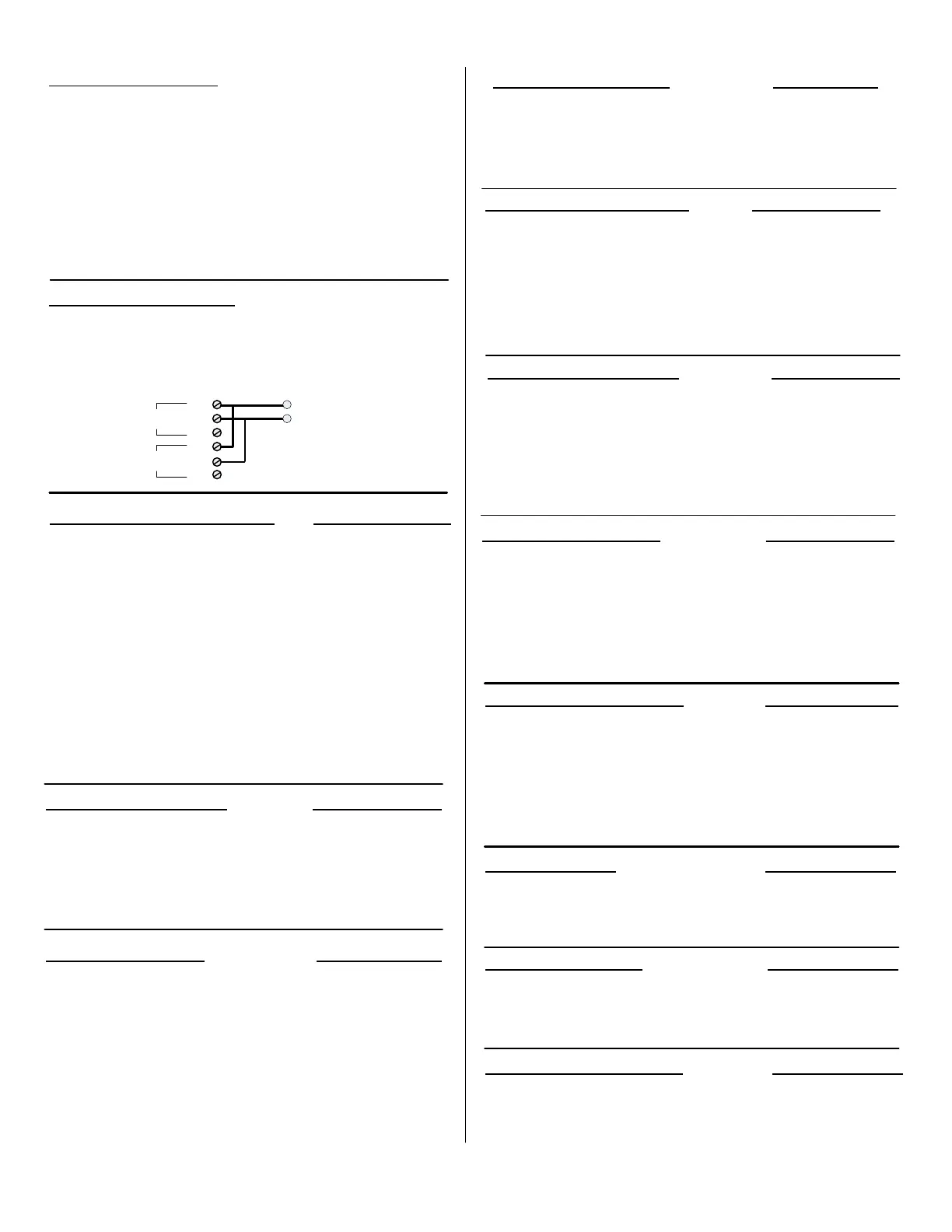
Typical Toggle Mode Wiring
For devices triggered by a normally open circuit, wire the
contacts of the Main and Auxiliary Relays in parallel (see the
Figure below). Either relay will be able to trigger the access
device. Entry codes programmed for the Auxiliary Relay will be
able to hold the output on.
Select Keypad Lockout Output Default: No Output
Sets which output activates when the keypad is “locked out” after
too many incorrect entry code attempts. The lockout time is 60
seconds.
Press: 1 3 # Output #
Output=Output to Activate (0-4)
1=Main Relay; 2 = Auxiliary Relay; 3=Output #3; 4=Output #4;
0=No Output
Select Alarm Shunt Output Default: No Output
Sets which output activates during the time access is granted.
(Use this output ot shunt alarm contacts attached to the access
door.) This output may be timed or toggled.
Press: 1 5 # Output #
Output=Output to Activate(0-4)
1=Main Relay; 2=Auxiliary Relay; 3=Output #3; 4=Output #4;
0=No Output
Select Request-to-Exit Output Default: Main Relay
Sets which output activates when the Request-to-Exit input is
grounded. This output may be timed or toggled.
Press: 1 6 # Output #
Output=Output to Activate(0-4)
1=Main Relay; 2=Auxiliary Relay; 3=Output #3; 4=Output #4;
0=No Output
Main Relay On-time Default: 2 Seconds
Sets the length of time the Main Relay activates when triggered.
Press: 2 1 # Seconds #
Seconds=Output time in seconds (0-60), 99=Toggle Mode
Auxiliary Relay On-time Default: 2 Seconds
Sets the length of time the Auxiliary Relay activates when triggered.
Press: 2 2 # Seconds #
Seconds=Output time in seconds (0-60), 99=Toggle Mode
Solid-state Output #3 On-time Default: 2 Seconds
Sets the length of time Output #3 activates when triggered.
Press: 2 3 # Seconds #
Seconds=Output time in seconds (0-60), 99=Toggle Mode
MAIN
RELAY
AUXILIARY
RELAY
928
OUTPUTS
EITHER RELAY CAN TRIGGER
THE ACCESS DEVICE
ACCESS
DEVICE
NO
COMMON
NC
NO
COMMON
NC
Page 6
08279830 Rev.01/07 Page 6 of 8


 To Next Page
 Loading...