English
7. Press to complete the software update.
Additional functions
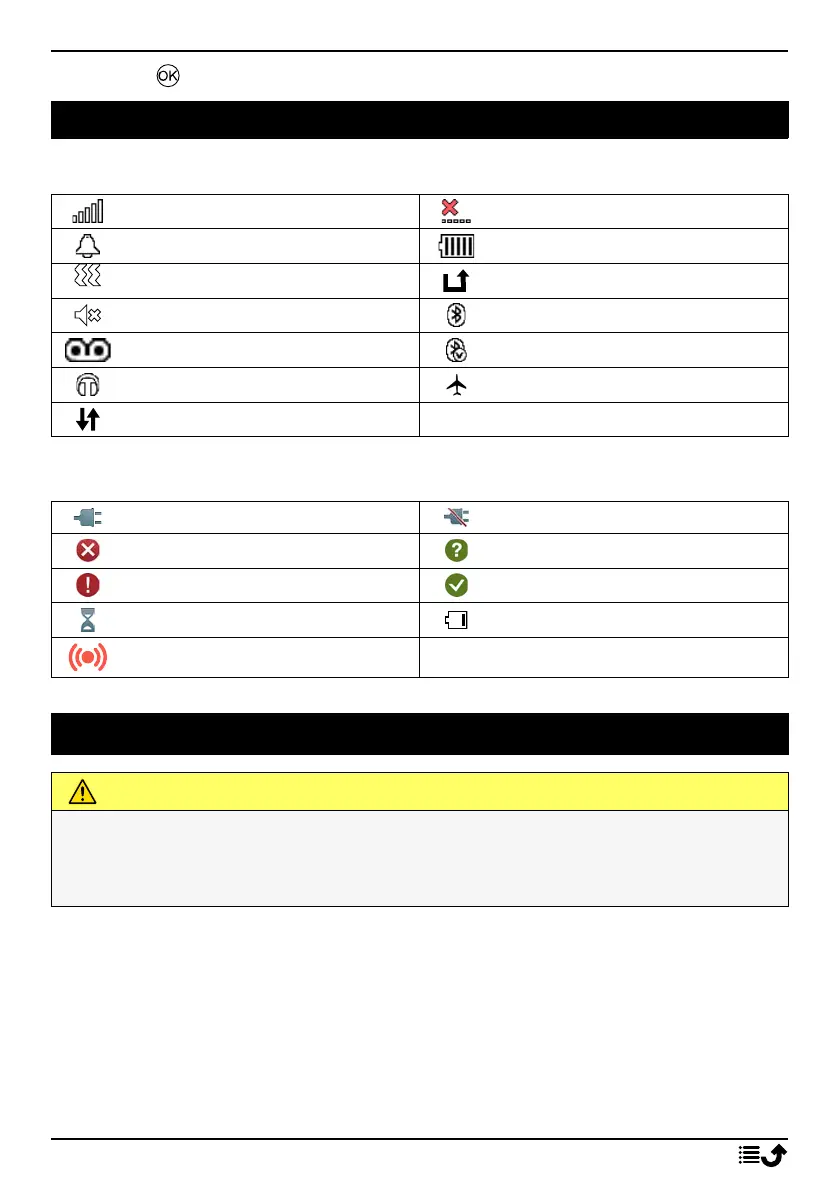
Display status symbols
Signal strength
No network coverage
Alarm active
Battery level
Vibration only
Call divert activated
Silent
Bluetooth on
Voicemail message received
Bluetooth connected
Headset connected
Flight mode activated
Data transmission
Display main symbols
Charger connected Charger removed
Error
Query
Warning
Done (confirmed)
Processing, please wait Battery level low
Assistance button call
Safety instructions
CAUTION
The unit and the accessories can contain small parts. Keep all of the equipment out of
the reach of small children.
The mains adapter is the disconnect device between the product and mains power. The
mains socket outlet must be close to the equipment and easily accessible.
Network services and costs
Your device is approved for use on the 4G LTE FDD 1 (2100), 3 (1800), 7 (2600), 8 (900),
20 (800), 28 (700) MHz, WCDMA 1 (2100), 8 (900) MHz, GSM 900/1800 MHz networks. To
use the device, you need a subscription with a service provider.
Using network services may result in traffic costs. Some product features require support
from the network provider, and you may need to subscribe to the services.
49



 To Next Page