English
Step 3 – Insert SIM card and memory card
IMPORTANT!
Turn off the phone and disconnect the charger before removing the
battery cover.
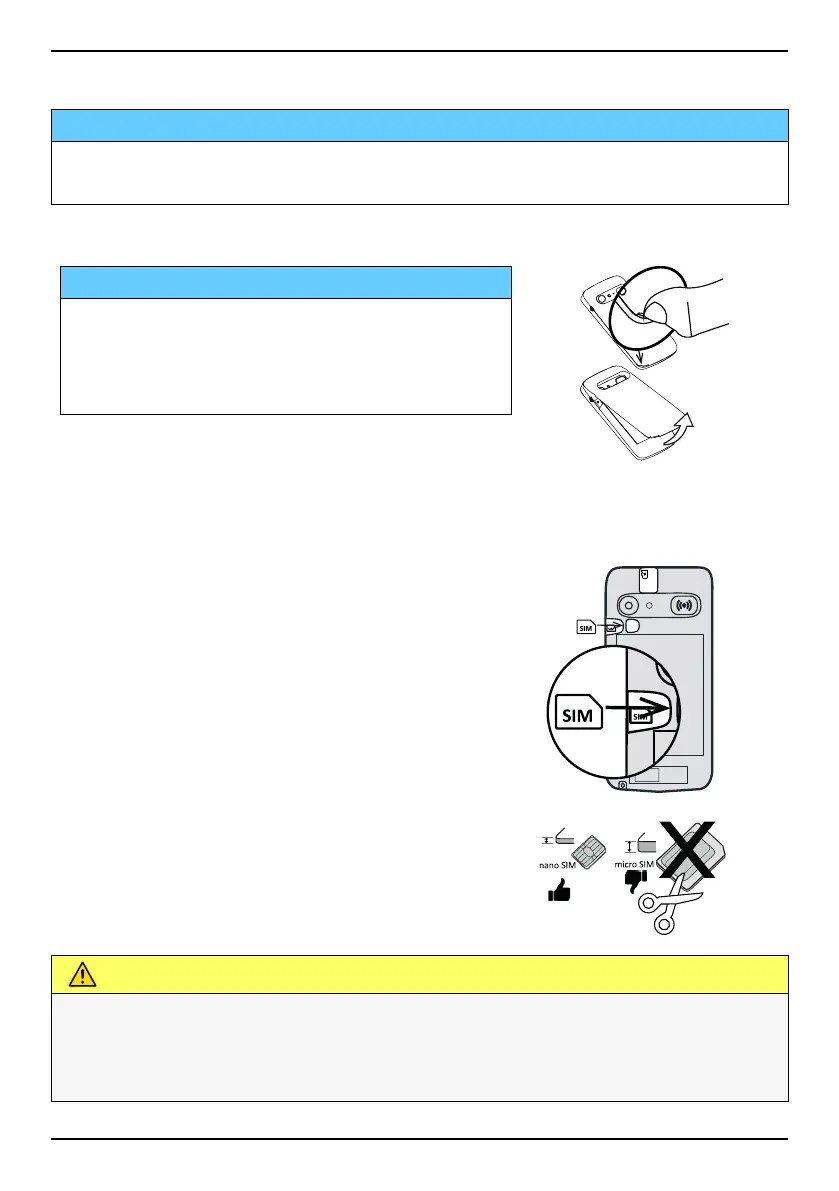
Remove the back cover
IMPORTANT!
Be careful not to damage your fingernails
when you remove the battery cover. Do not
bend or twist the battery cover excessively
as it may get damaged.
Insert the SIM card (not included)
Insert the nano-SIM card by gently sliding
it into the SIM card slot. Make sure that
the SIM card’s contacts are facing in-
wards and that the cut off corner is up, as
shown . Take care not to scratch or bend
the contacts on the SIM card. Should you
need, but have problem to remove/re-
place the SIM card, use adhesive tape on
the exposed part of the SIM card to pull it
out.
CAUTION
This device accepts nano-SIM or 4FF SIM card.
Using a modified incompatible card that is thicker than a nano-SIM
card may damage the card itself, the card slot and corrupt any data
stored on the card.
3



 To Next Page