English
Programming
Contacts, alarm codes and settings are programmed using
www.icareonline.com or by using a computer and the Doro Care CS2 soft-
ware. In some cases, the Doro CareMobile can be delivered pre-pro-
grammed by the supplier. For help with programming, please refer to the
service manual or contact your supplier.
Programming radio triggers
Up to ten (10) radio triggers or other radio-alarm transmitters can be pro-
grammed to Doro CareMobile.
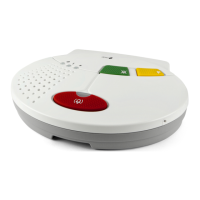
To connect a radio trigger
• Press the green button for approximately four seconds until the unit
emits a beep, release the button. The indicator light Power on !
flashes green.
• Push the radio trigger or activate other alarm accessories. Once the
Doro CareMobile receives the radio signal, you will hear a distinct
tone signal.
• Confirm by pressing the red button CareMobile, you will hear a con-
firmation tone.
Delete all radio triggers
CAUTION
All programmed radio triggers will be deleted!
To delete all radio triggers
• Press the green button for approximately four seconds until the unit
emits a beep, release the button. The indicator light Power on !
flashes green.
• Briefly press the volume key
on the bottom of the CareMo-
bile. You will hear a distinct tone signal, all accessories are deleted.


 To Next Page