English
4 www.doro.com
Settings
Memory
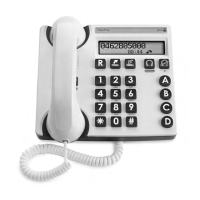
The telephone has 3 one-touch and 10 two-touch memories. One-touch
memories are stored in M1, M2 & M3, two touch memories are stored using the
telephone keypad digits 0-9.
Storing One-touch Memories
1. Lift the handset, press and release
P
(ignore anything you hear in the
earpiece).
2. Select a memory location M1, M2 or M3 by pressing the corresponding
button.
3. Enter the telephone number to be stored (up to 21 digits).
4. Press and release
P
again.
5. Replace the handset. The number is now stored.
Dialling using One-touch Memories
1. Lift the handset and wait for a dialling tone.
2. Select a memory location by pressing the corresponding memory button
(M1, M2 or M3). The stored number will now be dialled.
Storing Two-touch Memories
1. Lift the handset, press and release
P
(ignore anything you hear in the
earpiece).
2. Press and release
m
.
3. Select a memory location by pressing one of the keypad number buttons
0
-
9
.
4. Enter the telephone number to be stored (up to 21 digits).
5. Press and release
P
again.
6. Replace the handset. The number is now stored.
Dialling using Two-touch Memories
1. Lift the handset and wait for a dialling tone.
2. Press and release
m
.
3. Select a memory location by pressing the relevant keypad number
0
-
9
. The
stored number will now be dialled.
Press and release
r
if you need to insert a pause in a telephone number. The name or number
stored in memory can then be entered on the memo list if wished. If a stored number changes,
follow the procedures above entering the new number in the same location as the old one.



 To Next Page