7
English
Speed dial (Alarm numbers)
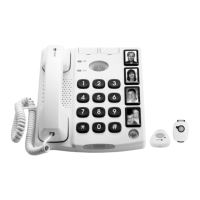
Thetelephonehas4speeddialnumbers(M1-M4).Whena
telephonenumberhasbeenstoreditcanbedialledbypressing
just one button.
Apictureorsymbolcanbeplacedunderthetransparentcover
onthespeeddialbuttonssoitiseasytoseewhoyouarecalling.
Storing Speed Dial Numbers
1. Press
P
.
2.Enterthephonenumber(upto22digits)usingthekeypad.
Press
P
.
3.Selectspeeddialnumber(M1-M4)bypressingthe
corresponding button.
Press
r
ifyouwantabreakinthetelephonenumber.
Ifyouneedtochangeanumber,storethenewnumberinthe
samelocationastheoldone.
If no number has been stored for the speed dial
numbers (M1-M4) the telephone will ash alternately
green and red until this has been done.
Making an alarm call with speed dial
1.Thealarmisactivatedmanuallybypressingthe button on
thetelephoneorthecordlessalarmunit.Thebuttonshouldbe
presseddownforabout2secondsuntilthetelephonebegins
tobeepandthelightcomeson.(Itisalsopossibletolinktoa
cord-connected alarm unit, see External alarm unit).
2.Ifyouwishtoterminatethealarm,holddownSTOP
g
or
thebuttononthecordlessalarmunitforapprox.4seconds
untilthephonestopsbeepingandthelightswitchesoff.
Itisalsopossibletointerruptanalarmbyliftingthehandset.
Dialling speed dial with the handset
1.Liftthehandsetandwaitforthediallingtone.
2.Pressthedesiredspeeddialbutton.


 To Next Page