8 9
1 Batch keys
You can set the batch size from 1 to 999 banknotes. When set number of
notes is counted, the device stops, indicates the total number of the
counted banknotes and makes an audio signal. The stacker capacity is 100
banknotes; therefore, counting stops as soon as it is full. To continue
counting, remove the banknotes from the stacker, and counter continues
operation automatically.
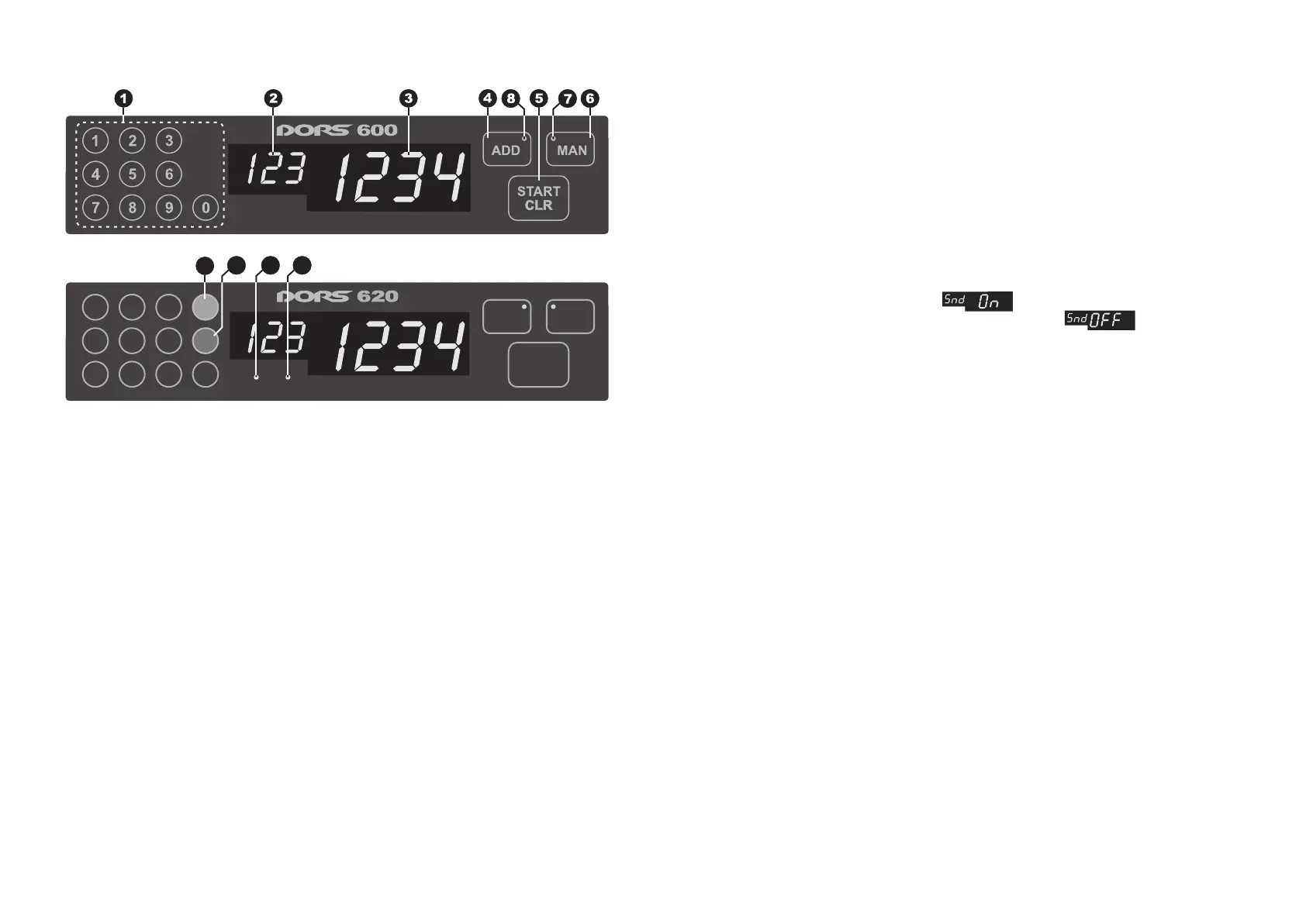
OPERATING KEYS
1 Batch keys;
2 Three-digit display (indicate present set of batch);
3 Four-digit display (indicate number of counted notes);
4 ADD key (addition mode);
5 START/CLR keys (start/clear);
6 MAN key (switch between manual and automatic mode);
7 Indicator of manual mode;
8 Indicator of addition mode;
9 UV key - switching on/off the mode of banknotes UV authentication (for
DORS 620 only);
10 The LED of UV authentication activation (for DORS 620 only);
11 AS key – switching on/off the mode of banknotes Anti-Stokes authentication
(for DORS 620 only);
12 The LED of Anti-Stokes authentication activation (for DORS 620 only).
Control panel of DORS 600
1
2
3
4
5
6
7
8
9
0
AS
UV
UV AS
CLR
START
ADD
MAN
Control panel of DORS 620
Fig. 2
9 11 10 12
For DORS 620
9 UV key for switching on/off the mode of banknotes UV authentication
(see Fig. 2) and selection of the level of UV control. When the UV control is on
BANKNOTE COUNTER DORS 620 / 600BANKNOTE COUNTER DORS 620 / 600
Setting the number of banknotes in a batch:
1 Use the key 1 (see Fig. 2) to set the required number of banknotes in a batch.
The display shows the set batch size. The counter is ready to count.
2 When counted number of banknotes is less than the set one, you hear an
audio signal, the display shows the actual number of the banknotes and a
three-digit display shows a message «Add». In this case, add banknotes into
the hopper. If the set batch size exceeds the hopper capacity, the counter
stops and the display starts blinking at filling the hopper. After the banknotes
have been removed from the stacker, the counter continues counting if there
are banknotes in the hopper.
To reset the batch size, press the «0» key until the data of a three-digit
display are cleared.
To switch on/off sound signal, press the «0» key within 3 seconds. When
sound mode is on, the message « » appears on indicator and dual
sound signal is given. At switching the mode off – the « » message and
single short signal appear.
4 ADD key (addition mode)
1. When addition mode is activated, the indicator 8 on the control panel
(see Fig. 2) is red.
2. In addition mode the number of just counted banknotes is added to the
number counted earlier.
5 START/CLR key (Start/Clear)
The key START/CLR may be activated only when a manual mode is switched
on (the indicator 7 in the upper corner of the key «MAN» is flashing).
When the banknotes are placed into the hopper and the key START/CLR is
pressed, the counting starts (if the hopper is empty, the message «НР»
appears on indicator shortly).
The second function of key is to clear the counting results (if there is no
error message ERROR message) in any counting mode (manual or
automatic) when the hopper and stacker are empty.
6 MAN key (manual/automatic mode)
1. The key MAN switches the counter in the manual or automatic modes.
2. Press the key MAN to activate a manual mode. The indicator 7 on the
control panel (see Fig. 2) gets red, it means that the manual mode is
activated. To start counting, press the START/CLR key.
3. Press the key to switch off the manual mode. The indicator is fade.
The counter starts counting automatically, when banknotes are placed into
the hopper.


 To Next Page
 Loading...

