16
17
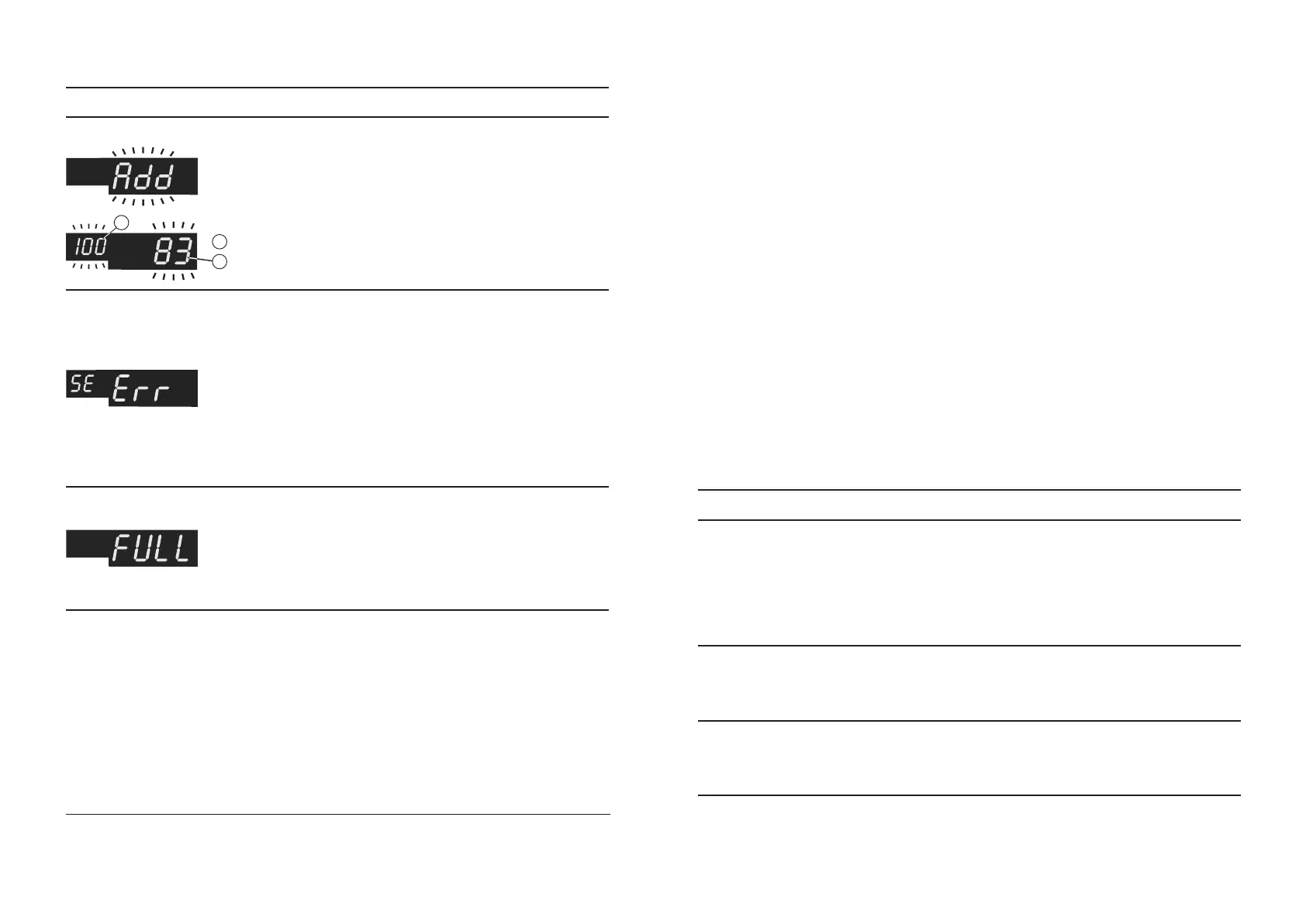
Alternate flashing
The number of
counted banknotes in
the stacker is less than
required number of
notes in the batch.
Place additional banknotes into
the hopper and continue
counting
1
1
Required number of notes in the batch*
Quantity of banknotes laying in stacker*
2
A banknote skewness
exceeds 22° degrees.
The banknotes shall be evenly
set. Adjust the banknotes
guides. If required adjust the
clearance of the banknotes feed
system for operation with
thicker banknotes. Turning of
the screw 6 (see Fig. 1) in a
counter clockwise direction
provides the required
9999 banknotes were
calculated. This
number is maximum
that subject to be
displayed.
Remove banknotes from
stacker and hopper, then press
«START/CLR» key.
* The numerical values are given as an example. Real digits may differ from given.
Notes:
For removing ERROR message just delete banknotes from the stacker.
Counter will continue to work automatically. It is recommended to recount the
banknotes to exclude the mistake in counting results. After errors «Chn Err» and
«dbL Err» there are more banknotes in the stacker than it is displayed on the
indicator.
The counter should be stored in the manufacturer's package in a heated and
ventilated storage room, at the temperature of +5°C to +40°C and a relative
humidity not exceeding 80%.
The counter should be transported in the manufacturer's package by an
automobile or railway transportation (in a covered transport vehicle), by air
transportation in the pressurized modules at the temperature of °C to +50°C, a
relative humidity of the air up to 98%, at the temperature of +25°C and the air
pressure 84 to 107 kPa (630 to 800mmHg).
TRANSPORTATION AND STORAGE
The preventive maintenance includes a partial disassembling of the counter
by a service engineer. The counter requires the maintenance every 90 days. If the
counter works more than one shift a day, the above-mentioned maintenance
should perform more frequently
On a daily basis:
1. Switch off the banknote counter if it is not used.
2. Wipe the external parts of the counter with a dry clean lint-free tissue.
MAINTENANCE
Table 3. Troubleshooting
TROUBLESHOOTING
FAILURE ELIMINATION METHOD
Counter fails to switch on.
Make sure that the counter is connected to
the power supply and the power cord is
plugged into the connector on the counter
back cover. If these terms are observed but
the counter fails to switch on, consult the
service division.
Self-testing error.
The error code is not indicated in
Table 2.
Switch the counter off. Consult the service
division.
There is a loud buzz sound or
another unusual noise during
operation.
Switch the counter off. Consult the service
division.
Design and specifications are subject to change without notice in order to improve the quality of
device.
BANKNOTE COUNTER DORS 620 / 600BANKNOTE COUNTER DORS 620 / 600
Table 2а. Error Codes Displayed When Counting
ERROR CODE CAUSE OPERATOR’S ACTIONS


 To Next Page
 Loading...

