12
13
5. Adjust the banknote guides according to the length of the longest banknote in
the batch being counted, align the batch edges and place it in the middle of the
hopper avoiding its skew.
6. The counter starts operating automatically after the banknotes have been
placed into the hopper. If the counter is in the manual mode, press the key
START/CLR to start the operation. After 100 banknotes have been counted, the
process of counting stops till the banknotes are removed from the stacker. To
continue counting remove the banknotes from the stacker, the counter
continues operation automatically (if the mode of manual start is not switched
on). To continue counting in the mode of manual start, press «START/CLR»
key. When a batch size is not set, the counter counts all the banknotes in the
hopper.
7. In case of an error, follow the recommendation of the «ERROR CODES»
section to eliminate it.
Notes:
Prepare the banknotes to be counted
as shown in Fig. 6;
remove the torn, wet, grease or dirty
ones, as well as the banknotes
of other denominations.
Fig. 6
ERROR CODES
In the case of error, the counter stops automatically, makes an audio signal
and ERROR CODE appears on the display. See table 2 «Error codes…» to
determine the cause of error and the method for its elimination. Sometimes if a
problem emerges, no error code is displayed. In this case refer to table 3 «Trou-
bleshooting» to determine the method of problem's elimination.
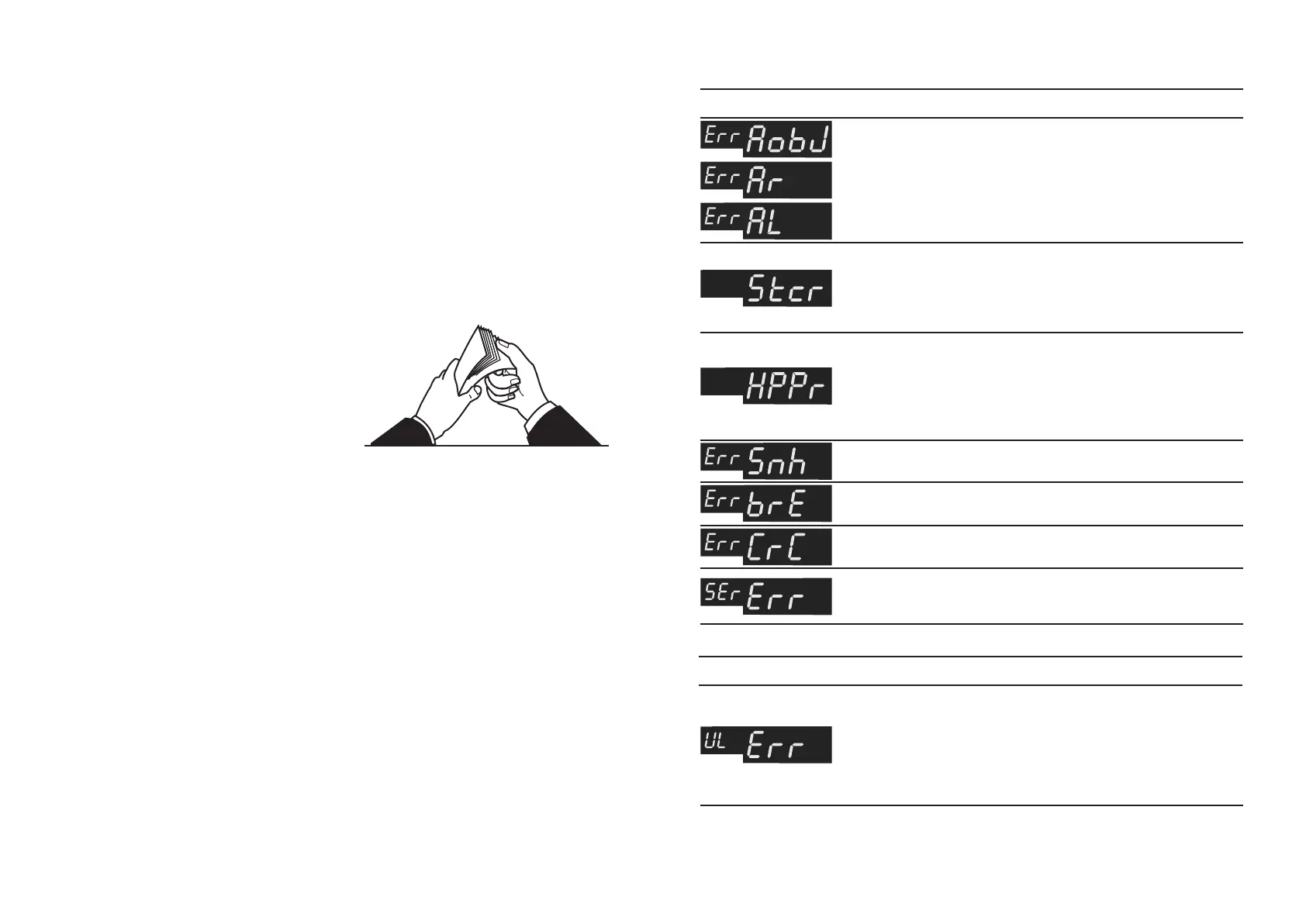
Counting sensor error.
Right sensor.
Left sensor.
There were banknotes in
the stacker at the moment
of energizing the device or
malfunction of stacker ’s
sensor.
There were banknotes in
the hopper at the moment
of energizing the device or
malfunction of hopper ’s
sensor.
Counting sensor error or
drive motor error.
Processor board error.
Processor board error.
Maintenance is required.
Switch the counter off.
Consult the service division.*
Table 2. Error Codes Displayed When the Counter is Switched On
A banknote with an
increased UV fluorescence
level has been detected at
the counting mode with UV
authentication.
Remove the suspicious banknote
and do the recounting. If the UV
fluorescence is a distinguishing
feature of this banknote type, use
the control regime for banknotes
with higher level of fluorescence or
deactivate the UV authentication.
* This error shows that the counter is functional, but it is recommended to make the service
maintenance.
Table 2а. Error Codes Displayed When Counting
BANKNOTE COUNTER DORS 620 / 600BANKNOTE COUNTER DORS 620 / 600
ERROR CODE CAUSE OPERATOR’S ACTIONS
Switch the counter off.
Consult the service division.
Remove the banknotes from the
stacker. Remove any foreign
objects out of the stacker.
Remove the banknotes from the
hopper. Remove any foreign
objects from the hopper.
Switch the counter off.
Consult the service division.
Switch the counter off.
Consult the service division.
Switch the counter off.
Consult the service division.
ERROR CODE CAUSE OPERATOR’S ACTIONS


 To Next Page
 Loading...

