Error
Messages
Reason Teller's actions
8. Detection on/off
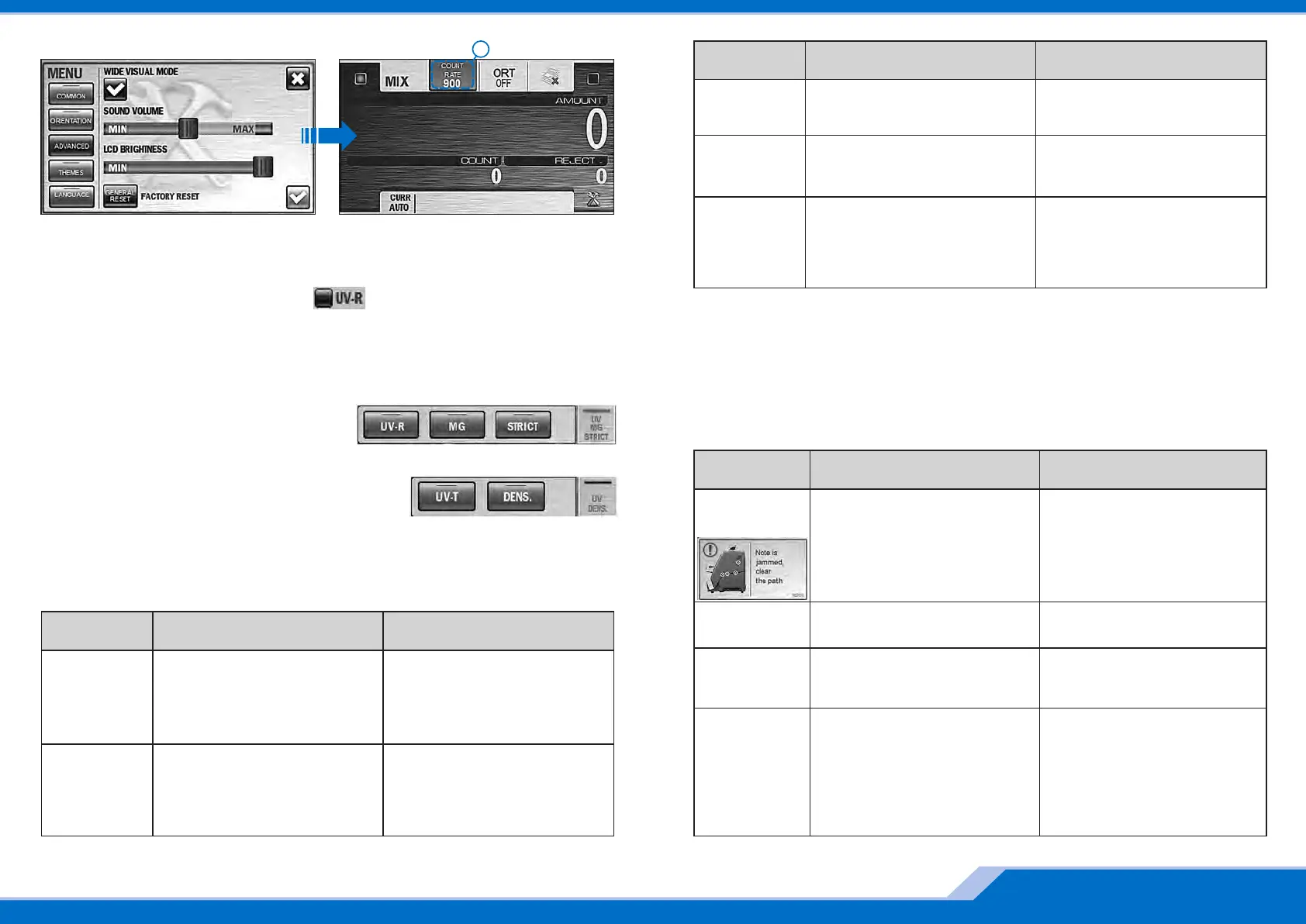
The key «Detection» gives the fast access to the control of detection range in each
counting mode.
4 5
www.dors.com
By pressing this key in DEN and MIX modes you
can activate/deactivate the reflective UV control
(UV-R), magnetic marks control (MG), strict level
of counterfeit control (STRICT).
By pressing this key in COUNT mode you can activate
/deactivate the transmissive UV control (UV-T) and optical
density control (DENSITY).
Note: depending on the selected type of detection the signs on the key «Detection» are also
highlighted.
An error occurred during selftesting of
the sorter (before the start of a count),
the
sensors are covered by foreign object.
Switch off the machine. Remove
banknotes and/or foreign objects from
the hopper, the stacker, the reject pocket,
and the path. Then switch on again. If
the error is reappeared, call a technician.
S.M.A.R.T.
ERROR
The banknotes are jammed. A foreign
object in the path blocks the gear and
causes the overcurrent.
Switch off the machine. Open the path,
and remove the jammed banknotes, the
foreign objects.
Overcurrent
The banknotes get jammed. Foreign
object in the path blocks the diverter
between the hopper and the reject
pocket.
Open the path, remove the jammed
banknotes, foreign objects from
diverter's area.
Switch
error
The calibration error is occurred during
the self-test.
Switch off the machine. Open the path
and remove the banknotes, the foreign
objects blocking CIS.Then switch on
again. If the error is reappeared, call a
technician.
Calibration
error
9. Error Messages
Error
Messages
P.O.S.T.
ERROR
An error occurred during selftesting of
the sorter (at its switching on), the
sensors are covered by foreign object.
Switch off the machine. Remove
banknotes and/or foreign objects from
the hopper, the stacker, the reject
pocket, and the path. Then switch on
again. If the error is reappeared, call a
technician.
Reason Teller's actions
Pantone 300C Black
EBKM.00D800.00.00.000-03UM Quick start_Rus
7. Count rate
To select the optimum count rate, press key/indicator (see picture above) and set any « » A
of the four available counting rates (600, 900, 1200, and 1500 banknotes per minute).
if UV-R detection is activated , only two counting speeds (600 and 900 Attention:
notes/min) are available.
А
Note's jam,
clean the
path!
A banknote is jammed in thepath during
counting.
Remove banknotes from thehopper,
open the path andremove the banknotes
from there.
The red circles on the pictureare marked
the places ofpossible jams.
Error
Messages
Reason Teller's actions
More banknotes than requiredwere
placed into the stacker inthe batch
mode.
Remove the banknotes fromthe stacker,
and recount thebatch.
Batch
error
In a process of a count anuncertain
amount of banknotesare put to the
stacker.
Clean the stacker, and recount the
banknotes.
Counterror,
uncertain
amount
10. Messages in course of count
Incorrect feeding of the banknotes. Remove banknotes from the hopper,
open the path and remove the
banknotes from there.
Adjust the hopper's guides according to
the length of the longest banknote in
the batch, level the batch edges
(separate banknotes shall not to
protrude from the batch), and place
them in the hopper avoiding their skew.
Feed error


 To Next Page
 Loading...