6 7
www.dors.com
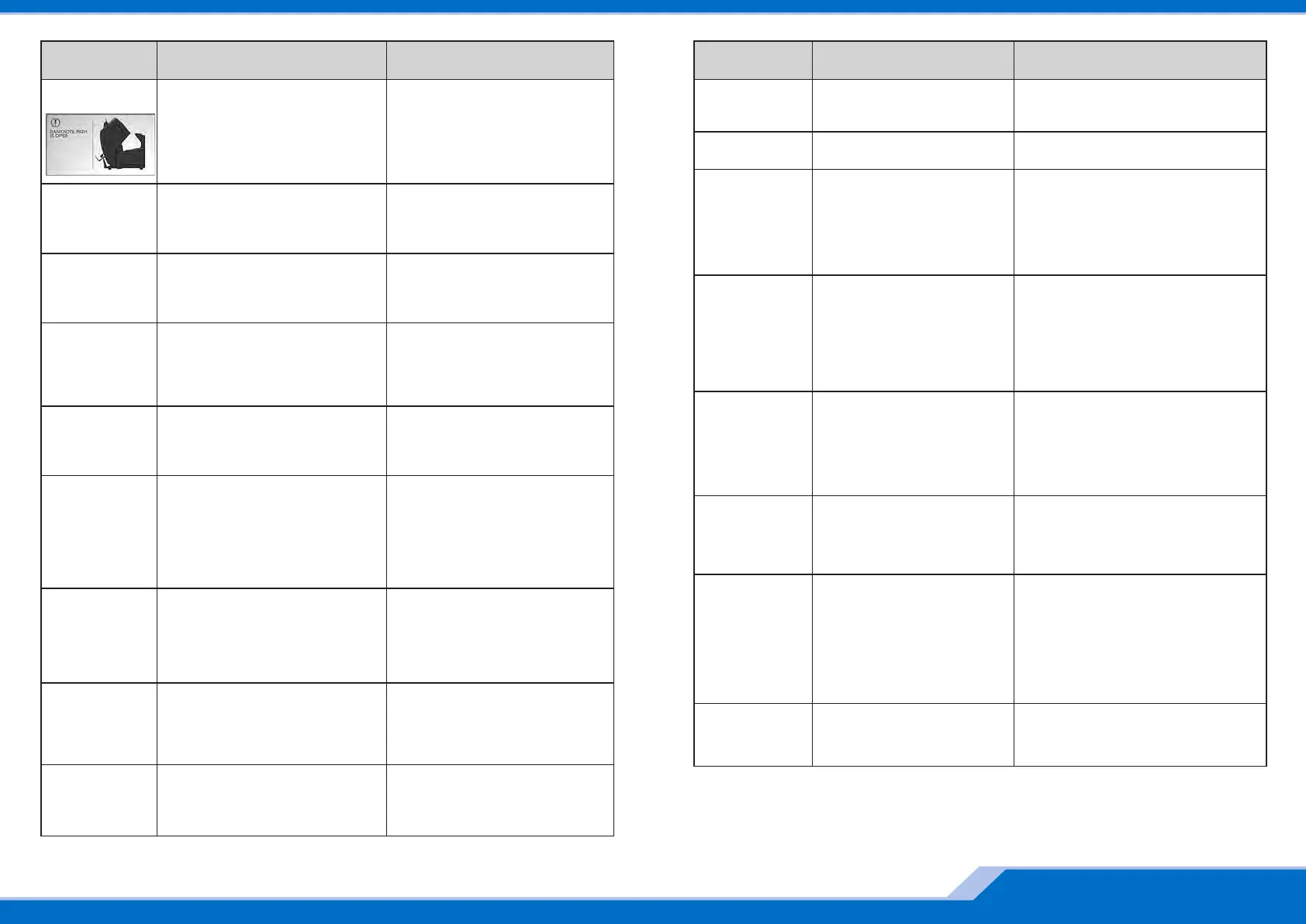
Remove
notes from
the stacker
The number of notes in the stacker is
equal to the stacker capacity.
Remove the banknotes from the
stacker. The machine resumes
counting automatically (in the
automatic start mode) or after key I (II)
is pressed (in the manual start mode).
Remove
notes from
reject pocket
The number of notes in the reject
pocket is equal to its capacity.
Remove the banknotes from the reject
pocket.
Add
banknotes
The hopper is empty while the number
of notes in the stacker is less than the
required batch size (in the AUTOMATIC
START mode).
Add banknotes to the hopper, the
machine resumes counting
automatically.
Add
banknotes
and
press start
The hopper is empty while the number
of notes in the stacker is less than the
required batch size (in the MANUAL
START mode).
Add banknotes to the hopper, press
key I (II).
Clean
thepockets
Counting settings/modes were
changed after a count is finished.
Remove the banknotes from the stacker
and the reject pocket.
Batch
is ready
A batch of required size is
counted.
Remove the banknotes from the stacker
and resume counting.
Function
isunavailable
You tried to choose the function
unavailable for the current
counting mode (for example, tried
to choose a currency in the
COUNT mode or a batch size in
the MIX mode).
Switch to the correct counting mode and
then choose the required function.
Self-testing.
Please,
wait till
operation
completion
The self testing is in progress. Wait till the message box is disappeared.
Batch of XXX
notes is ready
where YYY is
in stacker
and ZZZ
areremoved
The message is appeared when
you count a batch where selected
number of notes is more than a
current limit of the stacker.
Remove banknotes from the stacker and
continue a count.
Pantone 300C Black
EBKM.00D800.00.00.000-03UM Quick start_Rus
Banknote path
is closed
Clearing
the path
After the path is closed, the self
cleaning of the path is in progress.
Wait till cleaning of the path is over.
Banknote path
is closed
Note is jammed
inpath
There are banknotes or foreign objects
in closed path.
Open path, remove banknotes or
foreign objects.
Banknote path
is closed
Remove
banknotes
fromhopper
There are banknotes in hopper or
hopper's sensor is covered by a foreign
objects.
Remove banknotes or foreign objects
from hopper.
Banknote path
is closed
Clean the
pockets
There are banknotes in the stacker
and/or in the reject pocket.
Remove banknotes from the stacker
and/or from the reject pocket.
Banknote
pathisopen
The path is open, the upper part is
open.
Close the path.
Calibration.
Please, waittill
operation
completion
The sensors are in course of
calibration (the calibration is ran
automatically at the moment of
switching on and then every 30
minutes).
It is impossible to take banknotes
out of the hopper.
Wait till the message box is disappeared.
Adjust the hopper's guides according to the
length of the longest note in the batch.
Adjust the feeder gap if required («+»
means gap increase) for operation with
thicker banknotes. To get the required gap,
turn screw 1 (Figure 1) counterclockwise.
There are
no banknotes.
Feed error
The machine is going to be reset
to the factory setting.
Confirm or cancel the reset to the factory
setting.
Reset
confirmation
The full details are provided in the User Manual.
Error
Messages
Reason Teller's actions
Error
Messages
Reason Teller's actions


 To Previous Page
 Loading...