85
1 2
3
5
4
Safety Precautions
To ensure long lifespan and a reliable operation of display, user should meet the following
operation requirements and observe the below-mentioned safety precautions:
1. Do not touch the cable with wet hands. It may cause a shock hazard.
2. The display shall be installed on an even horizontal surface.
3. Do not pull the power cord to disconnect it from the outlet, neither bend it nor twist.
4. Do not use the display at extremely high or low temperatures; avoid humidity and the
exposition to direct sunlight.
5. When you are choosing the place for display, avoid the areas with high level of dust
content.
6. To avoid any fire or short circuit, do not install the device in places where it may be at risk
of a soot or steam.
Appearance
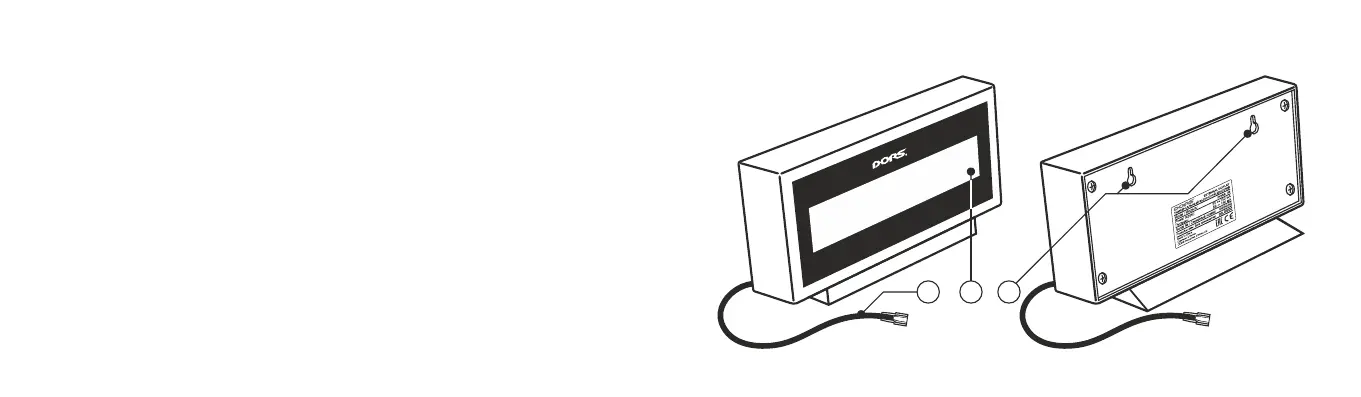
The appearance of display is shown on Fig.1, Fig. 2.
1. Power cord
(RJ45 connecter type).
2. LCD-display.
3. Fastener
holes.
UNIVERSAL EXTERNAL DISPLAY DORS 85UNIVERSAL EXTERNAL DISPLAY DORS 85
Delivery set:
Universal external display DORS 85…................................ 1 pc.
User manual…..................................................................... 1 pc.
Package…........................................................................... 1 set.
Fig. 1
Front side
Fig. 2
Rear side


 To Next Page