Wireless LAN
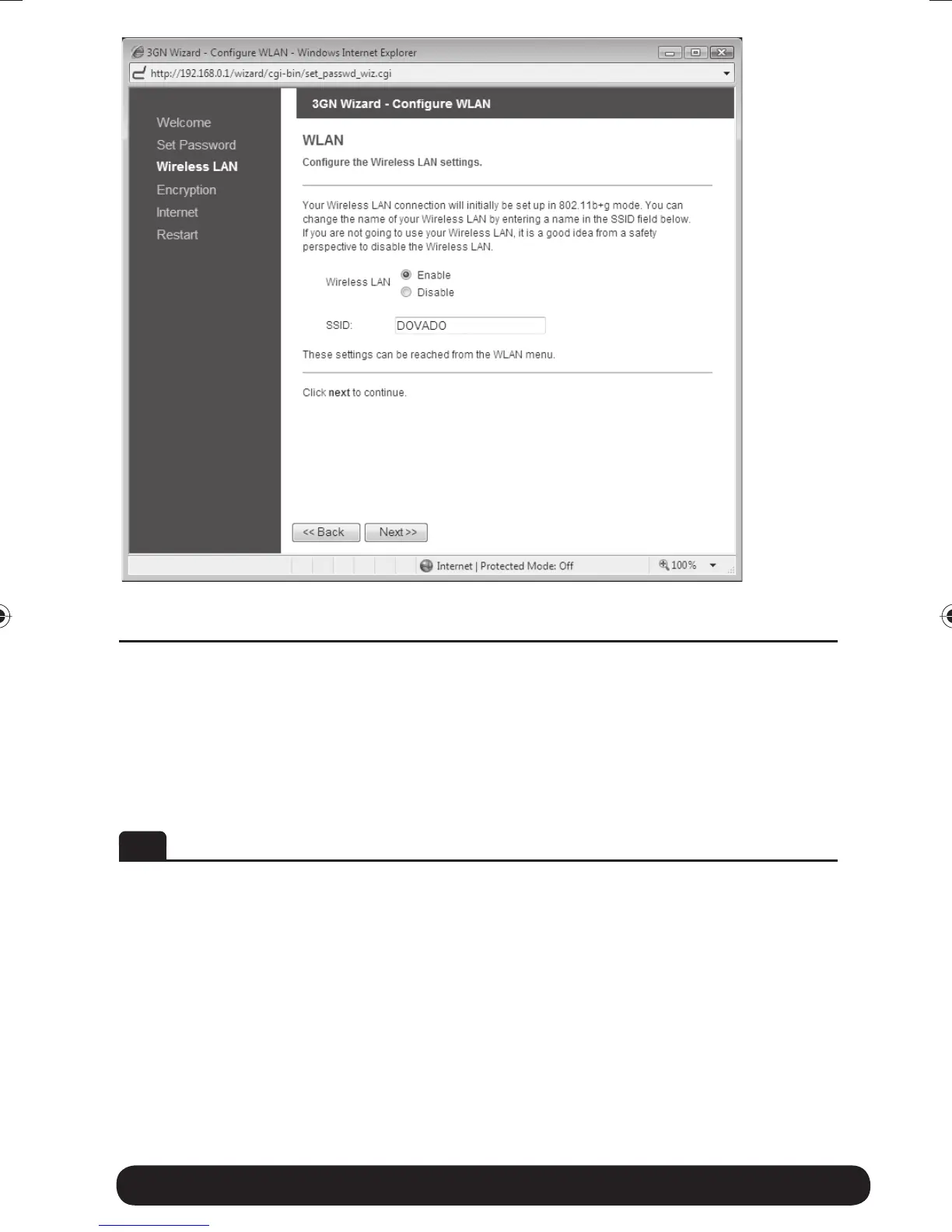
If you do not have any devices using Wireless LAN, choose disable for the
Wireless LAN option, and then click on Next to continue (this will skip the
encryption page). If you have a device using wireless LAN, enable Wireless
LAN. You can also change the SSID, which is displayed in the client when a
network search is performed. When you are done, click on Next to continue.
DE Wireless LAN (drahloses Netzwerk)
Falls Ihr Computer über kein drahloses Netzwerk (Wireless LAN) verfügt,
klicken Sie auf Disable und anschließend auf Next (die Seite für die
Verschlüsselung/Kryptierung wird übersprungen). Verfügt Ihr Gerät über
Wireless LAN, aktivieren Sie dieses. Sie können den SSID Namen ändern.
Dieser Name wird während der Suche nach einem drahtlosen Netzwerk
angezeigt. Wenn Sie damit fertig sind, klicken Sie auf Next, um fortzufahren.
Quick Wizard Guide 10
8388 3GN manual hopslagn.indd 108388 3GN manual hopslagn.indd 10 2010-01-04 14.092010-01-04 14.09


 To Next Page